Superb quality and spec AB-Com PULSe 4K SE. Crazy offer! Only £129! FREE UK DELIVERY! 4K UHD, Enigma 2, Multiboot 4 images & more!...
Superb quality and spec AB-Com PULSe 4K Rev II Twin Satellite tuner only £179! FREE UK DELIVERY! 4K UHD, Enigma 2, SATA HDD facility, Multiboot 4 images & more!...

[VU+ Duo2] Autotimer jams the box

You just need to stop trying to Blue Button “series link” to record IPTV, as this feature is not possible on ViX.
If it doesn't work then perhaps we should stop it from doing anything?
Expecting the user to not use it while knowing it will freeze the box is unfriendly.
 
If it doesn't work then perhaps we should stop it from doing anything?
Expecting the user to not use it while knowing it will freeze the box is unfriendly.
Well, I guess it depends on how far you go to bend an architecture to do something it wasn't built to support ... if ViX doesn't support I am guessing that none of the images support IPTV in this way.
 
You just need to stop trying to Blue Button “series link” to record IPTV, as this feature is not possible on ViX.


Sent from my iPhone using Tapatalk

What do you mean "Blue Button “series link” to record IPTV" ???
The AutoTimer items of the list are all for DVB-T/T2/S channels and the most of them are created via Graf.EPG view by 'Blue Button'
 
You just need to stop trying to Blue Button “series link” to record IPTV.
I can't see where IPTV comes into this. It's not mentioned by the OP and I can't see it in the debug log. All I can see is an AnimationSetup extension issue, which seems to be(?) trying to animate a StaticText object.
 
I can't see where IPTV comes into this. It's not mentioned by the OP and I can't see it in the debug log. All I can see is an AnimationSetup extension issue, which seems to be(?) trying to animate a StaticText object.
Yes, correct, shouldn‘t believe Andy all the time!!
 
I upgraded to .33 and the problem still exist.

I learned that this phenomenon happens if the new Autotimer instance is created during watching the previous recording. (If there's no playback ongoing the box won't jam)
 
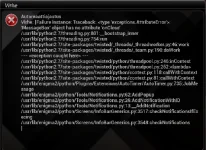
I managed to get Error screen shot. This happens few minutes after Autotimer item has been added (i.e when the timer re-recreation starts)

Hopefully this helps Autotimer.webp
 
You need to provide proper logs.
He did in the first post, although the info there is different (the actual error message is the same).

The problem seems to be something to do with animations (related to LCD4Linux?).
 
Also the odd thing is that the box UI jams only when the new autotimer item is placed and the timer update runs first time (delay 3min).

After rebooting the box runs OK. Just created item is on the Autotimer list and behaves nicely - new recording timers are added and timer refreshes (every 6h) cause no problems.
 

Attachments

Last edited:
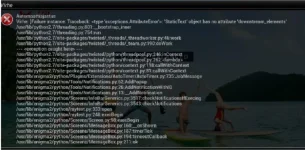
Update: I notice that the problem is not about the add items but manipulating Autotimer list. There was one item on the list with inactive timer creation (i.e. no green tag) after enabling the timer creation I got this Autotimer_update.webp
No new crash log though.
 
Have you got animations switched on in user interface?
 
The lcd4linux has different views for TV & Playback, they have the progress bar on.
--lcd4config---
config.BilderJPEG=75
config.BilderJPEGQuick=60
config.CalLine=1
config.CalListLines=3
config.ChannelLines=1
config.Clock=1
config.Clock2Analog=1
config.Clock2Spacing=0
config.ClockAlign=0
config.ClockAnalog=1
config.ClockColor=gold
config.ClockPos=196
config.ClockSize=46
config.ClockSpacing=0
config.DescLines=3
config.DevExtra=RAM
config.ElementThreads=2
config.Font=FONT
config.FritzLines=2
config.FritzLineType=2
config.FritzPictures=0
config.FritzRemove=12
config.Helligkeit=3
config.Helligkeit2=5
config.Helligkeit3=5
config.Info2Lines=1
config.InfoLines=1
config.L4LVersion=V4.6-r1
config.MailLines=3
config.MJPEGCycle=2
config.MPAVAlign=2
config.MPCalListLines=3
config.MPChannelColor=sandybrown
config.MPChannelLines=2
config.MPChannelPos=0
config.MPChannelSize=48
config.MPClock=1
config.MPClock2Analog=1
config.MPClock2Spacing=0
config.MPClockAlign=0
config.MPClockAnalog=1
config.MPClockColor=gold
config.MPClockPos=196
config.MPClockSize=46
config.MPClockSpacing=0
config.MPComm=0
config.MPCommAlign=0
config.MPCommColor=silver
config.MPCommLines=1
config.MPCommPos=0
config.MPCommSize=39
config.MPCoverLCD=123
config.MPDesc=1
config.MPDescAlign=0
config.MPDescColor=lightblue
config.MPDescLines=2
config.MPDescPos=110
config.MPDescSize=40
config.MPDescType=12
config.MPDevExtra=RAM
config.MPHelligkeit=5
config.MPHelligkeit2=5
config.MPHelligkeit3=5
config.MPInfo2Lines=1
config.MPInfoAlign=2
config.MPInfoColor=gold
config.MPInfoCPU=P
config.MPInfoLines=2
config.MPInfoPos=6
config.MPInfoSize=42
config.MPInfoSplit=True
config.MPMailLines=3
config.MPNetAtmo2Station=1
config.MPNetAtmoCO2Station=1
config.MPNetAtmoIDXStation=1
config.MPNetAtmoStation=1
config.MPNight=1
config.MPNight2=0
config.MPNight3=0
config.MPProgress=1
config.MPProgressAlign=2
config.MPProgressColor=silver
config.MPProgressColorText=moccasin
config.MPProgressLen=65
config.MPProgressPos=208
config.MPProgressShadow2=gradient
config.MPProgressSize=26
config.MPProgressType=21
config.MPRBoxTimerLines=1
config.MPRecording=0
config.MPRecordingType=1
config.MPTimerLines=1
config.MPTitleAlign=0
config.MPTitleColor=sandybrown
config.MPTitleLines=2
config.MPTitleSize=50
config.MPTunerActive=True
config.MPTunerAlign=2
config.MPTunerPos=70
config.MPTunerSize=47
config.NetAtmo2Station=1
config.NetAtmoCO2Station=1
config.NetAtmoIDXStation=1
config.NetAtmoStation=1
config.Night=0
config.Night2=0
config.Night3=0
config.OSD=1
config.OSDsize=435
config.PiconAlign=0
config.PiconPath=/picon/
config.PiconPathAlt=/media/usb/picon/
config.PiconSize=180
config.Popup=1
config.PopupPos=28
config.Prog=1
config.Prog2Lines=3
config.ProgColor=sandybrown
config.ProgLines=2
config.ProgNextLines=3
config.ProgPos=100
config.Progress=1
config.ProgressAlign=2
config.ProgressColor=silver
config.ProgressColorText=moccasin
config.ProgressLen=65
config.ProgressPos=208
config.ProgressShadow2=gradient
config.ProgressSize=26
config.ProgressType=21
config.ProgSize=43
config.ProgType=2
config.RBoxRefresh=1
config.RBoxTimerLines=1
config.RBoxTimerRefresh=15
config.Recording=0
config.RecordingType=1
config.ScreenSwitchLCD=3
config.StandbyCalListLines=3
config.StandbyClock2Analog=1
config.StandbyClock2Spacing=0
config.StandbyClockAnalog=1
config.StandbyClockPos=0
config.StandbyClockSpacing=0
config.StandbyClockType=1123
config.StandbyDevExtra=RAM
config.StandbyHelligkeit=1
config.StandbyHelligkeit2=1
config.StandbyHelligkeit3=1
config.StandbyInfo2Lines=1
config.StandbyInfoLines=1
config.StandbyMailLines=3
config.StandbyNetAtmo2Station=1
config.StandbyNetAtmoCO2Station=1
config.StandbyNetAtmoIDXStation=1
config.StandbyNetAtmoStation=1
config.StandbyNight=0
config.StandbyNight2=0
config.StandbyNight3=0
config.StandbyRBoxTimerLines=1
config.StandbyRecording=0
config.StandbyRecordingType=1
config.StandbyTimerLines=1
config.TimerLines=1
config.Tuner=1
config.TunerActive=True
config.TunerAlign=2
config.TunerSize=45
config.WebIfRefresh=3
config.WetterCity=Helsinki
config.WetterExtraFeel=3
config.WetterIconZoom=40
config.WetterRainColor2use=80
config.xmlOffset=0
 

OpenViX Feeds Status

Back
Top