Superb quality and spec AB-Com PULSe 4K SE. Crazy offer! Only £129! FREE UK DELIVERY! 4K UHD, Enigma 2, Multiboot 4 images & more!...
Superb quality and spec AB-Com PULSe 4K Rev II Twin Satellite tuner only £179! FREE UK DELIVERY! 4K UHD, Enigma 2, SATA HDD facility, Multiboot 4 images & more!...

[ViX_Misc] Virtual keyboard bugs

nekrub2

Member
Joined
Dec 6, 2015
Messages
354
Reaction score
5
Points
18
Location
Switzerland
Dear all,
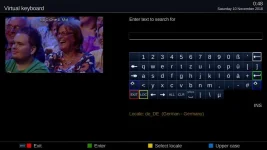
I'm using the virtual keyboard for the Wikipedia Plugin or any plugin requiring me to enter a text or a number. Until 5.2.003 it was all fine. Now with this version I see a completely different layout with the following bugs

1. There is no backspace key for correcting a typo
2. There is no ok button (green button works)
3. When you mark one character and click on clear the who entry is deleted

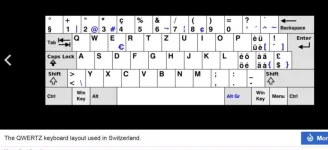
4. For German there is only the choice of the Germany layout - the Swiss German layout, which was available before is gone.


This happens whatever locaction (keyboard) you choose.

Please bring back the old virtual keyboard.

Thanks
nekrub2
 
Last edited:
There have been a few changes to the virtual keyboard.
With the virtual keyboard on the screen, press the “Help” button. This will give you a guide to what button does what.
Stu.
 
There are some issues with the virtual keyboard on OBH also, I am sure it will be resolved soon.
 
1) Backspace key is in the top/right corner. What skin are you using? Has it been updated for the new VKB? Please post a screen grab.

VKB.webp

2) We can ask Ian the logic behind this and change it if necessary. Until then you will have to press green.

3) Clear is for clearing the whole text. Press the help button on your remote. There is a complete list of all the functions. Highlight the function you want and the arrow will show you which button on the remote does that job.

4) If you provide a layout it can be added. Post a photo of a PC keyboard for that location.
 
Last edited:
Hi,

Currently using the VIXBMC Confluence skin, and the keyboard definitely hasn't been updated in V5.2 (looks fine using Magic skin). Is the Confluence skin still supported? If not, can I manually update the keyboard layout myself?

Thanks,
GAH
 
Currently using the VIXBMC Confluence skin, and the keyboard definitely hasn't been updated in V5.2 (looks fine using Magic skin). Is the Confluence skin still supported? If not, can I manually update the keyboard layout myself?
I'm using Confluence too, and yes it is now broken. It was fine a week or so ago.

There's a slew of changes for Simple_Ten_Eighty, iSkin-(Light/Dark), Vix-(Day/Night)-HD, YouVix-Blue and Magic-FHD here:
Code:
https://github.com/OpenViX/skins/commits/master/src/skins
which I should be able to adapt to get things working.
 
Last edited:
skin

I'm using skin Army_MoodBlue_mdo (1280 x 720) and by no mean I would like to change this.


With the default skin the keyboard display is complete - but I don't like the skin.
 
Last edited:
screen grabber

Can you please send me a link on the documentation how to install the screen graber?

With your answers I tested with the layout en-us to see the backspace. On top right I see the - sign. When moving with the arrow right and press ok I get =, moving one more time to the right I get backspace. This means I do not see all keys.

Thanks for your help
nekrub2
 
arrow left does not delete

Arrow left does not delete, arrow back (from VRC) only moves cursor left. Stop arrow from VRC part does indeed delete left character.
 
I'm using Confluence too, and yes it is now broken. It was fine a week or so ago.

There's a slew of changes for Simple_Ten_Eighty, iSkin-(Light/Dark), Vix-(Day/Night)-HD, YouVix-Blue and Magic-FHD here:
Code:
https://github.com/OpenViX/skins/commits/master/src/skins
which I should be able to adapt to get things working.
Thanks Birdman. There is only so much that can be done at once so all the embeded skins were updated as well as iSkin. Looking at the poll Confluence seems to be a pretty popular skin too so it would be good if you can update it. If there are problems Ian can help. There are other skins there too but their respective authors seem to have abandoned them.
 
Last edited:
I'm using skin Army_MoodBlue_mdo (1280 x 720) and by no mean I would like to change this.


With the default skin the keyboard display is complete - but I don't like the skin.
No idea who that skin belongs to. Maybe it is an ATV skin, so you may have to wait until ATV merge the new keyboard, or update it yourself.
 
Arrow left does not delete, arrow back (from VRC) only moves cursor left. Stop arrow from VRC part does indeed delete left character.

I didn’t mean the left arrow (next to ok) look closely and you have a < button on the remote next to zero (0), does this delete entries?


Sent from my iPhone using Tapatalk
 
arrow left <

Arrow left (close to 0 on vu+ remote) jumps and highlights first character but does not delete.

Furthermore I was wondering what the key ALL would help. Of course you can press ALL and start writing with the effect that only the new entries are there. But you get the same if you click on CLR.
 
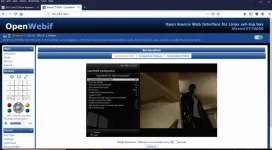
Can you please send me a link on the documentation how to install the screen graber?

It's already installed and part of the web Interface.

Find the IP of your box
Menu -> Information -> Network -> IP =

Then
Menu -> Plugins -> click on OpenWebif
OpenWebInterface Enabled = yes
Use new design = no
Press green to save settings.

If your box is connected to your home network, in your PCs web browser address bar type in the IP address of your box.
The webif will open up in your web browser
One of the options down the left hand edge is "Grab Screenshot" (which includes any box menus you may have on your TV screen)
Right click on the screenshot that appears to get a list of options - save, copy etc.

webif.webp
 
Last edited:
Hi All,

Sorry for the delay in responding here. I have been unwell.

The new VirtualKeyBoard is a complete rewrite and optimisation over all previous versions. Apart from cleaning up the code I wanted to make the keyboards look more like the keyboard you may have sitting on your study desk. All the changes can be reviewed in the /doc/VIRTUALKEYBOARD documentation in the repository as well as the code in the repository. For end users the online HELP system has been activated for the VirtualKeyBoard.

The skins were to be changed and updated by another developer who, due to personal reasons, was unable to complete the works. I was given a list of skins that had to be converted and those skins were updated by me. The documentation file I mentioned above will assist any other skin maintainers to update their skins. Please also note that skin control of the button colours has now changed. There is a new skin parameter that controls the text colour for each of the shift levels.

The "<" and ">" buttons either side of the zero "0" button are no longer edit buttons. This was done to work in with other UI navigation changes that are being developed to provide a unified and consistent navigation paradigm across Enigma2. Please use the online HELP button to help you find the buttons you need to use. By default PLAY or PLAY/PAUSE will delete characters under the cursor while BACK and STOP will delete characters to the left of the cursor. Think of PLAY pointing to the right as the forward delete and BACK (or STOP) as pointing backward along the line. The "<" and ">" now let you jump to the beginning or end of the text buffer respectively. The ALL button selects all the text in the text buffer. The CLR buffer clears the text buffer. The YELLOW or LOC button produces a pop up menu of all locales available for the VirtualKeyBoard. The INFO button provides access to the insert or overwrite modes of text entry. (The current mode should be displayed on any of the skins I converted and will hopefully be displayed on other skins when they are updated by their author or maintainer.)

If there are any languages or layouts have been missed then please provide me with the language and format that is missing together with any sample layouts that represent the way the language should be displayed. (I note that one such request has already been made. I will get to this ASAP.) New keyboards don't have to be 14 cells wide as the new code will automatically present ANY width keyboard up to 14 cells wide. Skins modified to work with the 14 cell wide keyboard will automatically work with any narrower keyboards. Also keyboards can have ANY number of shift levels though for the moment I have only coded for 4 different levels of shift.

I would also like to mention that all text cells (except SPACE) can now be translated to other languages. Apart from the SPACE button all text buttons are now dynamically created and the text is available for translation. There are no more text buttons that are made up of fixed images.

If there are any other questions or requests please ask.

Regards,
Ian.
 
Last edited:

OpenViX Feeds Status

Back
Top