Superb quality and spec AB-Com PULSe 4K SE. Crazy offer! Only £129! FREE UK DELIVERY! 4K UHD, Enigma 2, Multiboot 4 images & more!...
Superb quality and spec AB-Com PULSe 4K Rev II Twin Satellite tuner only £179! FREE UK DELIVERY! 4K UHD, Enigma 2, SATA HDD facility, Multiboot 4 images & more!...

Openmultiboot Guide?

dpullen87

Member
Joined
Sep 2, 2014
Messages
356
Reaction score
0
Points
16
Age
39
Is there a guide anywhere on how to use Openmultiboot?

I've downloaded the plugin and installed, opened and select my HDD. I've copied the image i want into /media/hdd/open-multiboot-upload but I'm not sure what to do next and how to get back to base image if I flash a new one.
 
if my memory is correct, reboot and it asks you which image you want to run.
 
Thanks Abu for the great guide, last question....

Is the HDD the best place to install this or would I be better of using a USB?
 
I don't see the plugin in the Vix feed as of today in extensions, is there an IPK about?
 
Last edited by a moderator:
Don't mix up Hardware multiboot with OpenMultiboot plugin.

You have a HD51, you don't need to use OMB.
 
I'll double check i have a Mut@nt HD51

Why do you want to use OMB (a plugin that works on most receivers, where image is on HDD) and not hardware multiboot (where images are on internal memory. Only a few receivers do this)?
 
There is nothing to install, it is part of image.

Flashing image

Use Image Manager to flash an image, you will be prompted as to what slot to install it on.

Select Image
In restart menu, you can select which slot to boot from.
 
There is nothing to install, it is part of image.

Flashing image

Use Image Manager to flash an image, you will be prompted as to what slot to install it on.

Select Image
In restart menu, you can select which slot to boot from.

When i go on image manager it doesn't ask about slots when i select the image it just says are you sure you want to flash on Mutant hd51

Image i'm trying to slot as is PurE2 unless it isn't supported.

I'm assuming i need to use multiboot?

But not familiar how to get an image to show on that.
 
Last edited:
Sorry, should have said, you will get the slot message on next page in process.

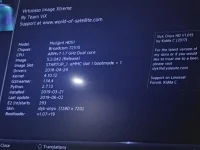
As a separate process, can you post a screenshot from the about page?

Menu > Information > About
 
Sorry, should have said, you will get the slot message on next page in process.

As a separate process, can you post a screenshot from the about page?

Menu > Information > About
The image was FTP'd to /HDD/imagebackups in its .zip that is ok right?
Attached:
IMG_1249.webp
 
Yes, the way to flash any image using Vix's image manager is the same whether the receiver supports hardware multiboot or not.

Transfer the image you want to /media/hdd/imagebackups/
Blue Button > Vix > Image Manager > Select image > Blue (Restore)

Confirm you want to flash

On receivers that support hardware multiboot, you will be prompted to select the slot you want to flash into

Receiver will reboot into that slot as soon as flash has completed
 
Before I make a guide thread for hardware multiboot, please provide feedback on following:


Some receivers support Hardware multiboot. There is nothing to install, it is part of the images.

Easiest way to check if your receiver supports Hardware Multiboot is to look in the Restart menu. If you have a multiboot function in there, your receiver supports hardware multiboot

Some receivers that support Hardware multiboot are listed below (best to check menu above as this thread will not be updated regularly):

Xtrend ET 8500
Mutant HD51
GB UE 4K/ Quad 4K
Zgemma H7
Octagon SF8008


1. Download your chosen image

2. Do not unzip the image file. Transfer your image zip file to your storage device.

OpenVix uses: /media/hdd/imagebackups/

For information only:
OpenATV uses: /media/hdd/images/
OpenPLI uses: /media/hdd/downloaded_images or root of storage device


3. Flashing image

Blue Button > Vix > Image Manager > Select image > Blue (Flash)
Confirm you want to flash
If your receiver supports Hardware multiboot, you will be asked which slot to use on next screen.

On OpenVix, your receiver will reboot as soon as flashing completes


4. Booting into a differnt image:

The Multiboot image selector is within the standy/power menus.

On Vix, do the following:
Menu > Standby and Restart > Multiboot

You will be presented with the different slots to boot from. Select the one you want.

Some receivers have different modes, you will be prompted with these if applicable.

For example, on the HD51
1 (UHD, no pip)
12 PiP (Picture in Picture)

The menu systems and wording is slightly different, so allow for slight differnces in wordings/options.
 

OpenViX Feeds Status

Back
Top