Superb quality and spec AB-Com PULSe 4K SE. Crazy offer! Only £129! FREE UK DELIVERY! 4K UHD, Enigma 2, Multiboot 4 images & more!...
Superb quality and spec AB-Com PULSe 4K Rev II Twin Satellite tuner only £179! FREE UK DELIVERY! 4K UHD, Enigma 2, SATA HDD facility, Multiboot 4 images & more!...

[TIVIAR-ALPHA+] Freeview Tuner doesn't show Freeview channels

@adm - there's a difference to how ABM works and the various "scanning" options. When you choose a particular transmitter option in ABM it tunes just those multiplexes (UHF channel frequencies) in the xml file associated with the transmitter. Other scanning options may include extra UHF channels, resulting in reception from different transmitters or marginal reception from the same transmitter intended to be beamed to a different area. So, the user may end up with the same multiplex (on different UHF channels) available to view. The signal level/quality on one of those multiplexes may be marginal and lead to the issues @SkyFan is experiencing. Your advice to ensure that joins or splitters are avoided is very appropriate in this case. What the OP really needs to do is ensure that his aerial is appropriate to the frequencies in use (channel group A) and is pointed at the relevant transmitter and that the cabling is sound. Ideally, he should be using ABM to receive the appropriate/relevant multiplexes from this single transmitter (providing, of course, that the ABM xml file contains the correct frequencies for those multiplexes). In that way he can remove ambiguities and can finally put this long thread to rest.

In the Irish Freeview environment (it's branded Saorview), we have a very limited service - just two multiplexes, but there are over sixty entries for each of the two multiplexes in the ABM providers file to identify every main and relay transmitter in the network, so that any user who knows his local transmitter can choose it properly.

Where I live I can physically eyeball my local transmitter and it's easy to select it by name in ABM. However, if I choose to scan all UHF channels my receiver will pick up another transmitter (which uses lower channel numbers) and store those in preference. This results in a less than optimal signal level, so the ABM method works much better for me in this instance.

I think that abu is trying to get the OP into a position where he can receive the best set of multiplexes. It would probably help if there was an unambiguous set of multiplex information from the specific transmitter that the OP is receiving from. As you have said also, the OP needs to identify and remove from the scanning process any duplicate weak multiplexes. There lies the issue...
 
ABM reads tables, it doesn't scan. ABM XML file for UK terrestrial lists
1. Frequency to "read" from,
2. HD muxes
3. overrides for problematic areas.

The ABM XML is different to the Enigma2 XML file.

The rest of advice about splitters, casing, signal drop are all excellent pieces of information.
 
Last edited:
ABM reads tables, it doesn't scan. ABM XML file for UK terrestrial lists
1. Frequency to "read" from,
2. HD muxes
3. overrides for problematic areas.

The ABM XML is different to the Enigma2 XML file.

The rest of advice about splitters, casing, signal drop are all excellent pieces of information.

Sorry about introducing confusion but I was trying to convey was that if Skyfan had used the terrestrial plugin in the way suggested and had selected the most appropriate (strongest?) signal then changing to ABM or any other method was unlikely to change anything - except we would all be guessing again about the true situation is.
 
They all work differently. Terrestrial scan doesn't give choice, it only uses the ones it can receive and strongest ones. This is why I suggested it first. The data imported by ABM may not be correct. I have mentioned this many times that ABM reads, it does not scan.

Important thing is we are all trying to help him. Long may it continue. IMO, best thing is we continue the diagnostic path in situ instead of introducing different ones and confusing matters. The are many variables. In some cases, some people are easier to confuse than others! I am not suggesting it applies in this case.
 
I have now done an ABM scan via Caldbeck England then did Blue button for Favourites > Terrestrial. There are no channel duplicates there. Each channel is only listed once. Below are a list of results for all the frequencies. I haven't looked at all the channels, just enough to see the results for all the different frequencies. Underlined are frequencies that display a picture without any breakup.

474 Mhz: Channel 4 HD, BBC Two HD, ITV HD, CBBC HD have has no picture
482 Mhz: BBC 1 HD, Channel 5 HD has no picture.
490 Mhz: Quest, QVC, More 4, Drama, 5 USA, CCXTV has no picture.
498 Mhz: ITV 4 has breakup.
506 Mhz: BBC Parliament is working fine.
514 Mhz: Sky Arts, Really, Dave is working fine.

522 Mhz: BBC News, CBBC has breakup
530 Mhz: ITV 2, ITV 3, E4, Film 4 are working fine.
546 Mhz: RT, Al-Jazeera, Ideal World, Yesterday is working fine.

What should I do now to get all the channels without breakup or loss of picture?
 
ABM creates ABM bouquets, it does not touch non-abm bouquets. Why are you checking the bouquets created by Terrestrial scan plugin? You won't even see duplicates in bouquets created by either plugin.

I am willing to help if you can do only as requested an not jump between different methods.
 
Last edited:
It's really confusing with bouquets, Channel lists, Orbital mode, etc. I thought I was checking the ABM bouquet. Please tell me precisely how to check the ABM bouquet. If I go to Blue button for Favourites > Sky Fan. I can only see a bouquet for freesat which is my custom list of channels for freesat.

There's nothing anywhere via Blue button for Favourites which says which of the channel lists are for ABM.
 
Last edited:
They all work differently. Terrestrial scan doesn't give choice, it only uses the ones it can receive and strongest ones. This is why I suggested it first. The data imported by ABM may not be correct. I have mentioned this many times that ABM reads, it does not scan.
That totally makes sense.
But why does ABM fail if all your tuners are in use?
 
There's nothing anywhere via Blue button for Favourites which says which of the channel lists are for ABM.

I suggested that you add the provider prefix in ABM config menu. Did you do that? You then have to run ABM for changes to take effect. Post a screenshot of what you see in your bouquet list.
 
Last edited:
Sorry I missed that from before. I've done it now. Here's the screenshots:
1A.webp
1B.webp
1C.webp

Which channel list from the above should I go into?
 
Here's another link which might tell you what you should get on Caldbeck Cumbria.

It gives details of which services are on which mux......

https://www.terrestrialtv.uk/dtt.php?reg=UK.E.BOR.CAL&col=LNTMHC

Edit: According to the link above, "BBC Parliament is working fine" and "CBBC has breakup" are on the same multiplex, PSB1.
 
Last edited:
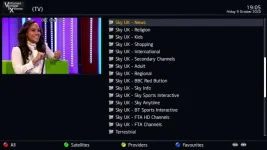
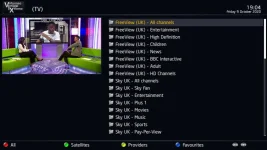
On the pictures you posted, all the ones that start with "Freeview UK" and "Sky UK" are the ABM bouquets.
In your picture, the one that just says "Terrestrial" is the one created by Terrestarial scan plugin.
 
Here's another link which might tell you what you should get on Caldbeck Cumbria.

It gives details of which services are on which mux......

https://www.terrestrialtv.uk/dtt.php?reg=UK.E.BOR.CAL&col=LNTMHC

Edit: According to the link above, "BBC Parliament is working fine" and "CBBC has breakup" are on the same multiplex, PSB1.

If you check his lamedb, he has two versions of BBC Parliament and CBBC. On 506 MHz and 522 MHz.
 
On the pictures you posted, all the ones that start with "Freeview UK" and "Sky UK" are the ABM bouquets.
In your picture, the one that just says "Terrestrial" is the one created by Terrestarial scan plugin.

I checked the Freeview UK All Channels bouquet. Below are the results. Underlined channels are displaying a picture without issues. I haven't watched them for a long time to test them, it was just a quick check:

474 Mhz: No channel uses this frequency. I checked all the channels.
482 Mhz: Channel 4 HD has no picture.
490 Mhz: Quest has no picture.
498 Mhz: ITV 4 has no picture.
506 Mhz: BBC Parliament is working.
514 Mhz: Sky Arts has no picture.
522 Mhz: BBC News has no picture
530 Mhz: ITV 2 is working fine.
546 Mhz: BBC 1 HD has no picture.
 
I'm totally losing the plot here, last time you said "482 Mhz: BBC 1 HD, Channel 5 HD has no picture", now you say "546 Mhz: BBC 1 HD has no picture"
 
I'm totally losing the plot here, last time you said "482 Mhz: BBC 1 HD, Channel 5 HD has no picture", now you say "546 Mhz: BBC 1 HD has no picture"

Possibly a marginal signal and what Skfan is seeing is a change of signal level depending on time of day/weather. Skyfan has indicated a perfectly watchable picture for a long period of time and then the next day a total picture breakup. Digital TV doesn't degrade in a nice soft way - it is all or nothing and sometimes very little makes the difference with a marginal signal level.
 
I checked the Freeview UK All Channels bouquet. Below are the results. Underlined channels are displaying a picture without issues. I haven't watched them for a long time to test them, it was just a quick check:

474 Mhz: No channel uses this frequency. I checked all the channels.
482 Mhz: Channel 4 HD has no picture.
490 Mhz: Quest has no picture.
498 Mhz: ITV 4 has no picture.
506 Mhz: BBC Parliament is working.
514 Mhz: Sky Arts has no picture.
522 Mhz: BBC News has no picture
530 Mhz: ITV 2 is working fine.
546 Mhz: BBC 1 HD has no picture.


You appear to be checking the correct frequencies (there is one Web source of data that does disagree with one frequency BUT THIS IS NOT YOUR CURRENT PROBLEM so lets not go there for a while - and once you have decent reception this descrepency will sort itself out)

Can you now go
Menu -> Setup -> Turners and Scanning -> Signal Finder

Tuner = your teresstrial tuner that has your aerial connected to it (it probably should have T or T2 in its name)
Tune = Predefined transponder
Transponder = 474Mhz (Channel 21)

Note: the < and > buttons of the remote changed the highlighted options for tuner, Tune and Transponder

Write down the SNR figure and see if the lock box is ticked

While highlighting the transponder increment the freq/channel number and again write down the SNR and lock indicator

Repeat up to channel 30 (you don't need to fgo any further as Calbeck doesn't use anything above this freaquency/broadcast channel)

DO NOT press the Green or Yellow buttons while in the Signal Finder page for ths test.
 
Last edited:
Possibly a marginal signal and what Skfan is seeing is a change of signal level depending on time of day/weather. Skyfan has indicated a perfectly watchable picture for a long period of time and then the next day a total picture breakup. Digital TV doesn't degrade in a nice soft way - it is all or nothing and sometimes very little makes the difference with a marginal signal level.

546 Mhz: BBC 1 HD has no picture.

.... 546 Mhz is a valid mux (CH30/Com6) on Caldbeck Cumbria, BBC1 HD doesn't transmit on that frequency. Yesterday, for example, does use that frequency.

I'd get the tv tuned into freeview first if I were Skyfan. If it's an aerial/leads/splitters/connectors problem, that would confirm it.
 
Last edited:
You appear to be checking the correct frequencies (there is one Web source of data that does disagree with one frequency BUT THIS IS NOT YOUR CURRENT PROBLEM so lets not go there for a while - and once you have decent reception this descrepency will sort itself out)

Can you now go
Menu -> Setup -> Turners and Scanning -> Signal Finder

Tuner = your teresstrial tuner that has your aerial connected to it (it probably should have T or T2 in its name)
Tune = Predefined transponder
Transponder = 474Mhz (Channel 21)

Note: the < and > buttons of the remote changed the highlighted options for tuner, Tune and Transponder

Write down the SNR figure and see if the lock box is ticked

While highlighting the transponder increment the freq/channel number and again write down the SNR and lock indicator

Repeat up to channel 30 (you don't need to fgo any further as Calbeck doesn't use anything above this freaquency/broadcast channel)

DO NOT press the Green or Yellow buttons while in the Signal Finder page for ths test.
474 Mhz: 0%. Lock unticked.
482 Mhz: 0%. Lock unticked
490 Mhz: 45%. Lock ticked
498 Mhz: Jumps constantly between 0% and 45%. When on 45% lock is ticked.
506 Mhz: 100%. Lock ticked
514 Mhz: 45%. Lock ticked
522 Mhz: 0%. Lock unticked
530 Mhz: Jumps constantly between 45% and 100% every few seconds or so. Lock is ticked
546 Mhz: 100%. Lock is ticked

My Sony Bravia KD55XD8577SUTV that I bought in 2016 for £1,100 found channels after updating the firmware but no channels display a picture and instead say “no signal please check your antenna connection”. I instead took a crappy TV from downstairs and connected it to the same aerial in my room and that TV displayed a picture on all freeview channels without issues after doing a scan. These are the options I selected on that TV for doing the scan:
Primary Region: England
Secondary Region: Borders
Tertiary Region: Any

So I don’t understand why Freeview works on that TV but not on my Tiviar Alpha+ box?
 

OpenViX Feeds Status

Back
Top