
Superb quality and spec AB-Com PULSe 4K SE. Crazy offer! Only £129! FREE UK DELIVERY! 4K UHD, Enigma 2, Multiboot 4 images & more!...
Superb quality and spec AB-Com PULSe 4K Rev II Twin Satellite tuner only £179! FREE UK DELIVERY! 4K UHD, Enigma 2, SATA HDD facility, Multiboot 4 images & more!...
You are using an out of date browser. It may not display this or other websites correctly.
You should upgrade or use an alternative browser.
You should upgrade or use an alternative browser.
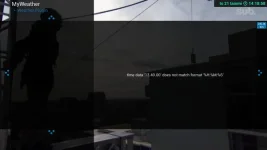
[ViX_Misc] Weather plugin time format error
- Thread starter Orlandox
- Start date


adm
Forum Supporter

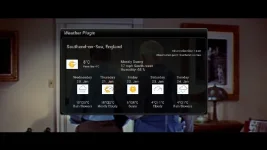
@ronand - which skin works for you?
works for me Xtrend 10k, Vix 5.4.004, vix-night-HD (1280x720) skin - and seems to work whatever the time setting (menu -> setup -> time -> time style)
Last edited:

Orlandox
ViX Beta Tester
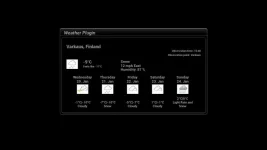
I think the problem is in this file : \Root\usr\lib\locale\fi_FI\LC_TIME, there is time format %H.%M.%S and in \Root\usr\lib\locale\en_GB\LC_TIME it is %H:%M:%S. How I can edit that file to test ?

ccs
ViX Beta Tester
- Joined
- Sep 6, 2014
- Messages
- 5,836
- Reaction score
- 5
- Points
- 0
.... it's a binary file, I doubt that you can edit it easily.
Those files haven't changed for over 3 years, they'll probably be part of the image build process.
And who knows what might stop working if you did make the change?
Those files haven't changed for over 3 years, they'll probably be part of the image build process.
And who knows what might stop working if you did make the change?
Last edited:
ccs
ViX Beta Tester
- Joined
- Sep 6, 2014
- Messages
- 5,836
- Reaction score
- 5
- Points
- 0
Took a while for me to work out that the time style option doesn't show in the simple_1080 skin.works for me Xtrend 10k, Vix 5.4.004, vix-night-HD (1280x720) skin - and seems to work whatever the time setting (menu -> setup -> time -> time style)

adm
Forum Supporter
I think the problem is in this file : \Root\usr\lib\locale\fi_FI\LC_TIME, there is time format %H.%M.%S and in \Root\usr\lib\locale\en_GB\LC_TIME it is %H:%M:%S. How I can edit that file to test ?
I’m not sure that this is the cause as I’ve just changed all the colons in the English/GB and English/English versions with full stops, uploaded the file to my box and have rebooted the box. My version of the Weather plug-in still works without shown a time error message.
However you may want to try with the Finnish file.
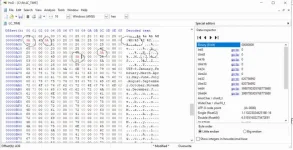
Download and install a hex editor such HxD HEX Editor
https://mh-nexus.de/en/hxd/
MAKE A BACKUP OF THE LC_time file
In Hxd Hex Editor open the LC_time file
From the top menu bar select search
In the search window that appears select the “Hex-values” tab
Search for “2E” (2E = . and 3A =
Replace the appropriate 2E with 3A and save the file
You can manually highlight 2E and type 3A or you can use the search/replace menu item.
One window will show the Hex (binary) code AND an ASCII translation which you can identify H:M:S etc.
adm
Forum Supporter
Search for “2E” (2E = . and 3A =
That should read
2E = a full stop
3A = a colon

Joe_90
Moderator
The closing bracket turned it into a smiley! Like this
Code tags would have resolved the issue
Code tags would have resolved the issue
Code:
(colon =:)Orlandox
ViX Beta Tester
Hello, I made a test by copying LC_TIME file from \Root\usr\lib\locale\en_GB\ to \Root\usr\lib\locale\fi_FI\, but same time format error. So localization is done somewhere else or the error is caused by plugin itself. I give up...
adm
Forum Supporter
... did you reboot the box after making the change?
I did a few test with replacing the colon in the H:M:S fields with full stops and rebooting after uploading the changed file. It made no difference to my working weather plugin - it still worked indicating the difference in the LC_time files for each language is probably not the cause of the problem.
Orlandox
ViX Beta Tester
I managed to get it working by changing some code: \Root\usr\lib\enigma2\python\Plugins\Extensions\WeatherPlugin\plugin.pyo --> "%H:%M:%S" to "%H.%M.%S" and "%H:%M",c to "%H.%M",c. Also \Root\usr\lib\enigma2\python\Components\Sources\MSNWeather.pyo --> "%H:%M:%S" to "%H.%M.%S" and "%H:%M",c to "%H.%M",c.
Maybe someone can change the source code by adding OR sentence, for example "%H:%M:%S" OR "%H.%M.%S" Is that possible ?
Maybe someone can change the source code by adding OR sentence, for example "%H:%M:%S" OR "%H.%M.%S" Is that possible ?
ccs
ViX Beta Tester
- Joined
- Sep 6, 2014
- Messages
- 5,836
- Reaction score
- 5
- Points
- 0
The source is here....
In theory, all you need to do is edit the plugin.py source file, put it into /usr/lib/enigma2/python/Plugins/Extensions/weatherplugin/ and reboot the gui.
Rename the original plugin.pyo file to plugin.pyo.orig in case the new version fails.
Code:
https://github.com/oe-alliance/enigma2-plugins/tree/master/weatherpluginIn theory, all you need to do is edit the plugin.py source file, put it into /usr/lib/enigma2/python/Plugins/Extensions/weatherplugin/ and reboot the gui.
Rename the original plugin.pyo file to plugin.pyo.orig in case the new version fails.
Last edited:
ccs
ViX Beta Tester
- Joined
- Sep 6, 2014
- Messages
- 5,836
- Reaction score
- 5
- Points
- 0
MSNWeather.pyo must be edited too to have observationtime working in Skin, otherwise you get n/a -error.
The source file will be in MSNWeather.py
