Superb quality and spec AB-Com PULSe 4K SE. Crazy offer! Only £129! FREE UK DELIVERY! 4K UHD, Enigma 2, Multiboot 4 images & more!...
Superb quality and spec AB-Com PULSe 4K Rev II Twin Satellite tuner only £179! FREE UK DELIVERY! 4K UHD, Enigma 2, SATA HDD facility, Multiboot 4 images & more!...

[Zgemma H7] Time Not Up-dating from versions 5.4.004/005/006

Yes - that 00.30 in the cron timer means run at 30 minutes past the hour, every hour.
Mine has:
Code:
30 * * * *    /usr/bin/ntpdate-sync silent
so it runs once an hour at half past.

I also have transponder time set, and all seems OK. Debug log show things like:

Code:
<  1841.9355> 18:54:31.6691 [eDVBLocalTimerHandler] diff is -1 
<  1841.9356> 18:54:31.6692 [eDVBLocalTimerHandler] diff < 120 .. use Transponder Time 
<  1841.9359> 18:54:31.6694 [eDVBLocalTimerHandler] no RTC available : ( 
<  1841.9360> 18:54:31.6696 [eDVBLocalTimerHandler] time update to 18:54:30   
<  1841.9361> 18:54:31.6696 [eDVBLocalTimerHandler] m_time_difference is -1 
<  1841.9361> 18:54:31.6697 [eDVBLocalTimerHandler] set Linux Time
<  1841.9375> 18:54:30.6710 [eDVBChannel] getDemux cap=00

Although there is always an ntpdate-sync run at enigma2 start-up, and that will work (for me), so the time isn't likely to be much wrong after that, but it is being corrected (by ~1s) by the transponder (as you can see by the system time going backwards by 1s between the last two entries).
 
Last edited:
It been one of those days....

Code:
root@vuultimo4k:~# crontab -l
30 * * * *    /usr/bin/ntpdate-sync silent
root@vuultimo4k:~#

and appears to run every 30 minutes?

Code:
12:41:58.2647 [Console] command: /usr/bin/ntpdate-sync
12:42:06.8222 [Console] finished: /usr/bin/ntpdate-sync
13:12:06.9327 [Console] command: /usr/bin/ntpdate-sync
13:12:13.6852 [Console] finished: /usr/bin/ntpdate-sync
13:42:13.7957 [Console] command: /usr/bin/ntpdate-sync
13:42:20.5675 [Console] finished: /usr/bin/ntpdate-sync
 
It been one of those days....

Code:
root@vuultimo4k:~# crontab -l
30 * * * *    /usr/bin/ntpdate-sync silent
root@vuultimo4k:~#

and appears to run every 30 minutes?

Code:
12:41:58.2647 [Console] command: /usr/bin/ntpdate-sync
12:42:06.8222 [Console] finished: /usr/bin/ntpdate-sync
13:12:06.9327 [Console] command: /usr/bin/ntpdate-sync
13:12:13.6852 [Console] finished: /usr/bin/ntpdate-sync
13:42:13.7957 [Console] command: /usr/bin/ntpdate-sync
13:42:20.5675 [Console] finished: /usr/bin/ntpdate-sync
Those console commands aren't anything to do with cron. Those are enigma2 running ntpdate-sync itself, which it does if you have network time sync enabled.
cron commands are a system thing, so aren't going to be reported in the debug logs, which are just the logs for an application. They might show up in the system log (/var/log/messages).
 
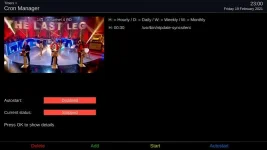
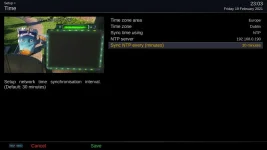
ccs - as birdman says, those entries in the log are just enigma running ntpdate-sync every 30 minutes which is the default if you have NTP sync enabled in the Time settings. The entries in crontab are designed to run at half past the hour (not every 30 minutes), but they will only run if you have cron enabled. My Timers entry for crontab show the ntpdate sync at 30 mins past the hour, but the cron is not set to autostart, which is the default setting.
 

Attachments

  • crontab.webp
    crontab.webp
    25.2 KB · Views: 7
  • ntp_settings.webp
    ntp_settings.webp
    20.7 KB · Views: 6
Last edited:
ccs - as birdman says, those entries in the log are just enigma running ntpdate-sync every 30 minutes which is the default if you have NTP sync enabled in the Time settings. The entries in crontab are designed to run at half past the hour (not every 30 minutes), but they will only run if you have cron enabled. My Timers entry for crontab show the ntpdate sync at 30 mins past the hour, but the cron is not set to autostart, which is the default setting.

on both my boxes the cron timers are set:
Autostart = active
Current status = running

While I may have enabled cron timers in the dim and distant past on my Xtrend ET10k I definitely didn't on my more recent purchase of a Zgemma H9S so something related to a Vix upload (or another menu setting) must have generated the cron timer and enabled it.
 
That's a bit puzzling as cron is not active on any of my three boxes (all running dev). I'll check the Release image setting on my AX61 and the ATV image also. Something may have changed in date/time handling recently. If time is set by NTP, then transponder time is not used to set the clock. If time is set by transponder then NTP is ignored, but there is a call made to NTP at startup in any case and I'm not sure of the reason - maybe for log naming?
 
If time is set by transponder then NTP is ignored,
enigma2's internal one is, but if you enable cron you still get the hourly one.

but there is a call made to NTP at startup in any case and I'm not sure of the reason - maybe for log naming?
Probably, but it mostly fails on my boxes. My logs are usually named with the time of the previous shutdown.
 
I just disable fake-hwclock by renaming the script in /etc/init.d on my hd51/ax61 which are wifi and enable time by NTP. Now, my logs are dated and timed correctly and only once in a blue moon do I get a 1/1/1970 log file. fake-hwclock just doesn't work for me as my boxes spend most of the time in deep standby. For users who just leave the box on or in normal standby it probably doesn't affect them.
 
That's a bit puzzling as cron is not active on any of my three boxes (all running dev).

I've just flashed 5.4.007 (release) without a settings/plugins restore and the ntpupdate cron job is autostarting and running at half past the hour.
 
Thanks all, you have all been busy while I was away from the PC. After doing a recording test, I've narrowed my problem down to the EPG time not updating immediately on the later openvix versions 004, 005, & 006. As said before , up-to version 003, all is fine and does not require internet connection for timers and time to work correctly. I tested a recording from deep standby and watched the box come out of deep standby at the right time in readiness to record - but...... the recording did not start at the preset time. but delayed recording by the amount of time the box was in deep standby. So in practise what I am saying is that as it stands, if I want to set a very early recording maybe 2'oclock am from deep standby, the recording would not actually start until the length of time has elapsed from when the box last went into deep standby (because the epg time hasn't synced with the box time) unless the internet is left on, which we don't do. I don't fully understand crone timers etc. but it seems it relies on internet connection? I will have to stay on 003 until I can come up with a solution.
 
Maybe turn on debug logs and try the test again - make sure there's no network access.

menu/system/logs/settings - location=/media/hdd, enable=yes, time format= include local time

Then restart the gui.
 
Last edited:
I have done several hours of testing this morning. I can confirm, that, on a clean Release 5.4.7 install, the system time is not being updated from the transponder on an off-line system.

The system date on my AX61 at boot is last Thursday 18th which was when the image build was done. I did a clean flash with no restores and did not run the network wizard on my system which uses wifi for network connectivity. I did just a basic tuner config and tuned to my local terrestrial transmitter. No time update was done. I turned on debug logging and read through it on-screen. The boot process is pulling a plausible date and time from the build and tries to issue an ntpdate-sync, but this fails because the box is offline. The default setting in Time menu is for transponder sync. I left the box running for quite a while and changed channels but no time sync from the transponder. Because the box is off-line I can't connect to it to check the system log/dmesg.

When I checked the cron settings in the Timers menu I can see that cron is enabled and there is an ntpsync-silent job set to run on the half-hour. This seems to be the default setting now, but I could have sworn that this cron setting was disabled in older builds. I might have a look back to check. Either way, there is a definite issue and we will get the devs to chase it.
 
I have done several hours of testing this morning. I can confirm, that, on a clean Release 5.4.7 install, the system time is not being updated from the transponder on an off-line system.

The system date on my AX61 at boot is last Thursday 18th which was when the image build was done. I did a clean flash with no restores and did not run the network wizard on my system which uses wifi for network connectivity. I did just a basic tuner config and tuned to my local terrestrial transmitter. No time update was done. I turned on debug logging and read through it on-screen. The boot process is pulling a plausible date and time from the build and tries to issue an ntpdate-sync, but this fails because the box is offline. The default setting in Time menu is for transponder sync. I left the box running for quite a while and changed channels but no time sync from the transponder. Because the box is off-line I can't connect to it to check the system log/dmesg.

When I checked the cron settings in the Timers menu I can see that cron is enabled and there is an ntpsync-silent job set to run on the half-hour. This seems to be the default setting now, but I could have sworn that this cron setting was disabled in older builds. I might have a look back to check. Either way, there is a definite issue and we will get the devs to chase it.

I can confirm the bug. Transponder time doesn’t work at all on both my boxes.

In the time setting I selected transponder time. I disabled the cron ntp timer and then put my boxes into deep standby.

I turned off my router.

After 30 minutes I turned on both my boxes. The time shown was that when the box turned off. The time then incremented at (approx) the correct rate from that turn off time. I left the boxes for 10+ minutes and the time was never corrected!

On my Xtrend 10k I have both satellite and terrestrial tuners and it didn’t make any difference tuning into BBC1 on either service.

So, if the Internet is disconnected, transponder is selected as the time source and the box is put into deep standby the time will always be wrong!!! I suspect that other may not have seen this bug if their box is always connected to a working internet connection and/or they never put it into deep standby. Even if they believe their box is fetching the transponder time it is actually getting it via ntp.

Running 5.4.007
 
@Fat-tony I am sure you will remember back in 2017 when Schimmelreiter changed how the clock worked e.g. https://github.com/oe-alliance/oe-alliance-core/commit/faa6d30a12618e36307c37e23d797224edf182d4 amongst a few.
I think Birdman had to add code to Vix to solve a few issues - is this involved in the current issue???

I can never forget that @twol - birdman and I spent months trying to get it working properly on my mutant HD51! I think setting the system clock from the fp timer only works on certain boxes

There is a bug thread at the moment and abu has identified several candidates for checking.
 
Thanks for all your testing. I am now happy it was not just me, but appears there is a problem since 5.4.003. Your expert knowledge and test confirms what I was trying to say. I updated to 5.4.007 with no restore and a quick scan of 28.2e just for a test and just the same as you have found. I then changed to Openatv to check it wasn't my box and everything works fine, clock update and everything while not connected to internet. Thanks again for your testing, I thought I was losing my "marbles". What next?
 
One possible workaround is to never put the box in deep standby, just normal standby.
 
Thanks for all your testing. I am now happy it was not just me, but appears there is a problem since 5.4.003. Your expert knowledge and test confirms what I was trying to say. I updated to 5.4.007 with no restore and a quick scan of 28.2e just for a test and just the same as you have found. I then changed to Openatv to check it wasn't my box and everything works fine, clock update and everything while not connected to internet. Thanks again for your testing, I thought I was losing my "marbles". What next?

It has been reported as a bug and will be fixed asap. In the meantime stay on the working image version.
 
I have the same problem with Octagon SF4008. Up to 5.4.003 time synchronisation with the transponder works. In newer versions it doesn´t. I rolled back to 5.4.003 with configuration restore and time synchronisation with the transponder works again. My HW configuration is 2x DVB-S, 1x DVB-T. My changes to the open vix "factory setting" is:
Removed: wireles LAN
all USB network drivers
EPG import
2 skins
Added: VPS
media player
 

OpenViX Feeds Status

Back
Top