Superb quality and spec AB-Com PULSe 4K SE. Crazy offer! Only £129! FREE UK DELIVERY! 4K UHD, Enigma 2, Multiboot 4 images & more!...
Superb quality and spec AB-Com PULSe 4K Rev II Twin Satellite tuner only £179! FREE UK DELIVERY! 4K UHD, Enigma 2, SATA HDD facility, Multiboot 4 images & more!...

New skin: Simple Ten Eighty

Based on the replies I've already had, it'll have to do, real or not.


Or you could change the serviceWidth check in setEntries (in Components/EpgListGrid.py) since they appear to be wrong. Or at leats the logic is wrong. You really need to get each of the three possible date formats (starting with the longest) and stop once what you have fits within serviceWidth. The current code is juts a piece of guesswork, as you have no idea what font size is being used for the display.
 
What you are suggesting would only be possible with a fixed width font.
 
Line 927 of Components/EpgListGrid.py looks like this

Code:
			fnum = float(timeEpoch)/float(timeSteps)
			incWidth = int(eventRect.width() / fnum)
			timeStepsCalc = timeSteps * SECS_IN_MIN

			nowTime = localtime(time())
			begTime = localtime(timeBase)
			serviceWidth = serviceRect.width()
			if nowTime.tm_year == begTime.tm_year and nowTime.tm_yday == begTime.tm_yday:
				datestr = _("Today")
			else:
				if serviceWidth > [COLOR="#FF0000"]179[/COLOR]:
					dateFormat = config.usage.date.daylong.value
				elif serviceWidth > [COLOR="#FF0000"]129[/COLOR]:
					dateFormat = config.usage.date.dayshort.value
				elif serviceWidth > [COLOR="#FF0000"]79[/COLOR]:
					dateFormat = config.usage.date.daysmall.value
				else:
					dateFormat = "%a"
				datestr = strftime(dateFormat, begTime)

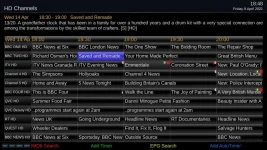
I've got Service width in the grid epg set to 225, and the date "Fri 9 Apr 2020" doesn't fit.

If I mess with EpgListGrid.py and force the date to be "Fri 9 Apr", it fits ok....

Code:
			fnum = float(timeEpoch)/float(timeSteps)
			incWidth = int(eventRect.width() / fnum)
			timeStepsCalc = timeSteps * SECS_IN_MIN

			nowTime = localtime(time())
			begTime = localtime(timeBase)
			serviceWidth = serviceRect.width()
			if nowTime.tm_year == begTime.tm_year and nowTime.tm_yday == begTime.tm_yday:
				datestr = _("Today")
			else:
				if serviceWidth > [COLOR="#FF0000"]999[/COLOR]:
					dateFormat = config.usage.date.daylong.value
				elif serviceWidth > [COLOR="#FF0000"]2[/COLOR]:
					dateFormat = config.usage.date.dayshort.value
				elif serviceWidth > [COLOR="#FF0000"]1[/COLOR]:
					dateFormat = config.usage.date.daysmall.value
				else:
					dateFormat = "%a"
				datestr = strftime(dateFormat, begTime)

EDIT: If I make the Timeline font size small enough I should be able to see when the date format changes for different service widths.

Service width of 173 changes the date format (loses the year), Timeline font size -2.
 
Last edited:
For my Service width of 225, Line 937 of EpgListGrid.py, when set to "if serviceWidth > 231:" works, ie. the year is dropped. Setting to 230, the year is back again.

Not really sure how that bit of code is supposed to work, as both the font size (mine is set to +5) and service width play a part.
 
What you are suggesting would only be possible with a fixed width font.
If there were a way to get the pixel-width that a given piece of text would take up were it displayed then that coudl be used.
I take it no-one has ever found such a function?
 
If there were a way to get the pixel-width that a given piece of text would take up were it displayed then that coudl be used.
I take it no-one has ever found such a function?

Yes of course you can do it with fixed width font but not true type. e.g.

True type:
iiiii
mmmmm

Fixed width:
iiiii
mmmmm


And the differing width also depends on the font face, not just that it is true type.
 
Yes of course you can do it with fixed width font but not true type. e.g.

True type:
iiiii
mmmmm

Fixed width:
iiiii
mmmmm


And the differing width also depends on the font face, not just that it is true type.

I think birdman wonders if there is a some function you can ask "how wide will this string be in this font", or perhaps, if the renderer is not too advanced and doesn't adjust the widths to suit the neighbouring characters, just "how wide will this character be in this font".

It seems like something that might exist.
 
Last edited:
Line 927 of Components/EpgListGrid.py looks like this

Code:
			fnum = float(timeEpoch)/float(timeSteps)
			incWidth = int(eventRect.width() / fnum)
			timeStepsCalc = timeSteps * SECS_IN_MIN

			nowTime = localtime(time())
			begTime = localtime(timeBase)
			serviceWidth = serviceRect.width()
			if nowTime.tm_year == begTime.tm_year and nowTime.tm_yday == begTime.tm_yday:
				datestr = _("Today")
			else:
				if serviceWidth > [COLOR="#FF0000"]179[/COLOR]:
					dateFormat = config.usage.date.daylong.value
				elif serviceWidth > [COLOR="#FF0000"]129[/COLOR]:
					dateFormat = config.usage.date.dayshort.value
				elif serviceWidth > [COLOR="#FF0000"]79[/COLOR]:
					dateFormat = config.usage.date.daysmall.value
				else:
					dateFormat = "%a"
				datestr = strftime(dateFormat, begTime)

I've got Service width in the grid epg set to 225, and the date "Fri 9 Apr 2020" doesn't fit.

If I mess with EpgListGrid.py and force the date to be "Fri 9 Apr", it fits ok....

Code:
			fnum = float(timeEpoch)/float(timeSteps)
			incWidth = int(eventRect.width() / fnum)
			timeStepsCalc = timeSteps * SECS_IN_MIN

			nowTime = localtime(time())
			begTime = localtime(timeBase)
			serviceWidth = serviceRect.width()
			if nowTime.tm_year == begTime.tm_year and nowTime.tm_yday == begTime.tm_yday:
				datestr = _("Today")
			else:
				if serviceWidth > [COLOR="#FF0000"]999[/COLOR]:
					dateFormat = config.usage.date.daylong.value
				elif serviceWidth > [COLOR="#FF0000"]2[/COLOR]:
					dateFormat = config.usage.date.dayshort.value
				elif serviceWidth > [COLOR="#FF0000"]1[/COLOR]:
					dateFormat = config.usage.date.daysmall.value
				else:
					dateFormat = "%a"
				datestr = strftime(dateFormat, begTime)

EDIT: If I make the Timeline font size small enough I should be able to see when the date format changes for different service widths.

Service width of 173 changes the date format (loses the year), Timeline font size -2.

So as a starting point you need something like this:
Code:
			else:
				if serviceWidth > (self.timelineFontSize + self.epgConfig.timelinefs.value) * 9:
					dateFormat = config.usage.date.daylong.value
				elif serviceWidth > (self.timelineFontSize + self.epgConfig.timelinefs.value) * 6.5:
					dateFormat = config.usage.date.dayshort.value
				elif serviceWidth > (self.timelineFontSize + self.epgConfig.timelinefs.value) * 4:
					dateFormat = config.usage.date.daysmall.value
 
.... Thanks, I'll have a go tomorrow.
 
Ok, now I have tried it I need to tweak a bit.

Code:
			else:
				if serviceWidth > (self.timelineFontSize + self.epgConfig.timelinefs.value) * 7.6:
					dateFormat = config.usage.date.daylong.value
				elif serviceWidth > (self.timelineFontSize + self.epgConfig.timelinefs.value) * 4.5:
					dateFormat = config.usage.date.dayshort.value
				elif serviceWidth > (self.timelineFontSize + self.epgConfig.timelinefs.value) * 2.85:
					dateFormat = config.usage.date.daysmall.value

Don't forget some fonts are wider than others, so in skins with narrow fonts such as Magic FHD and iSkin it leaves a bit of extra space, but in all skins it seems to trim the year before it goes out of bounds.
 
....works fine with my settings of Service width = 225 and Timeline font size +5.

Not sure how your tweaking actually works, so ...

Sticking with my fontsize of +5, "Mon 12 Apr" doesn't quite fit between a width of 161 thru' to 199. At 160 the month finally gets drops.
 
This works better for me.....

Code:
			if serviceWidth > (self.timelineFontSize + self.epgConfig.timelinefs.value) * 7.6:
					dateFormat = config.usage.date.daylong.value
				elif serviceWidth > (self.timelineFontSize + self.epgConfig.timelinefs.value) * [COLOR="#FF0000"]5.55[/COLOR]:
					dateFormat = config.usage.date.dayshort.value
				elif serviceWidth > (self.timelineFontSize + self.epgConfig.timelinefs.value) * 2.85:
					dateFormat = config.usage.date.daysmall.value

The month now gets dropped at Service width = 199.
 
This works better for me.....

Code:
			if serviceWidth > (self.timelineFontSize + self.epgConfig.timelinefs.value) * 7.6:
					dateFormat = config.usage.date.daylong.value
				elif serviceWidth > (self.timelineFontSize + self.epgConfig.timelinefs.value) * [COLOR="#FF0000"]5.55[/COLOR]:
					dateFormat = config.usage.date.dayshort.value
				elif serviceWidth > (self.timelineFontSize + self.epgConfig.timelinefs.value) * 2.85:
					dateFormat = config.usage.date.daysmall.value

The month now gets dropped at Service width = 199.

Yes but has to work in all skins, not just ones with narrow fonts.
 
Yes but has to work in all skins, not just ones with narrow fonts.

I thought you said "in all skins it seems to trim the year before it goes out of bounds", all I'm doing is dropping the month when the service width is wider than your original change.
 
Yes but has to work in all skins, not just ones with narrow fonts.
And with any user-chosen font-size change.
Why not just drop displaying the year completely? It's mentioned elsewhere on the screen should you have forgotten what it is and wish to be reminded.
 
I already fixed it. I don't see any problem now. Works correct in all the skins I tested from our skins repo.

All I am saying is with a narrow font there will be a bit of extra margin, to allow for wide fonts on other skins.
 
I already fixed it. I don't see any problem now. Works correct in all the skins I tested from our skins repo.

All I am saying is with a narrow font there will be a bit of extra margin, to allow for wide fonts on other skins.

Although not with the settings I mentioned in posts #151 and #152, but not to worry.
 

Attachments

  • fit.webp
    fit.webp
    68.8 KB · Views: 39
Last edited:
Please explain how you are doing that with what is currently in the enigma repo.
 
It's your post #150 with Service width 180, Timeline font size +5, Simple_1080 skin, 5.4.009.011

I've just re-installed to double check.
 
Last edited:
@CCS, I think the formula is good, so just play around with those floats until you are happy with it at all resolutions.

And then we can commit your choice.
 

OpenViX Feeds Status

Back
Top