Superb quality and spec AB-Com PULSe 4K SE. Crazy offer! Only £129! FREE UK DELIVERY! 4K UHD, Enigma 2, Multiboot 4 images & more!...
Superb quality and spec AB-Com PULSe 4K Rev II Twin Satellite tuner only £179! FREE UK DELIVERY! 4K UHD, Enigma 2, SATA HDD facility, Multiboot 4 images & more!...

[VU+ Solo2] Orphan file cleanup?

derekoh

New member
Joined
Nov 15, 2018
Messages
12
Reaction score
0
Points
0
I have my Vu+ Solo2 save all recordings to a NAS drive, which I then point Plex at so I can view the videos in Plex (directly as a Plex library rather than as Plex DVR).

This all works great, however... If I then delete one of the videos from Plex it will delete the .ts file, but leaves the other files in situ (.eit, .ts.ap, .ts.cuts, .ts.meta and .ts.sc)

Is there a way of having these automatically cleaned-up to remove the orphaned files?

Thanks
 
Not a direct answer to what you asked, but I use the "event name first" in the recording composition option. This makes manipulation of files clearer using PC.

Until you get a fix, you could try selecting all and moving to another directory. That will leave the orphan files in the original directory.
 
I've managed to create a script that will do this for me:

Code:
#! /bin/bash

path=/data/media/FreeSat

for file in "$path"/*.{ts.ap,ts.cuts,ts.meta,ts.sc,eit} ; do
    filename=$(basename -- "$file")
    testfile="$path/${filename%%.*}.ts"
    if ! [ -e "$testfile" ]
    then
       echo "$testfile doesn't exit"
       echo "    deleting $file"
       echo
       rm -- "$file"
    fi
done

I'm going to run this from Cron on my NAS - should do the trick nicely.

Basically, it looks at that folder and finds any files eit, ts.ap, ts.cuts, ts.meta or ts.sc files that don't have an accompanying .ts file and deletes them.

My bash isn't the greatest, so I'm sure it can be improved, but it does the job!

Hope it's useful.
 
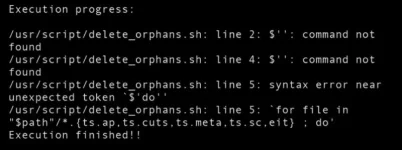
I know I'm dredging up an old thread but does anyone know why this script is not running for me from scriptrunner?
I've just changed the path.

Code:
#! /bin/bash

path=/media/autofs/SERIES/test

for file in "$path"/*.{ts.ap,ts.cuts,ts.meta,ts.sc,eit} ; do
    filename=$(basename -- "$file")
    testfile="$path/${filename%%.*}.ts"
    if ! [ -e "$testfile" ]
    then
       echo "$testfile doesn't exit"
       echo "    deleting $file"
       echo
       rm -- "$file"
    fi
done

2021-08-13_142528.webp
 
Last edited:
Only a guess, should there be a space after #! or doesn't it matter?
 
I get the same error if I try to run it as a scheduled task directly from my NAS:

Dear user,

Task Scheduler has completed a scheduled task.

Task: delete_orphans
Start time: Fri, 13 Aug 2021 16:25:09 GMT
Stop time: Fri, 13 Aug 2021 16:25:09 GMT
Current status: 2 (Interrupted)
Standard output/error:
/volume4/E2/NAS-scripts/delete_orphans.sh: line 2: $'\r': command not found
/volume4/E2/NAS-scripts/delete_orphans.sh: line 4: $'\r': command not found
/volume4/E2/NAS-scripts/delete_orphans.sh: line 5: syntax error near
unexpected token `$'do\r''
/volume4/E2/NAS-scripts/delete_orphans.sh: line 5: `for file in
"$path"/*.{ts.ap,ts.cuts,ts.meta,ts.sc,eit} ; do
'


From DS916plus

But working fine from putty.
 
It works fine from Putty though :confused:
Works ok for me using putty and also windows telnet.

Are you sure the script is using unix eol characters?
 
Last edited:
Works ok for me using putty and also windows telnet.

Are you sure the script is using unix eol characters?

You've lost me there! I've just pasted the script exactly as it is.
I would like to automate it if possible, rather than using putty, either as a cron job on my box or as a scheduled task from my NAS.
 
.... you need to paste it into something like notepad++, and make sure you're creating a unix file (option edit/EOL conversion), not a windows of mac file.
 
I always use Notepad++ anyway, brilliant editor :thumbsup:

Anyway I managed to sort it by actually pasting the script in as a daily scheduled task on the NAS rather than entering the link to the bash script.
All tested and working fine. This is the script with my recordings path in case it helps anyone else:

Code:
#!/bin/bash

path=/volume1/Recordings

for file in "$path"/*.{ts.ap,ts.cuts,ts.meta,ts.sc,eit} ; do
    filename=$(basename -- "$file")
    testfile="$path/${filename%%.*}.ts"
    if ! [ -e "$testfile" ]
    then
       echo "$testfile doesn't exit"
       echo "    deleting $file"
       echo
       rm -- "$file"
    fi
done

Thanks for the help and big thanks to @derekoh who wrote the script.
 
Last edited:
Be very careful with this.
I just tried it and it messed up about 20 recordings that were playable before.
 
Be very careful with this.
I just tried it and it messed up about 20 recordings that were playable before.

The problem is to do with when the file name minus extension ends with a full stop or multple full stops.
It checks for the wrong .ts file!

If you have:
"20210423 0013 - BBC One HD - Greta Thunberg_ A Year to....eit"

It will look for
"20210423 0013 - BBC One HD - Greta Thunberg_ A Year to.ts"
when it should be looking for
"20210423 0013 - BBC One HD - Greta Thunberg_ A Year to....ts"
and it will fail to find it and delete the .eit file!
 
.... cheers, I just tested that the script ran, having first taken out the rm command just in case.
 
The problem is to do with when the file name minus extension ends with a full stop or multple full stops.
It checks for the wrong .ts file!

If you have:
"20210423 0013 - BBC One HD - Greta Thunberg_ A Year to....eit"

It will look for
"20210423 0013 - BBC One HD - Greta Thunberg_ A Year to.ts"
when it should be looking for
"20210423 0013 - BBC One HD - Greta Thunberg_ A Year to....ts"
and it will fail to find it and delete the .eit file!

Long filenames I've got from ages ago end with 3 dots ("...") in movie list, but they are replaced by underscores on the hdd.

EDIT: Today - Even titles which actually end with "..." are converted to "___" on the hdd, and are show as dots in movie list.

This rings the faintest bell.
 
Last edited:
Seems to be working for me:

Task Scheduler has completed a scheduled task.

Task: delete_orphans
Start time: Sat, 14 Aug 2021 16:00:01 GMT
Stop time: Sat, 14 Aug 2021 16:00:03 GMT
Current status: 0 (Normal)
Standard output/error:
/volume1/Recordings/20210813 2259 - Really - These Woods Are
Haunted.ts doesn't exit
deleting /volume1/Recordings/20210813 2259 - Really - These Woods
Are Haunted.ts.ap

/volume1/Recordings/20210813 2259 - Really - These Woods Are
Haunted.ts doesn't exit
deleting /volume1/Recordings/20210813 2259 - Really - These Woods
Are Haunted.ts.cuts


From DS916plus
 

OpenViX Feeds Status

Back
Top