Superb quality and spec AB-Com PULSe 4K SE. Crazy offer! Only £99! FREE UK DELIVERY! 4K UHD, Enigma 2, Multiboot 4 images & more!...
Superb quality and spec AB-Com PULSe 4K Rev II Twin Satellite tuner only £149! FREE UK DELIVERY! 4K UHD, Enigma 2, SATA HDD facility, Multiboot 4 images & more!...

[GiGaBlue UHD UE 4K] Gigablue UHD 4K UE - can't save settings / can't update / can't flash from USB

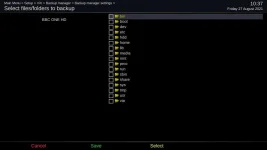
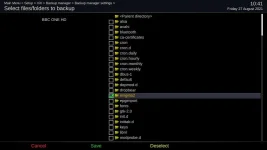
And if you want to tidy up the folders backupmanager looks for, as a rough guide, this is mine..

Code:
config.backupmanager.backupdirs=['/etc/enigma2/', '/etc/fstab', '/etc/hostname', '/etc/network/interfaces', '/etc/passwd', '/etc/shadow', '/etc/etc/shadow', '/etc/resolv.conf', '/etc/ushare.conf', '/etc/inadyn.conf', '/etc/tuxbox/config/', '/etc/wpa_supplicant.conf', '/usr/softcams/', '/etc/auto.network', '/etc/samba', '/usr/keys', '/usr/lib/enigma2/python/Plugins/SystemPlugins/AutoBouquetsMaker/providers/terrestrial_finder.xml', '/usr/script']

Some may not be relevant, but it might at least highlight what you shouldn't have included in your huge backups.
 

Attachments

  • b.webp
    b.webp
    13 KB · Views: 11
  • bb.webp
    bb.webp
    19.4 KB · Views: 12
Last edited:
And if you want to tidy up the folders backupmanager looks for, as a rough guide, this is mine..
Code:
[COLOR="#0000CD"]config.backupmanager.backupdirs=[/COLOR]['/etc/enigma2/', '/etc/fstab', '/etc/hostname', '/etc/network/interfaces', '/etc/passwd', '/etc/shadow', '/etc/etc/shadow', '/etc/resolv.conf', '/etc/ushare.conf', '/etc/inadyn.conf', '/etc/tuxbox/config/', '/etc/wpa_supplicant.conf', '/usr/softcams/', '/etc/auto.network', '/etc/samba', '/usr/keys', '/usr/lib/enigma2/python/Plugins/SystemPlugins/AutoBouquetsMaker/providers/terrestrial_finder.xml', '/usr/script']
.

Maybe I should have said that in /etc/enigma2/settings there is a line starting with config.backupmanager.backupdirs=. That will tell you what is currently being backed up.
 
Maybe I should have said that in /etc/enigma2/settings there is a line starting with config.backupmanager.backupdirs=. That will tell you what is currently being backed up.

Ah, OK, wasn't sure why that field was ticked in the second picture!

As in the old image setting backup, something was going wrong and resulting in the huge and possibly corrupt backup files, I thought I would make a backup of each folder separately and restore one at a time to the new image.

I was recommended also to transfer OSCam - as CCCam is operating under the new image, do I need still to do this? Do two cam apps provide a greater number of extra channels than just the one or is OSCam a better plugin than CCCam?
 
Post weekend update!

I was finally able to restore my stb to its pre-update condition, all my channels/bouquets intact. Channel freezing continued.

Had some issue with the dish not moving properly. Reset the rotor motor. Eventually found the powered cable was a little loose at the wall socket.

I checked signal levels, which seemed low. Using fine movement options, I found levels were maximised with about 8 small steps. Used Auto-focus (slightly random, it was unable to sync east on some satellites) and calibrate (seems to o much the same job!).

Need to do some extended viewing on the freezing channels but what I did watch briefly last night seemed freeze free. I think (fingers crossed emoji!) that may have sorted it.

Have taken an image and a settings backup. Now to do the selective settings backups, update ViX image, restore all settings bit by bit.

Thanks for all advice
 
Have you got a viewing card inserted in your receiver?
 

OpenViX Feeds Status

Back
Top