Superb quality and spec AB-Com PULSe 4K SE. Crazy offer! Only £129! FREE UK DELIVERY! 4K UHD, Enigma 2, Multiboot 4 images & more!...
Superb quality and spec AB-Com PULSe 4K Rev II Twin Satellite tuner only £179! FREE UK DELIVERY! 4K UHD, Enigma 2, SATA HDD facility, Multiboot 4 images & more!...

Build my own Vix image

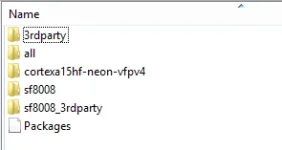
So there should be another sf8008 directory inside the 3rdparty one?

I've just checked my other boxes that are are on 5.4 and they all have the oe-alliance-settings-feed.conf as well.
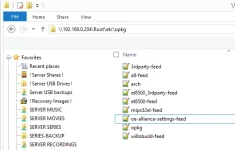
2021-09-14_223152.webp

I have been banished downstairs now so will carry on tomorrow.
Thanks for the advice so far :thumbsup:
 
So after 5.5 you need a directory/ folder named sf8008 and inside that 3rdparty sf8008 etc.
Not sure where the oe-alliance-feeds springs from, or whether that url works - if it doesn,t that would screw things up
I would be tempted to stop the box, remove it and reboot

Wow, that is right out of order. That is linking to a url for which the feed server is not authoritative.
 
So there should be another sf8008 directory inside the 3rdparty one?

I've just checked my other boxes that are are on 5.4 and they all have the oe-alliance-settings-feed.conf as well.

View attachment 62579

I have been banished downstairs now so will carry on tomorrow.
Thanks for the advice so far :thumbsup:

NO - /5.5/sf8008/sf8008 or /5.5/sf8008/3rdparty etc
 
Code:
http://myvixbuild.xyz/feeds/openvix/release/5.5/sf8008/all

What happen if you put that in a web browser?
 
Code:
http://myvixbuild.xyz/feeds/openvix/release/5.5/sf8008/all

What happen if you put that in a web browser?

That isn't the actual url, I pm'd the correct one to Twol.
I was just concerned about security on my server if I posted the correct url.

If I paste the url followed by the plugin name.ipk it downloads via the browser okay.
 
Also, from the debug log...
Code:
22:06:05.3185 [OnlineUpdateCheck][kernelMismatch] no kernel mismatch found
Means it is accessing the feeds. If not it would say...
Code:
[OnlineUpdateCheck][kernelMismatch] error fetching http://myvixbuild.xyz/feeds/openvix/release/5.5/sf8008/sf8008/Packages.gz
 
If I go into the install plugins screen I just get a blank screen and pressing any button brings up the access denied symbol at top right.

1_0_19_22D9_80D_2_11A0000_0_0_0_20210915095508.webp
 
If I go into the install plugins screen I just get a blank screen and pressing any button brings up the access denied symbol at top right.

View attachment 62581

So its hanging. I had this on my Synology(NAS) dns which worked fine in a browser but not from E2 (and I don't know why)
Where are the feeds - on a HDD or NAS??
If the feeds url is invalid it usually says so or returns blank screen .... but you can still access.
 
Just tested downloading a skin via putty using the full path and it downloaded and installed okay:

Code:
opkg install http://myvixbuild/feeds/openvix/release/5.5/sf8008/sf8008/enigma2-plugin-skins-openvix-youvix-purple_5.5+git2786+331c423-r4_sf8008.ipk
 
Would it be because I built a release image perhaps? Does it need to be developer at this stage.
I've tried the PluginBrowser.py from the dev build but that doesn't make any difference either.
 
Would it be because I built a release image perhaps? Does it need to be developer at this stage.
I've tried the PluginBrowser.py from the dev build but that doesn't make any difference either.

No - shouldn‘t be any different……..but again Where are the feeds - on a HDD or NAS??
 
They're on a NAS.

I've now tried to use the feeds from the openvix-5.5.015.003.Py3-sf8008_mmc.zip and that doesn't work either although the About Boxbranding screen shows my server address so not sure if I need to change something there?

I've also tried the PluginBrowser.py from that image as well.

I've also built images for 2 different boxes and they are the same as well.

I can download from my server through a browser and via putty using the same url as in the feeds and I've set the feeds up exactly the same as in ViX 5.4 which works perfectly.

Running out of ideas now :confused:
 
They're on a NAS.

I've now tried to use the feeds from the openvix-5.5.015.003.Py3-sf8008_mmc.zip and that doesn't work either although the About Boxbranding screen shows my server address so not sure if I need to change something there?

I've also tried the PluginBrowser.py from that image as well.

I've also built images for 2 different boxes and they are the same as well.

I can download from my server through a browser and via putty using the same url as in the feeds and I've set the feeds up exactly the same as in ViX 5.4 which works perfectly.

Running out of ideas now :confused:

Edit the conf files in /etc/opkg and put the real ip address(of the NAS) in rather than myvixbuild … makes sure that access is allowed from the sat receiver(nfs)
You may be having the same issue that I had with my Synology NAS
 
Last edited:
Sorry, my bad. It's not a NAS it's on my website on hosting24.
I can access plugin feeds on it from a ViX 5.4 build with no problems.

Everything exactly the same apart from the feeds are in a 5.5 directory rather than 5.4.
 
@Willo3092 - You are going to hate this - installed your opkg feed conf's, and listed plugins no issues.
Telnet to box, opkg update ............ downloads from your build url .... no issues
 
Thanks twol, I really appreciate you taking the time to test. At least I know it's not my server or feeds now.
Must be something wrong with the image I'm building then because I get the same on 3 different boxes.

I set my build environment up using the guide for ATV 7.0, is it any different for ViX and is there a github page with a guide?
 
Also, from the debug log...
Code:
22:06:05.3185 [OnlineUpdateCheck][kernelMismatch] no kernel mismatch found
Means it is accessing the feeds. If not it would say...
Code:
[OnlineUpdateCheck][kernelMismatch] error fetching http://myvixbuild.xyz/feeds/openvix/release/5.5/sf8008/sf8008/Packages.gz

Have you looked at this. Would suggest something is wrong in PluginBrowser.
 
Thanks twol, I really appreciate you taking the time to test. At least I know it's not my server or feeds now.
Must be something wrong with the image I'm building then because I get the same on 3 different boxes.

I set my build environment up using the guide for ATV 7.0, is it any different for ViX and is there a github page with a guide?
There is:
https://github.com/OpenViX/enigma2/tree/Dev-python3-compatible
but its basically same as OpenATV.

I still believe its a hang on the network.
Download for instance Huevos py3 sf8008, flash a slot and then replace the /etc/opkg feed conf files with yours.... see if that works......... if you need another box then let me know and I will build it - at the moment I can still do it(my office will be empty shortly as we are having new floors and room has to be emptied).
If it works its your build, which I find hard to believe - unless you are excluding some files from the build
if it doesn't work then its your network access.
 
Last edited:
I copied my feeds to Huevos py3 build and all working fine :thumbsup:
As you say I will have to look at the image because I did exclude some stuff weeks ago when I kept getting build failures on a mips box.
I'll try building again without the exclusions. Thanks twol :)
 

OpenViX Feeds Status

Back
Top