Superb quality and spec AB-Com PULSe 4K SE. Crazy offer! Only £99! FREE UK DELIVERY! 4K UHD, Enigma 2, Multiboot 4 images & more!...
Superb quality and spec AB-Com PULSe 4K Rev II Twin Satellite tuner only £149! FREE UK DELIVERY! 4K UHD, Enigma 2, SATA HDD facility, Multiboot 4 images & more!...

Testers required for OpenViX Python 3 images

Status
Not open for further replies.
@twol
Would you have a link to a 5.5.015.x py3 image for a Gigablue UE 4K?
Running 5.5.014.011 and tried to update the packages, but it gets stuck in a boot loop, so need an image flash to move on.
TIA
WW

The last image for that box is 5.5.014.008.

Twol has had his server out of action for a few days so would be best if you wait for the latest to be built. Probably a couple days.
 
You probably need this as well...

Code:
https://github.com/OpenViX/enigma2/commit/4dac0e2f3c8cd4c9eff625f7a641b61e943c99fa

https://github.com/OpenViX/enigma2/commits/Dev-python3-compatible
 
No problem with the zap history on 5.5.014.005 on my H7 (built by myself).
 
You probably need this as well...

Code:
https://github.com/OpenViX/enigma2/commit/4dac0e2f3c8cd4c9eff625f7a641b61e943c99fa

https://github.com/OpenViX/enigma2/commits/Dev-python3-compatible
Except that commit says it is to stop Py2 crashing, and this is (supposedly) Py3.
 
.... but the second Github Py3 link shows the commit I was referring to (Tools.Sign).
 
That's the one with the title:
?
So implicitly Py3 does not crash.

So why is the commit only in the Py3 branch. Maybe the title is a typo???

Maybe @BefuddledBrian can confirm if it helped.
 
Last edited:
So why is the commit only in the Py3 branch. Maybe the title is a typo???
"º" will crash Py2 because if the encoding is not declared Python will be expecting ASCII.

Brian's problem is he doesn't have Tools.Sign present on his system.

The branch name is "Dev-python3-compatible". That branch should work for both Py2 and Py3, although one commit has been added that is not Py2 compatible.

The idea was we could use this branch for the Py2 and Py3 builds. But as branch 5.0 is Py3 only that is looking unlikely.

So the possible next step will be create a dedicated Py3 branch and remove all the compatibility stuff.
 
So why is the commit only in the Py3 branch. Maybe the title is a typo???

Maybe @BefuddledBrian can confirm if it helped.

I did an update and I think it's moved me even further ahead so that the fix is already included.
 
So why not fix that commit?

I pointed out at the time that it was committed that the branch should be Py2 compatible. The problem is the module being used does not exist in Py2.
 
Last edited:
Cos I went on holiday and forgot about it!

Are we still wanting this sorted?
 
Cos I went on holiday and forgot about it!

Are we still wanting this sorted?

I would really like the Py3 branch fully compatible with Py2 as well. This means we can switch developer builds to this branch without having to move to core branch 5.0 yet.

Up to now we have been maintaining 2 branches and that is starting to get hard work (for me). Stuff like vix-core and ABM we have made compatible with both Py2 and Py3 and now only need to maintain one branch. Those have been working like that for around a year.
 
Last edited:
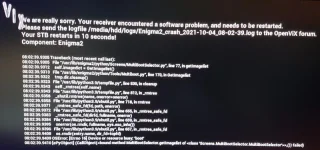
My SF8008 crashes and deletes all existing images when I try to open the Multiboot Image Selector from the standby menu on openvix-5.5.015.003.Py3-sf8008_mmc.
It first did it on my own image build so I tried it with the 'official' image and still the same.

I have installed ViX 5.5.015.003 on partition 4 and ViX 5.4.015 on partition 1 if that makes a difference?

When the crash occurs It gets stuck on this screen and I have to power off and flash a recovery image.
If I go into the multiboot part of the recovery menu it says 'no images found'.

multiboot crash.webp

View attachment Enigma2_debug_2021-10-04_07-56-37.log
 
My SF8008 crashes and deletes all existing images when I try to open the Multiboot Image Selector from the standby menu on openvix-5.5.015.003.Py3-sf8008_mmc.
It first did it on my own image build so I tried it with the 'official' image and still the same.

I have installed ViX 5.5.015.003 on partition 4 and ViX 5.4.015 on partition 1 if that makes a difference?

When the crash occurs It gets stuck on this screen and I have to power off and flash a recovery image.
If I go into the multiboot part of the recovery menu it says 'no images found'.

View attachment 62648

View attachment 62649

I too have an Octagon sf8008 and have experienced what you describe. Also the multiboot boot menu does not seem to work correctly from 5.5.15.3. I cannot see slot 1 when I reboot from this menu. I have Vix 5.5 in slot 2 and Vix 5.4 in slot 1
 
I too have an Octagon sf8008 and have experienced what you describe. Also the multiboot boot menu does not seem to work correctly from 5.5.15.3. I cannot see slot 1 when I reboot from this menu. I have Vix 5.5 in slot 2 and Vix 5.4 in slot 1

Thanks for that, I was worried it was just me!

Just for info, the ViX 5.5 is a clean install with no settings restore.
The only thing I've done is set a password via putty. No bouquets created or anything else changed from the clean image.
 
Just upgraded my Zero 4K to 5.5.016.001 but it’s hanging on the boot screen every time. I can connect by telnet and ftp. Is there a way to enable debug logs by telnet so I can post something up for someone to have a look at? Thanks
 
Try something like this...

In telnet

init 4
enigma2

You should get some debugging online.

Cntrl+C to abort if needed.
 
Status
Not open for further replies.

OpenViX Feeds Status

Back
Top