Superb quality and spec AB-Com PULSe 4K SE. Crazy offer! Only £129! FREE UK DELIVERY! 4K UHD, Enigma 2, Multiboot 4 images & more!...
Superb quality and spec AB-Com PULSe 4K Rev II Twin Satellite tuner only £179! FREE UK DELIVERY! 4K UHD, Enigma 2, SATA HDD facility, Multiboot 4 images & more!...

[VU+ Solo2] error dump appears approx every 5 minutes

martint123

New member
Joined
Jun 2, 2015
Messages
3
Reaction score
0
Points
0
Just upgraded from v5 to 6.0.007. Every 5 minutes or so the screen fills with error text. Tried reloading again without restore settings and it appears to be ok.
However, I would dearly love to be able to restore my old settings?

possible?

screendump attached
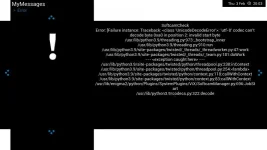
vix.webp
 
Just upgraded from v5 to 6.0.007. Every 5 minutes or so the screen fills with error text. Tried reloading again without restore settings and it appears to be ok.
However, I would dearly love to be able to restore my old settings?

possible?

screendump attached
View attachment 63323
So you are using CCcam? Did you copy the CCcam.cfg from somewhere???
Anyway that seems to be the issue.... so if the answer to above is Yes.....
....and you can use putty and filezilla.
Flash and restore settings.
Log into putty - if you have not been using a password, set one. Enter passwd and type in your password 2x (needed for filezilla).
type init 4 (space between)
filezilla copy /etc/cccam.cfg to PC.
using filezilla delete on receiver
putty type init 6 (space between)

have a look at your cccam cfg file.
 
Many thanks for that. Sadly it's been years since I used CCam and didn't do anything with during the upgrade to 6, just letting restore pull everything from the tar file.
I reverted to 5 to keep the family happy so I'll try the upgrade later on and get rid of CCam first. will report later
thanks again.


So you are using CCcam? Did you copy the CCcam.cfg from somewhere???
Anyway that seems to be the issue.... so if the answer to above is Yes.....
....and you can use putty and filezilla.
Flash and restore settings.
Log into putty - if you have not been using a password, set one. Enter passwd and type in your password 2x (needed for filezilla).
type init 4 (space between)
filezilla copy /etc/cccam.cfg to PC.
using filezilla delete on receiver
putty type init 6 (space between)

have a look at your cccam cfg file.
 

OpenViX Feeds Status

Back
Top