Superb quality and spec AB-Com PULSe 4K SE. Crazy offer! Only £99! FREE UK DELIVERY! 4K UHD, Enigma 2, Multiboot 4 images & more!...
Superb quality and spec AB-Com PULSe 4K Rev II Twin Satellite tuner only £149! FREE UK DELIVERY! 4K UHD, Enigma 2, SATA HDD facility, Multiboot 4 images & more!...

GIGABLUE UHD TRIO 4K remote control IR codes

satteliter

Forum Supporter
Donated Member
Joined
Feb 20, 2021
Messages
108
Reaction score
0
Points
16
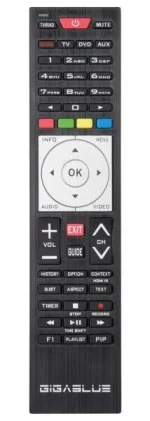
I have the GIGABLUE UHD TRIO 4K box and remote(pic attached) GIGABLUE-4K_TRIO.webp
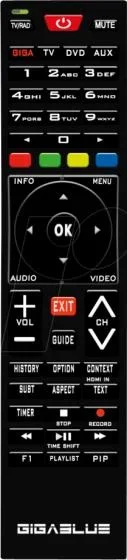
I've noticed the Subtitle button on the remote does nothing (I know to get subtitles through Audio button instead).

I started looking to see if this was fixable but saw that the IR inputs are not handled by ir-keytable or lirc or something I could troubleshoot/modify etc..
I installed ir-keytable using opkg and the output of 'ir-keytable' was:

Driver: ir_std
Default keymap: rc-hi3798
Input device: /dev/input/event0
Supported kernel protocols: nec
Enabled kernel protocols: nec
Name: dreambox advanced remote control
bus: 25, vendor/product: 0001:0002, version: 0x0100
Repeat delay = 500 ms, repeat period = 125 ms


When I ran /proc/stb/ir/rc# cat customcode , the output was 51ae

looking around the box some more, i saw config.plugins.remotecontrolcode.systemcode = ConfigSelection(default="50af", choices=[("50af", _("Code 1")), ("51ae", _("Code 2"))]) which is ok.

However, I can't find anywhere in OpenVix or OE-Alliance code that explicitly maps the dmesg output for 'playpause' (0x50af08f7) with the actual event or even the entry in debug log (18b ) or any other button.

Link to spreadsheet with every button pressed and corresponding 'dmesg' entry and also 'debug log entry':
https://docs.google.com/spreadsheet...lSltKpiCY0Y1eUnUyPPkziVPSJ4hYIYP51EOV/pubhtml

Does anyone have experience with the enigma2/openvix and remote control codes? Or any understanding of the flow from box getting IR signal to openvix processing signal?
Or even whether it's possible to use ir-keytable or even lirc ?
 
I should also mention that changing the remote control system code to Code 2 resulted in same issues with buttons not being recognized.
[50af being at the start of every dmesg entry for remote button push. (button for '4' is 0x50af9768) etc.]
 
If you look at boxbranding, remotes, there are other places where buttons are re-purposed globally. The gb ue 4k has a mod to "create" a help button.

On PLI, ATV and also Vix, you can add modify function of keys using a translation.xml file. I can't remember the exact name, but debug log prints it.
 
Does the screen show anything when the button is pressed (unhandled key icon) or no response at all?
 
For 2 buttons, the screen shows nothing(nor does the debug log) - dmesg does have code entry though:


[table="width: 500"]
[tr]
[td]button[/td]
[td]dmesg[/td]
[td]ui[/td]
[td]debug logs[/td]

[/tr]

[tr]
[td]context [/td]
[td]0x50afa35c[/td]
[td]<NOT RECOGNISED-nothing on screen>[/td]
[td]no output[/td]
[/tr]

[tr]
[td]subt [/td]
[td]0x50afa15e[/td]
[td]<NOT RECOGNISED-nothing on screen>[/td]
[td]no output[/td]
[/tr]
[/table]


And for 3 buttons, it has the incorrect function performed


[table="width: 500"]
[tr]
[td]button[/td]
[td]dmesg[/td]
[td]ui[/td]
[td]debug logs[/td]

[/tr]

[tr]
[td]option[/td]
[td]0x50af18e7[/td]
[td]Subtitle[/td]
[td]KEY_SUBTITLE[/td]
[/tr]

[tr]
[td]aspect [/td]
[td]0x50af09f6[/td]
[td]activatePiP[/td]
[td]KEY_SCREEN[/td]
[/tr]

[tr]
[td]pip[/td]
[td]0x50af5fa0[/td]
[td]f2[/td]
[td]KEY_F2[/td]
[/tr]
[/table]
 
@satteliter, Abu's post will help you with the 3 keys that are producing output in the debug log, but it can't help if the kernel drivers don't pass through a button press. In that case a fix from the manufacturer would be needed, or a patch for the kernel.

Or alternatively, for the 3 working keys, you can create a user file: "/usr/share/enigma2/keytranslation.xml" and store it in your backup.
More details here: https://github.com/OpenViX/enigma2/commit/8aa55099f34aba434ad74e1f63a86fd955cfc6da
 
Last edited:
@satteliter, if you are up for testing we can try some experiments.
 
Yip, up for testing but I haven't got a build environment set up for oe/openvix. Not sure how easy this is?

Is there any way to just set it to the correct remote type - gb4?

gb4 is the trio4k remote but for some reason it's been mapped to gb3 remote - https://github.com/oe-alliance/branding-module/blob/master/BoxBranding/remotes/gb4/rc.png


Both UHD trio4k and UHD UE 4k have same remote(gb4) shown in listings:
https://store.gigablue.de/4k-receiver/gigablue-uhd-trio-4k/gigablue-uhd-trio-4k.html
https://store.gigablue.de/4k-receiver/gigablue-uhd-ue-4k/gigablue-uhd-ue-4k.html
 
Yip, up for testing but I haven't got a build environment set up for oe/openvix. Not sure how easy this is?

Is there any way to just set it to the correct remote type - gb4?

gb4 is the trio4k remote but for some reason it's been mapped to gb3 remote - https://github.com/oe-alliance/branding-module/blob/master/BoxBranding/remotes/gb4/rc.png


Both UHD trio4k and UHD UE 4k have same remote(gb4) shown in listings:
https://store.gigablue.de/4k-receiver/gigablue-uhd-trio-4k/gigablue-uhd-trio-4k.html
https://store.gigablue.de/4k-receiver/gigablue-uhd-ue-4k/gigablue-uhd-ue-4k.html

build environment - see bottom half of page. If you have ever built, then should be straight forward for you. This will also build OK with Ubuntu 21.04 and 22.04 (I have my main build on 22.04 ß at the moment and its rock solid)
ref remotes .. gbquad4k & gbue4K have same remote (but not according to BoxBranding) and Yes remote is same for all (I have all 3 boxes) ..,. just don't know if difference between gb3 & gb4
 
For 2 buttons, the screen shows nothing(nor does the debug log) - dmesg does have code entry though:


[table="width: 500"]
[tr]
[td]button[/td]
[td]dmesg[/td]
[td]ui[/td]
[td]debug logs[/td]

[/tr]

[tr]
[td]context [/td]
[td]0x50afa35c[/td]
[td]<NOT RECOGNISED-nothing on screen>[/td]
[td]no output[/td]
[/tr]

[tr]
[td]subt [/td]
[td]0x50afa15e[/td]
[td]<NOT RECOGNISED-nothing on screen>[/td]
[td]no output[/td]
[/tr]
[/table]


And for 3 buttons, it has the incorrect function performed


[table="width: 500"]
[tr]
[td]button[/td]
[td]dmesg[/td]
[td]ui[/td]
[td]debug logs[/td]

[/tr]

[tr]
[td]option[/td]
[td]0x50af18e7[/td]
[td]Subtitle[/td]
[td]KEY_SUBTITLE[/td]
[/tr]

[tr]
[td]aspect [/td]
[td]0x50af09f6[/td]
[td]activatePiP[/td]
[td]KEY_SCREEN[/td]
[/tr]

[tr]
[td]pip[/td]
[td]0x50af5fa0[/td]
[td]f2[/td]
[td]KEY_F2[/td]
[/tr]
[/table]

sub title does work if you have sub titles on the stream
 
this is image of remote I got with my gigablue quad uhd 4k
Gigablue_Remotecontrol_Universal_4K.webp
 

OpenViX Feeds Status

Back
Top