Superb quality and spec AB-Com PULSe 4K SE. Crazy offer! Only £99! FREE UK DELIVERY! 4K UHD, Enigma 2, Multiboot 4 images & more!...
Superb quality and spec AB-Com PULSe 4K Rev II Twin Satellite tuner only £149! FREE UK DELIVERY! 4K UHD, Enigma 2, SATA HDD facility, Multiboot 4 images & more!...

[Zgemma H9S] Deep standby time? Startup EPG problem

adm

Forum Supporter
Donated Member
Joined
Sep 9, 2014
Messages
1,767
Reaction score
18
Points
38
Location
Southend on Sea, UK
Zgemma H9S running VIX 6.1.004

This is my bedroom box without a hard disk but with a USB stick to store the EPG. It has a direct connection to the quad LNB via a down-lead cable.

I have a couple of timers
1) at 6.15am the box is set to record* from the Sky IEPG channel for 15 minutes to get the EPG.
2) at 6:45am the box is set to record* BBC1 for 15 minutes. This is to ensure that when I switch the box on it goes to last channel the box was switched to and not just a blank screen from the IEPG channel.

The box is set for only SKY FTA channels and only gets the 7 day EPG from the IEPG channel (Freesat EPG is disabled)

*The recording is to trash so I’m not actually filling up the USB stick. This method has worked previously for around a year on this box and my other box, an Extrend 10K. The Extrend doesn’t have the problem detailed below.

The Zgemma H9S is placed in deep standby when not in use

When switched on from, say, 4 hours in deep standby it boots normally. When going to the grid EPG screen the EPG for the current time is missing and for ALL channels. The EPG for programs in the next 30 minutes to 2 hours for all channels is also missing. The period for the missing EPG seems random and different on a different switch on from hours after being in deep standby. The EPG for approx 7 days afterwards is OK. The time displayed in the EPG obtained from the transponder is correct.

Repeatedly going back into the grid EPG screen doesn’t make a difference.

However going to menu → setup - > epg → load, save, and delete EPG cache and selecting load EPG Cache does restore the EPG for the current time and for the missing 30 to 240 minutes. This indicates that the data is available but the box time is possibly hours out during boot up from deep standby?

I repeat, that I’m not seeing this problem on my Extrend ET10K and as the Extrend this is my main box I would notice this immediately. The Zgemma H9S is only used very occasionally and possibly I wouldn’t have noticed the problem in previous versions of OpenVix so I don’t know when the problem started happening.

Could it be the the Zgemma H9S is losing the correct time during deep standby and is using this incorrect time when loading the EPG cache during boot-up, and before fetching the time from the transponder?

The time zone is correctly set.
 
*The recording is to trash so I’m not actually filling up the USB stick. This method has worked previously for around a year on this box and my other box, an Extrend 10K. The Extrend doesn’t have the problem detailed below.
Wouldn't a zap timer work? So you end up on th requested channel, but don't do any recording at all?
 
Could it be the the Zgemma H9S is losing the correct time during deep standby and is using this incorrect time when loading the EPG cache during boot-up, and before fetching the time from the transponder?
Whereas that sound plausible from the symptoms it sounds as though the clock is an hour or so in the future at the time the EPG is loaded. Difficult to see how that might occur.

You can get the time from either NTP or the transponder. Try switching to the other one?
 
Whereas that sound plausible from the symptoms it sounds as though the clock is an hour or so in the future at the time the EPG is loaded. Difficult to see how that might occur.

You can get the time from either NTP or the transponder. Try switching to the other one?

I've already tried both NTP and transponder - same problem with both. Maybe a log file late today or tomorrow.

Wild speculation. Could the box be ignoring the timezone setting in deep standby, or assigning a different default zone?
 
Last edited:
Wouldn't a zap timer work? So you end up on th requested channel, but don't do any recording at all?

Maybe a zap timer would work but I don't think that is the problem as the same arrangement is working on my Extrend ET10K and has been for some considerable time. Until I recently noticed the problem on the Zgemma this arrangement has been working OK on that box.
 
Does the zgemma have a real-time clock (RTC)? None of my boxes have RTC. What happens during deep standby is that a simple countdown timer in the panel is initialised with a value at shutdown (the number of seconds to the next wake time) and it counts down to zero and wakes the box at that time. So, timezone etc. would have no effect. It's possible that the timer could be running fast or slow, but that's fairly unusual. My Miraclebox did have an issue with a fast timer after a Front Panel firmware update screwed it up. But, it was quite consistent and would run 20 minutes fast in 24 hours. But that's an unusual case.

The box gets its initial time at boot from the "fake hwclock" which is stored when the box is put into deep standby. Then the clock is updated by NTP or from a transponder. I usually use NTP, but I also have a default channel set to tune at boot time (BBC1 would have a reliable transponder time setting). Obviously, if your particular box has a RTC, then the time should be correct at boot time, providing there hasn't been a power cut. Otherwise, you are dependent on a reliable time being set from a transponder or NTP at boot time. I had a situation yesterday where ntpdate ran twice at startup and advanced the clock briefly to today's date, but I'm running a script to force an NTP sync because of dodgy wifi in the house. Set the debug log running as @birdman suggested and maybe we can spot the issue. If you look in /var/log/messages you may spot the ntpdate settings being actioned.
 
Update

I switched the box on from deep standby at approx 20:40 and as the picture came up I think the time in the on-screen banner showed 02:xx. I cannot be totally sure as I only caught the display out of the corner of my eye. However in the grid EPG most of the EPG was missing until approx 2am tomorrow morning. For the rest of the x days it was OK. The time shown when selecting the grid EPG was correct. It is configured for transponder time.

View attachment Enigma2_debug_2022-05-05_20-44-36.zip
 
Had you put the box in deep standby at 02:00 this morning? That would explain why it briefly showed the stored time.
However, the boot process used NTP to set the clock. This happens at boot, even though you have set the box to use transponder time. What channel was it tuned to? The transponder clock set the time backwards by 37 seconds (see below). The transponder clock usually is accurate to about 2 or 3 seconds on 28.2E, so it's rather strange that it was 37 seconds slow.

Code:
20:46:08.7696 [eDVBLocalTimerHandler] dont have correction.. set Transponder Diff
20:46:08.7701 [eDVBLocalTimerHandler] update RTC
20:46:08.7703 [eDVBLocalTimerHandler] time update to 20:45:31
20:46:08.7706 [eDVBLocalTimerHandler] m_time_difference is -37
20:45:31.7708 [eDVBLocalTimerHandler] stepped Linux Time to 20:45:31
20:45:31.7716 [eDVBChannel] getDemux cap=00
20:45:35.9646 [eInputDeviceInit] 1 8b (139) 1
20:45:35.9646 [eRCDeviceInputDev] emit: 1
20:45:35.9663 [InfoBarGenerics] Key: 139 (Make) KeyID='KEY_MENU' Binding='('MENU',)'.
 
Had you put the box in deep standby at 02:00 this morning? That would explain why it briefly showed the stored time.
However, the boot process used NTP to set the clock. This happens at boot, even though you have set the box to use transponder time. What channel was it tuned to? The transponder clock set the time backwards by 37 seconds (see below). The transponder clock usually is accurate to about 2 or 3 seconds on 28.2E, so it's rather strange that it was 37 seconds slow.

Code:
20:46:08.7696 [eDVBLocalTimerHandler] dont have correction.. set Transponder Diff
20:46:08.7701 [eDVBLocalTimerHandler] update RTC
20:46:08.7703 [eDVBLocalTimerHandler] time update to 20:45:31
20:46:08.7706 [eDVBLocalTimerHandler] m_time_difference is -37
20:45:31.7708 [eDVBLocalTimerHandler] stepped Linux Time to 20:45:31
20:45:31.7716 [eDVBChannel] getDemux cap=00
20:45:35.9646 [eInputDeviceInit] 1 8b (139) 1
20:45:35.9646 [eRCDeviceInputDev] emit: 1
20:45:35.9663 [InfoBarGenerics] Key: 139 (Make) KeyID='KEY_MENU' Binding='('MENU',)'.


If it uses NTP then the box would also have to establish a wi-fi connection to the router during boot-up.

I'm attempting to be a bit more systematic with future reporting.
 
If it uses NTP then the box would also have to establish a wi-fi connection to the router during boot-up.
Which is what it should be doing (if you use Wifi).
Mind you, whether the boot sequence waits for it to connect is another matter.
The /var/log/messages file will show when ntpdate runs.
My systems are on Ethernet, so the time is set before enigma2 starts.
 
update 2

Before the box put into deep standby the EPG was fetched from IEPG
Box put into deep standby at 23:45 Thursday
Box switched on 1:30(ish) Friday
When the BBC HD picture appeared the time in the on-screen banner was 3:13!!
Approx 30 minutes of EPG missing.

It looks like box is unable to maintain time or is corrupted during boot from deep standby.

View attachment Enigma2_debug_2022-05-06_01-37-45.zip
 
Time in debug file starts at 01:37, with no massive adjustments.

Not sure about this though (just searching for string "cache").....

Code:
        Line 26: 01:37:46.3198 [Font] Intializing font cache, using max. 4MB...
	Line 101: 01:37:46.3785 [eEPGCache] Initialized EPGCache (wait for setCacheFile call now)
	Line 101: 01:37:46.3785 [eEPGCache] Initialized EPGCache (wait for setCacheFile call now)
	Line 101: 01:37:46.3785 [eEPGCache] Initialized EPGCache (wait for setCacheFile call now)
	Line 173: 01:37:47.9196 [eEPGCache] time updated.. but cache file not set yet.. dont start epg!!
	Line 173: 01:37:47.9196 [eEPGCache] time updated.. but cache file not set yet.. dont start epg!!
	Line 234: 01:37:50.3649 [eEPGCache] setCacheFile [COLOR="#FF0000"]read/write epg data from/to '/etc/enigma2/epg.dat'[/COLOR]
	Line 234: 01:37:50.3649 [eEPGCache] setCacheFile [COLOR="#FF0000"]read/write epg data from/to '/etc/enigma2/epg.dat'[/COLOR]
	Line 374: 01:38:39.6633 [eEPGCache] time updated.. start EPG Mainloop
	Line 384: 01:38:40.5168 [eEPGCache] [COLOR="#FF0000"]129203 events read from /etc/enigma2/epg.dat[/COLOR]
	Line 539: 01:38:41.1472 [decoder][eDVBText] initCache
	Line 667: 01:41:39.0847 [eEPGCache] event 67fa not found in epgcache
	Line 667: 01:41:39.0847 [eEPGCache] event 67fa not found in epgcache
 
update 2

Before the box put into deep standby the EPG was fetched from IEPG
Box put into deep standby at 23:45 Thursday
Box switched on 1:30(ish) Friday
When the BBC HD picture appeared the time in the on-screen banner was 3:13!!
Approx 30 minutes of EPG missing.

It looks like box is unable to maintain time or is corrupted during boot from deep standby.

View attachment 63820

Is it possible the time in the on-screen banner was 3:31 (not 3:13)? The reason I ask is that if ntpdate runs twice at startup, it can cause the clock to be advanced to double the time difference between shutdown time and boot time. Your box was shut down at 23:45 and booted at 01:37 which requires ntpdate to make a step adjustment of 1 hour and 52 minutes. If it ran twice it would briefly step the time twice, making it 03:31. I've seen this happen on my box, but it's a very rare occurrence. You can tell if this is happening by looking at /var/log/messages (see post #7 and #11). You will see where ntpdate steps the time. A copy of this file (as well as the debug log) would be useful to see it it happens again.
 
Is it possible the time in the on-screen banner was 3:31 (not 3:13)? The reason I ask is that if ntpdate runs twice at startup, it can cause the clock to be advanced to double the time difference between shutdown time and boot time. Your box was shut down at 23:45 and booted at 01:37 which requires ntpdate to make a step adjustment of 1 hour and 52 minutes. If it ran twice it would briefly step the time twice, making it 03:31. I've seen this happen on my box, but it's a very rare occurrence. You can tell if this is happening by looking at /var/log/messages (see post #7 and #11). You will see where ntpdate steps the time. A copy of this file (as well as the debug log) would be useful to see it it happens again.

You could be correct but its not a rare event on my box. It seems to happen every time that the box is in deep standby for a few hours. Note:my box is connected via wi-fi to the router. In normal operation I only use the network connection for Vix upgrades and in this instance FTP transfers. It is in general a viewing only box with no recording or timeshift.

At approx 13:38 the box was placed into deep standby with a full EPG populated

At approx 16:42 the box was switched on. The time displayed in the banner when the picture appeared was first 16:42 then 19:47 and then again 16:42. Approx 2.25 hours of the EPG was missing.

Time between turn off and turn on = 3 hours 4 minutes. The time display of 19:47 is twice that period from last switch off.

I have my EPG configured to show 30 minutes of past history (menu/setup/EPG/EPG setting/Maintain old EPGdata for =30) and so the missing EPG is roughly the 3 hours additional time to 19:47

View attachment messages.zip

View attachment Enigma2_debug_2022-05-06_16-49-38.zip
 
Last edited:
Code:
May  6 16:42:42 zgemmah9s daemon.notice ntpdate[1620]: step time server [COLOR="#FF0000"]192.168.178.1 [/COLOR]offset +11067.907306 sec
May  6 19:47:14 zgemmah9s daemon.notice ntpdate[1776]: step time server 192.168.178.1 offset +11067.907504 sec

As I mentioned in my previous post, you appear to be storing epg.dat in /etc/enigma2/epg.dat (not the usb stick you said in #1). Is this deliberate?

Shows again in your last debug log.

My ntp looks like this, using pool.ntp.org...

Code:
May  6 14:45:24 vuultimo4k daemon.notice ntpdate[1616]: step time server [COLOR="#FF0000"]185.83.169.27 [/COLOR]offset +2.068287 sec

Yours appears to be accessing a box on your LAN.
 
Last edited:
Code:
May  6 16:42:42 zgemmah9s daemon.notice ntpdate[1620]: step time server [COLOR="#FF0000"]192.168.178.1 [/COLOR]offset +11067.907306 sec
May  6 19:47:14 zgemmah9s daemon.notice ntpdate[1776]: step time server 192.168.178.1 offset +11067.907504 sec

As I mentioned in my previous post, you appear to be storing epg.dat in /etc/enigma2/epg.dat (not the usb stick you said in #1). Is this deliberate?

It wasn't deliberate. It should have been set to my usb stick but I've just checked and the setting seems to have changed. I've set it back to the usb stick.

My ntp looks like this, using pool.ntp.org...

Code:
May  6 14:45:24 vuultimo4k daemon.notice ntpdate[1616]: step time server [COLOR="#FF0000"]185.83.169.27 [/COLOR]offset +2.068287 sec

Yours appears to be accessing a box on your LAN.

I'm using transponder time so the option to set pool.ntp.org is no longer available as an option. The box on the LAN is my router.
 
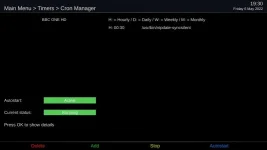
I use transponder time as well, but still see this cron job running by default......

ntp.webp
 
Sorry about the delayed response, but was away in the real world for several hours :beer_toast:

There's definitely something odd happening at boot time (similar to my issue - also on wifi). From your dmesg file:

Code:
May  6 16:42:42 zgemmah9s daemon.notice ntpdate[1620]: step time server 192.168.178.1 offset +11067.907306 sec
May  6 19:47:14 zgemmah9s daemon.notice ntpdate[1776]: step time server 192.168.178.1 offset +11067.907504 sec

At startup, ntpdate is stepping the time twice, thus propelling your box into the future! This is exactly what happens on my mutant HD51 and occasionally on my ax61HD, both of which are connected via wifi.
 

OpenViX Feeds Status

Back
Top