Superb quality and spec AB-Com PULSe 4K SE. Crazy offer! Only £99! FREE UK DELIVERY! 4K UHD, Enigma 2, Multiboot 4 images & more!...
Superb quality and spec AB-Com PULSe 4K Rev II Twin Satellite tuner only £149! FREE UK DELIVERY! 4K UHD, Enigma 2, SATA HDD facility, Multiboot 4 images & more!...

missing epg data - opentv

I think you are not setting the correct channel for EPGRefresh to tune. Looks like ITV London. Should be the IEPG channel from your Sky bouquet (Freq 11778000 Pol 1 SR 27500000 INV 2 FEC 2 orbpos 282 ).

I don't bother with specifically running EPGRefresh on Saorview. I have RTE1 set as the startup channel and when it boots from deep standby it automatically tunes RTE1 and then goes into standby. The Saorview EPG is so small (11'ish channels x 8 days) that the schedule is downloaded in seconds.
 
I think you are not setting the correct channel for EPGRefresh to tune. Looks like ITV London. Should be the IEPG channel from your Sky bouquet (Freq 11778000 Pol 1 SR 27500000 INV 2 FEC 2 orbpos 282 ).

I don't bother with specifically running EPGRefresh on Saorview. I have RTE1 set as the startup channel and when it boots from deep standby it automatically tunes RTE1 and then goes into standby. The Saorview EPG is so small (11'ish channels x 8 days) that the schedule is downloaded in seconds.

I think I just had ITV London on but the EPGRefresh setting was 100% on the IEPG channel abc.webp
 
EPGRefresh is failing to run in any of your logfiles in post #18. The log message indicates that the box is not in standby or is otherwise busy.
 
EPGRefresh is failing to run in any of your logfiles in post #18. The log message indicates that the box is not in standby or is otherwise busy.

The box definitely came out of deep standby itself. maybe it went straight to active(instead of just standby) but all tuners would have been available anyway.
First human interaction with box was after 8.30am local. Entries for eInputDeviceInit in log at 08:37 onwards in 2023-03-02_07-28-03.log
 
Some more logs from this mornings run.
Crashed again. Came out of deep standby itself again at 07.30.
Box on 02 Feb was put to sleep at ~23:30. Then came on the next day (03 Feb) at ~07.30.

It seems EPGRefresh takes box out of deep standby and puts it to active (rather than just standby) which then results in the
Box still in use, rescheduling
message thus it doesn't run.
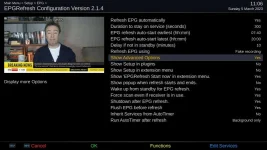
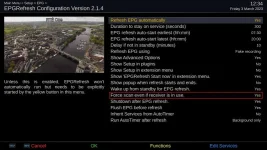
I have now set EpgRefresh to 'Force scan' so will provide updates later/tmwView attachment Enigma2_debug_2023-03-03_07-27-38.logView attachment Enigma2_crash_2023-03-03_07-27-56.logView attachment Enigma2_debug_2023-03-03_07-28-06.logepg refresh config 03 feb 23.webp
 
I didn't think EPGRefresh would boot the box from deep standby? Are you sure you don't have a PowerTimer set? The time window in the EPGRefresh settings is just when the plugin will run. Yes - you have to set the "force scan" option in the plugin, otherwise it won't run unless it's in standby.


EDIT - I looked through all the logs. At 09.57 you put the box in standby and EPGRefresh started and tuned to the IEPG channel and started pulling the EPG normally. Shortly afterwards, you took the box out of standby and started changing the EPGRefresh config and it would not run, because it was already running. I think that whatever you are using to start the box at 07.30 (A PowerTimer or some scheduled ABM run or XMLTV run or whatever) is starting in normal running mode (not standby) as it seems to tune multiple channels. I'm pretty sure EPGRefresh does not boot the box. It's been a while since I used it, but I always used it in conjunction with a separate PowerTimer.
 
Last edited:
On my Zgemma H7S I get the same effect sometimes where it's like the text is missing from the EPG so that multiple EPG entries look blank on the EPG.

I've been experimenting to try and figure out what's going on but I haven't really got very far yet.
I'm hindered by knowing C pretty well but not C++.

I find one thing that makes it go wrong on my Zgemma H7S is if I happen to be flicking through the channels at a time when the EPG is being read (by either OpenTV Zapper or by EPG Refresh).
 
On my Zgemma H7S I get the same effect sometimes where it's like the text is missing from the EPG so that multiple EPG entries look blank on the EPG.

I've been experimenting to try and figure out what's going on but I haven't really got very far yet.
I'm hindered by knowing C pretty well but not C++.

I find one thing that makes it go wrong on my Zgemma H7S is if I happen to be flicking through the channels at a time when the EPG is being read (by either OpenTV Zapper or by EPG Refresh).

Hi Brian - I've been experimenting with running OpenTVZapper at a fixed time each day. My GB Quad+ boots at 17.50 from deep and goes into standby after tuning RTE1 (to get the time and that will automatically refresh the EIT EPG schedule info from Saorview). At 17.52 I have scheduled the zapper to run and this tunes the Sky OpenTV provider and runs for about three minutes. All works flawlessly providing I don't take the box out of standby and start tuning while the zapper is running. Yesterday, I deliberately took the box out of standby at 17.53 and started tuning through DVB-T channels. After the zapper had completed I checked the EPG and could see that the cache had not changed from the day before, so it obviously impacted on the running zapper in some way, even though I didn't try tuning any sat channels. I didn't trigger any "huffman error" messages, though. I'll test a few more scenarios to see if I can repeat the errors. It may give @Huevos some clue as to what's happening.
 
I didn't think EPGRefresh would boot the box from deep standby? Are you sure you don't have a PowerTimer set?

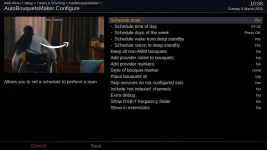
ABM set to run at 03.00.
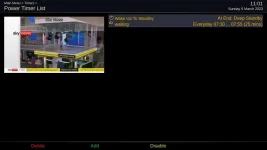
Only power time is a deep standby which kicks in after 60 mins of standby.

I'll change EPGRefresh to 06.30 in config and see if box turns on tmw at 06.30
 
I set EPGRefresh to 06.30. Box came on at 06.30.

logs attached(incl crash). epgrefresh did run though. And epg was populated when I checked at ~09.00

initial log and crash View attachment Enigma2_debug_2023-03-04_06-27-33.logView attachment Enigma2_crash_2023-03-04_06-27-47.log

log where epgrefresh ranView attachment Enigma2_debug_2023-03-04_06-27-58.log

< 167.6608> 06:30:01.0003 [EPGRefresh] Timer added <EPGRefreshTimerEntry (Sat 04 Mar 2023 06:30:31 GMT, 0, <bound method EPGRefresh.prepareRefresh of <Plugins.Extensions.EPGRefresh.EPGRefresh.EPGRefresh object at 0xadaeb410>>)>
< 198.6614> 06:30:32.0009 [EPGRefresh] In Timespan, will check if we're in Standby and have no Recordings running next
< 198.6621> 06:30:32.0016 [EPGRefresh] About to start refreshing EPG
< 198.6631> 06:30:32.0026 [EPGRefresh] Services we're going to scan: <EPGRefreshService (1:0:16:848:3EA:2174:EEEE0000:0:0:0:, ?)>, <EPGRefreshService (1:0:1:105D:7D4:2:11A0000:0:0:0:, ?)>
< 198.6649> 06:30:32.0043 [EPGRefresh] flushing EPG cache...
......
< 198.8389> 06:30:32.1784 [EPGRefresh] Maybe zap to next service
< 198.8393> 06:30:32.1787 [EPGRefresh] DEBUG: ParentalControl not configured
< 198.8396> 06:30:32.1791 [EPGRefresh.RecordAdapter.play]
< 198.8400> 06:30:32.1794 [Navigation] recording service: 1:0:16:848:3EA:2174:EEEE0000:0:0:0:
.....
< 499.6607> 06:35:33.0002 [EPGRefresh] Maybe zap to next service
< 499.6612> 06:35:33.0007 [EPGRefresh] DEBUG: ParentalControl not configured
< 499.6616> 06:35:33.0011 [EPGRefresh.RecordAdapter.play]
< 499.6619> 06:35:33.0013 [eDVBServiceRecord] stop recording!
< 499.6622> 06:35:33.0016 [eDVBServiceRecord] fetching cutlist failed because tstools failed
< 499.6656> 06:35:33.0050 [eDVBCAService] free slot 0 demux 0 for service 1:0:16:848:3EA:2174:EEEE0000:0:0:0:
< 499.6660> 06:35:33.0055 [eDVBCAService] free service 1:0:16:848:3EA:2174:EEEE0000:0:0:0:
< 499.6672> 06:35:33.0066 [Navigation] recording service: 1:0:1:105D:7D4:2:11A0000:0:0:0:
....
< 800.6608> 06:40:34.0002 [EPGRefresh] Maybe zap to next service
< 800.6613> 06:40:34.0007 [EPGRefresh] Done refreshing EPG
< 800.6615> 06:40:34.0010 [EPGRefresh] Debug: Cleanup
< 800.6637> 06:40:34.0031 [EPGRefresh] Debug: Calling nextTodo
< 800.6640> 06:40:34.0035 [EPGRefresh] Debug: Call <bound method EPGRefresh._ToDoCallAutotimer of <Plugins.Extensions.EPGRefresh.EPGRefresh.EPGRefresh object at 0xadaeb410>>
< 800.6645> 06:40:34.0040 [EPGRefresh] Debug: Call AutoTimer: True
....
< 800.6701> 06:40:34.0096 [EPGRefresh] Debug: Calling nextTodo
< 800.6705> 06:40:34.0100 [EPGRefresh] Debug: Call <bound method EPGRefresh._ToDoAutotimerCalled of <Plugins.Extensions.EPGRefresh.EPGRefresh.EPGRefresh object at 0xadaeb410>>
< 800.6712> 06:40:34.0106 [EPGRefresh] Debug: Calling nextTodo
< 800.6715> 06:40:34.0110 [EPGRefresh] Debug: Call <bound method EPGRefresh._callFinishNotifiers of <Plugins.Extensions.EPGRefresh.EPGRefresh.EPGRefresh object at 0xadaeb410>>
< 800.6721> 06:40:34.0115 [EPGRefresh] Debug: Calling nextTodo
< 800.6724> 06:40:34.0119 [EPGRefresh] Debug: Call <bound method EPGRefresh.finish of <Plugins.Extensions.EPGRefresh.EPGRefresh.EPGRefresh object at 0xadaeb410>>
< 800.6729> 06:40:34.0124 [EPGRefresh] Debug: Refresh finished!
 
Last edited:
Also just to document it. First human interaction with box was around 9 local time.
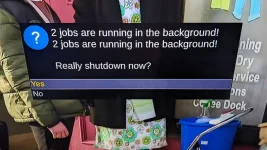
Had this message on screen:

2 jobs are running in the background!

Really shutdown now?

[Yes]
[No]

PXL_20230304_085911785.webp
 
On my Zgemma H7S I get the same effect sometimes where it's like the text is missing from the EPG so that multiple EPG entries look blank on the EPG.

I've been experimenting to try and figure out what's going on but I haven't really got very far yet.
I'm hindered by knowing C pretty well but not C++.

I find one thing that makes it go wrong on my Zgemma H7S is if I happen to be flicking through the channels at a time when the EPG is being read (by either OpenTV Zapper or by EPG Refresh).

I should add. For me this is not a new problem. I have always found the EPG would occasionally corrupt in this way (lots of blank entries).

I've been trying to make everything that's involved with reading the OpenTV EPG run at a high priority, but it doesn't seem to make any difference. But I may have missed something.
Weirdly, it looks like the current code actually runs (or is intended to run - it looks wrong to me) the EPG reading stuff at a low priority!?
 
Last edited:
Also just to document it. First human interaction with box was around 9 local time.
Had this message on screen:


View attachment 64927

I was curious as to why your box didn't return to deep standby after 20 minutes (you said you had a PowerTimer set and I could see it mentioned in the log during startup). But I can see in the log that the box seems to be tuning various channels by itself (not related to EPGRefresh). Is this something to do with Unicable? Something to keep the LNB powered? The fact that two jobs (whatever they are) are running is what is keeping the box from reverting to deep standby. The crash at initial startup is worrying. Maybe you should do a clean flash and restore? Maybe it's a hardware/driver issue - wouldn't be the first with Gigablue. My own GB Quad+ will throw a C++ crash/error every few months for no apparent reason. Has been stable for months now, though - fingers crossed!

I just use a conventional LNB and the only channel that is tuned by the box after a PowerTimer boot is RTE1 (as this is set as the startup channel). If I don't interact with the box while it is in standby, nothing else is ever tuned unless ABM/OpenTVZapper is set to run.
 
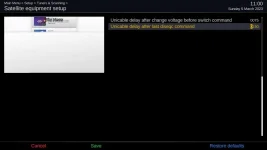
Is this something to do with Unicable? Something to keep the LNB powered?

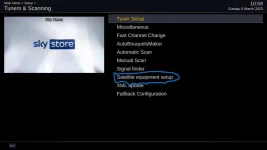
Yip, I added 'Satellite equipment setup' plugin to solve an issue.i can't remember 100% what issue i initially changed it for - think it may have been to reduce/remove initial tune failed messages. Although I will add that there had been a power timer putting the box to deep standby after being standby for 60 mins - this behaved with no issues - i will leave sat equipment plugin active and disable after next run if it fails.

Box is a Vu+ Duo 4k SE .

So, for this morning's run, I had the following settings in play.

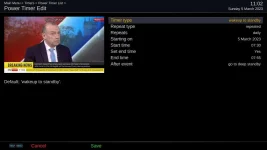
I had set a power timer to take the box out of deep standby into standby at 7.30 and go back to deep standby at 07:55
I then had ABM set to run at 07.32 and epgrefresh set to run at 07:40.
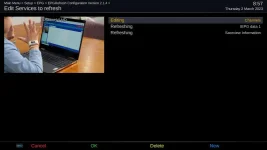
From there, it had Saorview Information(terrestrial) and IEPG data 1 (satellite) to run,
The other thing I had set was for rte1 to be the default startup channel.
I will change EPGRefresh to not attempt shutdown just in case it's interfering with AutoTimer (power timer already set to take care of shutdown)

Still not sure what was taking the box out of standby into active such that message was on screen (assuming EPGRefresh and ABM can run in standby - thinking this may have been setting rte1 as the startup channel - now disabled) edit: I think EPGRefresh needs to be out of standby judging the wording of the description for setting 'Wakeup up from standby for EPG refresh' - i have left this set to Yes

Logs attached for this morning. Crash again - i had updated to 6.3.003 yesterday I think but will get a full flash in this week.
View attachment Enigma2_debug_2023-03-05_07-30-35.logView attachment Enigma2_crash_2023-03-05_07-30-49.logView attachment Enigma2_debug_2023-03-05_07-30-59.log

All relevant setting screens attached as they were for this morning's run.
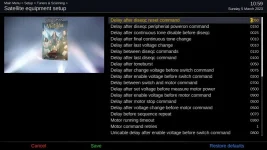
sat equipment setting page1.webpsat equipment setup.webpabm.webpepgrefresh settings full.webpauto power timer settings.webpautopower timer.webpsat equipment setting page2.webp

On a positive note, no huffman encode errors in the last couple of runs!

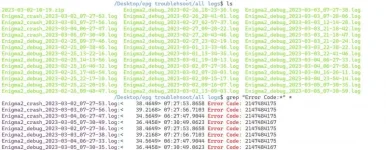
On the crash side, I will just leave the error message here for web/search indexing as Google returned no results. When I loosened search terms, I got one results with that numeric string having to do with Greek ISO entry or something.

< 36.4421> 07:30:49.0585 [eDVBLocalTimerHandler] remove channel 0x69f738
< 36.4423> 07:30:49.0587 [eEPGTransponderDataReader] remove channel 0x69f738
< 36.4457> 07:30:49.0622 PC: 00000000
< 36.4458> 07:30:49.0622 Fault Address: 00000000
< 36.4458> 07:30:49.0623 Error Code: 2147484167
< 36.4460> 07:30:49.0625 Backtrace:
< 36.4462> 07:30:49.0627 /usr/bin/enigma2(_Z17handleFatalSignaliP9siginfo_tPv) [0x889D4]
< 36.4464> 07:30:49.0629 /lib/libc.so.6(__default_rt_sa_restorer) [0xB5B111D0]
< 36.4464> 07:30:49.0629 -------FATAL SIGNAL (11)
 
Last edited:
I've no idea what's causing the crash at initial startup from deep. One of the devs would need to take a look.

I think you're making things more complex than they need be. You have ABM and EPGRefresh and a PowerTimer set to wake the box. You have ABM and the PowerTimer trying to put the box in deep standby. To be honest, I would just disable EPGRefresh completely and let the built-in OpenTVZapper do the necessary. Both of these utilities tune the box to the Sky IEPG channel and the OpenTV reader downloads the schedule data for the EPG. I would leave the setting having RTE1 as the startup channel. The mere fact that it tunes RTE1 will download the Saorview EPG in seconds, assuming you have Enable EIT EPG set to YES.

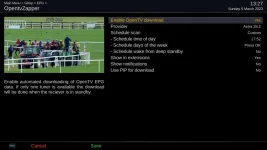
What I would suggest is to leave the PowerTimer set to boot to standby at 07.30 daily and go back into deep standby at 07.55. Have ABM set to run at 07.35 on whatever days you wish, but do not set any wake or shutdown options for ABM (you are already controlling the startup/shutdown with the PowerTimer). Have OpenTVZapper enabled in the EPG options. Set a schedule time (rater than the automatic interval) in the zapper settings - you could do this at 07.40 if you wanted to wait until after ABM had run. This means that the PowerTimer is controlling the startup/shutdown and you are scheduling events to happen during the period. If one of the other plugins related to unicable or FCC or whatever is affecting the EPG acquisition, then it is a matter of eliminating the plugins one by one until the culprit is located.

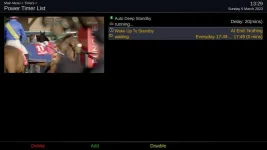
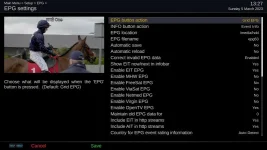
My routine is that the box is scheduled to boot at 17.49 (my box is slow to boot - it's old), then at 17.52 the zapper runs and finishes by 17.55. At 18.01 I have a timer set to record the news from RTE1. If no-one is around, the box will automatically go back into deep standby after the recording is done. I have a separate ABM schedule set to run at 04.30 on Tuesday and Thursday to update any bouquet changes. It uses the ABM scheduler to boot and shutdown the box - no PowerTimer used. Here are my EPG, PowerTimer and zapper settings:
 

Attachments

  • wake_to_standby.webp
    wake_to_standby.webp
    19.3 KB · Views: 6
  • zapper_settings.webp
    zapper_settings.webp
    33.1 KB · Views: 7
  • EPG_settings.webp
    EPG_settings.webp
    36.3 KB · Views: 6
I think you're making things more complex than they need be

Agreed! I updated things after this morning's run to only have the power time dealing with standby on/off.

I've disabled ABM & EPGRefresh from wake/shutdown actions.

OpenTV EPG corruption was causing the issues.
If these issues persist past tomorrow, I will just use OpenTV scheduled for satellite and let terrestrial populate on boot as you've recommended.
Thanks for the screenshots.


I've no idea what's causing the crash at initial startup from deep. One of the devs would need to take a look.

Is that on this forum or some enigma forum/github?
 
Just realised how to narrow down that crash. Started when I started using EPGRefresh. I've been keeping all the logs.
I'm curious to see if it's a coincidence or not.box crash lists.webp
 
Agreed! I updated things after this morning's run to only have the power time dealing with standby on/off.

I've disabled ABM & EPGRefresh from wake/shutdown actions.

OpenTV EPG corruption was causing the issues.
If these issues persist past tomorrow, I will just use OpenTV scheduled for satellite and let terrestrial populate on boot as you've recommended.
Thanks for the screenshots.


Is that on this forum or some enigma forum/github?

A couple of the OpenVix devs should be able to identify the offending module. In the meantime, if you've disabled EPGRefresh, let's see if the crashes stop.
 
So todays update is:

- everything worked! no crashes. EPG populated(both terrestrial & sat). EPGRefresh did it's job/ No huffman encode errors! No messages on screen -> Box was in deep standby when i went to check it.

[just to add some unrelated - i switched wifi off and went with wired for network connection.
Log(singular!) attached

View attachment Enigma2_debug_2023-03-06_07-30-40.log


wifi info in log is just fake name & pwd i set]
 
That's a better results - hopefully will remain stable. By the way, there is no need to set the Saorview channel in EPGRefresh - the initial tune to RTE will download the Saorview EPG in seconds. I think you also may have the OpenTV Zapper enabled as I can see entries in the log for it. I suggest that you use either OpenTV zapper or EPGRefresh - not both.
 

OpenViX Feeds Status

Back
Top