Superb quality and spec AB-Com PULSe 4K SE. Crazy offer! Only £99! FREE UK DELIVERY! 4K UHD, Enigma 2, Multiboot 4 images & more!...
Superb quality and spec AB-Com PULSe 4K Rev II Twin Satellite tuner only £149! FREE UK DELIVERY! 4K UHD, Enigma 2, SATA HDD facility, Multiboot 4 images & more!...

[VU+ Solo2] Image Manager extremely slow - is there something wrong

nekrub2

Member
Joined
Dec 6, 2015
Messages
354
Reaction score
5
Points
18
Location
Switzerland
Dear all
I just tried to download the latest image and noticed a very strange behavior of the image manager. I already started when clicking on image manager. The circle started spinning and it went nearly one minute to open. Inside the spinning went on and I suspect something does not play.
So I looked into the debug log which I will attach. Here are some lines with an error statement.

21:27:32.2512 [InputDevice] Found: evdev='event0', name='dreambox advanced remote control (native)', type='remote'
21:27:32.2538 [InputDevice] Error: evdev='mice' getInputDevices <ERROR: ioctl(EVIOCGNAME): '[Errno 25] Inappropriate ioctl for device'>
21:27:32.2647 [InputDevice] Error: evdev='mouse0' getInputDevices <ERROR: ioctl(EVIOCGNAME): '[Errno 25] Inappropriate ioctl for device'>

21:29:57.5436 [InfoBarGenerics] Key: 108 (Break) KeyID='KEY_DOWN' Binding='('DOWN',)'.
21:29:57.5451 [eDVBPESReader] ERROR reading PES (fd=27): Function not implemented
21:30:01.5647 [gRC] main thread is non-idle! display spinner!
21:30:40.0372 [eInputDeviceInit] 1 6c (108) 1
21:30:40.0379 [eRCDeviceInputDev] emit: 1
21:30:40.0390 [InfoBarGenerics] Key: 108 (Make) KeyID='KEY_DOWN' Binding='('DOWN',)'.
21:30:40.0394 [ActionMap] Keymap 'DirectionActions' -> Action = 'down'.
21:30:40.0400 [eInputDeviceInit] 0 6c (108) 1
21:30:40.0401 [eRCDeviceInputDev] emit: 0
21:30:40.0410 [InfoBarGenerics] Key: 108 (Break) KeyID='KEY_DOWN' Binding='('DOWN',)'.
21:30:40.0416 [eDVBPESReader] ERROR reading PES (fd=27): Function not implemented
21:30:44.1245 [gRC] main thread is non-idle! display spinner!

Do you have a clue what is going on when trying to upgrade?
nekrub2
 

Attachments

Dear all
I just tried to download the latest image and noticed a very strange behavior of the image manager. I already started when clicking on image manager. The circle started spinning and it went nearly one minute to open. Inside the spinning went on and I suspect something does not play.
So I looked into the debug log which I will attach. Here are some lines with an error statement.

21:27:32.2512 [InputDevice] Found: evdev='event0', name='dreambox advanced remote control (native)', type='remote'
21:27:32.2538 [InputDevice] Error: evdev='mice' getInputDevices <ERROR: ioctl(EVIOCGNAME): '[Errno 25] Inappropriate ioctl for device'>
21:27:32.2647 [InputDevice] Error: evdev='mouse0' getInputDevices <ERROR: ioctl(EVIOCGNAME): '[Errno 25] Inappropriate ioctl for device'>

21:29:57.5436 [InfoBarGenerics] Key: 108 (Break) KeyID='KEY_DOWN' Binding='('DOWN',)'.
21:29:57.5451 [eDVBPESReader] ERROR reading PES (fd=27): Function not implemented
21:30:01.5647 [gRC] main thread is non-idle! display spinner!
21:30:40.0372 [eInputDeviceInit] 1 6c (108) 1
21:30:40.0379 [eRCDeviceInputDev] emit: 1
21:30:40.0390 [InfoBarGenerics] Key: 108 (Make) KeyID='KEY_DOWN' Binding='('DOWN',)'.
21:30:40.0394 [ActionMap] Keymap 'DirectionActions' -> Action = 'down'.
21:30:40.0400 [eInputDeviceInit] 0 6c (108) 1
21:30:40.0401 [eRCDeviceInputDev] emit: 0
21:30:40.0410 [InfoBarGenerics] Key: 108 (Break) KeyID='KEY_DOWN' Binding='('DOWN',)'.
21:30:40.0416 [eDVBPESReader] ERROR reading PES (fd=27): Function not implemented
21:30:44.1245 [gRC] main thread is non-idle! display spinner!

Do you have a clue what is going on when trying to upgrade?
nekrub2
By popular request ( because other images do it) Imagemager now searches all attached devices (including network) for images.
… and Yes, it means a delay
 
By popular request ( because other images do it) Imagemager now searches all attached devices (including network) for images.
… and Yes, it means a delay

So that could mean a backup image from 1 box could end up on another box on same network as i found H7S on my Et 10000
 
So that could mean a backup image from 1 box could end up on another box on same network as i found H7S on my Et 10000

It only looks in local attached devices and networked devices… so if you keep.everything on a NAS then add machine identifier
 
Would be nice to have a setup option, disabling network search for for image manager. Without this, I would have to un-mount my laptop and remove my swap USB. Alternative: Old way - download new release, put it on a USB and boot with stick.
 
Would be nice to have a setup option, disabling network search for for image manager. Without this, I would have to un-mount my laptop and remove my swap USB. Alternative: Old way - download new release, put it on a USB and boot with stick.

I don,t think it takes that long….. I have 2 NAS boxes and its only probably 20 + seconds at most, and the box has to have the devices attached through your network settings.
 
Last edited:
I don,t think it takes that long….. I have 2 NAS boxes and its only probably 20 + seconds at most, and the box has to have the devices attached through your network settings.

Is the short time because the network devices respond quickly? I don't know anything about this function but on other networks I have had experience of, if a network check is taking place and a device doesn't respond (perhaps it's been removed) the delay becomes the much longer timeout values.
 
Interesting as my network scans on Et 100000 does not see my H7s but is mounted on it and might be to do with switch and everything on Home network except for 2 nas drives which need looking at or moving .
 
By popular request ( because other images do it) Imagemager now searches all attached devices (including network) for images.
… and Yes, it means a delay
I've added an option to disable it.
 
By popular request ( because other images do it) Imagemager now searches all attached devices (including network) for images.
… and Yes, it means a delay
i thought Vix had a configurable option to say where they are? One location only.
 
To me, it would be far better to scan the varying folder names used by the images (images, downloaded_images, imagebackups) as well as root of devices connected to box. Scanning network locations should be an option that is off by default. Those who use a network mount will enable that option, majority don't.
 
This is not a new situation, it was discussed.
So Huevos now provides an option, default to the user defined folder(so OK birdman) and for the rest it does what all the others do and looks for image zips.
If anybody wants something else feel free to issue a commit.
 
Sorry, I am not understanding what what you are saying nor do I have access to where the discussion was held, so sorry if I am duplicating what was asked already

Can you please answer this specific question:
Does image manager now check the folder names that other images use?
 
Sorry, I am not understanding what what you are saying nor do I have access to where the discussion was held, so sorry if I am duplicating what was asked already

Can you please answer this specific question:
Does image manager now check the folder names that other images use?

To answer my own question:

getImages([path.join(media, x) for x in medialist if path.splitext(x)[1] == ".zip" and model in x])
for folder in ["imagebackups", "downloaded_images", "images"]:

EDIT: But it does not work
 
Last edited:
To answer my own question:

getImages([path.join(media, x) for x in medialist if path.splitext(x)[1] == ".zip" and model in x])
for folder in ["imagebackups", "downloaded_images", "images"]:

EDIT: But it does not work
Of course it works. Do you think that code was written and nobody bothered to test it.
 
Of course it works. Do you think that code was written and nobody bothered to test it.

Maybe it does for you, but it does not work for me. It does not list images in "images" or "downloaded_images" folder for me.
 
Sorry, I am not understanding what what you are saying nor do I have access to where the discussion was held, so sorry if I am duplicating what was asked already

Can you please answer this specific question:
Does image manager now check the folder names that other images use?
The feature was added 14 months ago. No idea why people are making an issue of it now as if it is something to do with this release.

https://github.com/OpenViX/vix-core...c78f85721cb051bb390ba4f72cf21f0ab0edR378-R398
 
Nobody has made an issue of anything, so don't get defensive.

I asked Jibyel to add the other locations to openatv, on 20December 2021. They did and it works for their image all the locations used by vix/atv/pli. Pli did similar it and and it works too.

The commit on Vix does not work for me, but it works for you. So, there is no problem, I can drag and drop images when using vix to flash or boot into the other images to flash.

Have a nice evening
 
And the image names are?


Last login: Sun Mar 5 21:50:56 GMT 2023 on pts/0
root@zgemmah9sse:~# ls -l /media/hdd/imagebackups
-rwxrwxrwx 1 root root 113509459 Sep 13 14:04 openatv-7.0-zgemmah9sse-20220910_mmc.zip
-rwxrwxrwx 1 root root 121490963 Mar 4 18:24 openatv-7.2-zgemmah9sse-20230304_multi.zip
-rwxrwxrwx 1 root root 111485646 Jan 7 00:47 openvix-6.3.001.release-zgemmah9sse_multi.zip
-rwxrwxrwx 1 root root 111254878 Jan 21 16:24 openvix-6.3.002.release-zgemmah9sse_multi.zip
-rwxrwxrwx 1 root root 111248460 Mar 5 21:19 openvix-6.3.003.release-zgemmah9sse_multi.zip
-rwxrwxrwx 1 root root 111246345 Mar 5 20:56 openvix-6.3.004.001.developer-zgemmah9sse_multi.zip


root@zgemmah9sse:~# ls -l /media/hdd/images
-rwxrwxrwx 1 root root 100177097 Sep 18 15:45 openatv-6.4-zgemmah9sse-20220917_mmc.zip
-rwxrwxrwx 1 root root 99957625 Nov 14 18:19 openatv-6.4-zgemmah9sse-20221114_multi.zip
-rwxrwxrwx 1 root root 99959688 Nov 23 20:28 openatv-6.4-zgemmah9sse-20221118_multi.zip
-rwxrwxrwx 1 root root 107273299 Nov 17 23:52 openatv-7.0-zgemmah2h-20221117_usb.zip
-rwxrwxrwx 1 root root 113669696 Sep 27 17:05 openatv-7.0-zgemmah9sse-20220927_mmc.zip
-rwxrwxrwx 1 root root 113861588 Nov 23 20:20 openatv-7.0-zgemmah9sse-20221120_multi.zip
-rwxrwxrwx 1 root root 128774503 Nov 28 19:38 openatv-7.1-vusolose-20221127_usb.zip
-rwxrwxrwx 1 root root 115883800 Nov 27 16:51 openatv-7.1-zgemmah9sse-20221126_multi.zip
-rwxrwxrwx 1 root root 116855263 Jan 10 14:10 openatv-7.1-zgemmah9sse-20230108_multi.zip
-rwxrwxrwx 1 root root 115813465 Jan 31 13:21 openatv-7.2-h3-20230130_usb.zip
-rwxrwxrwx 1 root root 120738075 Dec 11 16:09 openatv-7.2-zgemmah9sse-20221209_multi.zip
-rwxrwxrwx 1 root root 120752351 Dec 15 17:07 openatv-7.2-zgemmah9sse-20221213_multi.zip
-rwxrwxrwx 1 root root 120768794 Dec 15 16:50 openatv-7.2-zgemmah9sse-20221215_multi.zip
-rwxrwxrwx 1 root root 121489301 Jan 21 06:40 openatv-7.2-zgemmah9sse-20230120_multi.zip
-rwxrwxrwx 1 root root 89032071 Dec 11 15:09 openpli-develop-h3-20221210_usb.zip
-rwxrwxrwx 1 root root 90267111 Feb 15 17:43 openpli-homebuild-vuduo4k_usb.zip
-rwxrwxrwx 1 root root 110558023 Dec 24 16:46 openvix-6.3.000.release-zgemmah9sse_multi.zip


root@zgemmah9sse:~# ls -l /media/hdd/downloaded_images
-rwxrwxrwx 1 root root 115813465 Jan 31 13:20 openatv-7.2-zgemmah2h-20230130_usb.zip
-rwxrwxrwx 1 root root 81934696 Sep 17 22:45 openpli-develop-h9se-20220916_emmc.zip
-rwxrwxrwx 1 root root 81895713 Dec 11 15:51 openpli-develop-h9se-20221210_emmc.zip


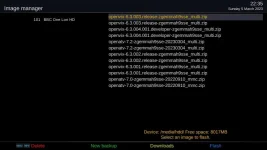
Without changing the image name, moving it between folders makes it show up.

Another thing I am doing wrong, I am somehow making the images show up twice. Not sure what I am doing wrong.
 

Attachments

  • image manager list.webp
    image manager list.webp
    33.6 KB · Views: 5
Last edited:

OpenViX Feeds Status

Back
Top