Superb quality and spec AB-Com PULSe 4K SE. Crazy offer! Only £129! FREE UK DELIVERY! 4K UHD, Enigma 2, Multiboot 4 images & more!...
Superb quality and spec AB-Com PULSe 4K Rev II Twin Satellite tuner only £179! FREE UK DELIVERY! 4K UHD, Enigma 2, SATA HDD facility, Multiboot 4 images & more!...

Build my own Vix image

Run top command and monitoring during a build, you may see memory needs 2gb per thread at certain points during build for the likes when nodejs etc.. are running their linker stages. Available memory divided by 2 is good and safe for threads?

You can cut a build by many hours build time and use much less resources by not building nodejs qt etc.. if you uncomment #STATIC_FEED = "1" or try set it in site.conf
Code:
https://github.com/oe-alliance/oe-alliance-core/blob/2e1b2e083ae6936056f0e0842e485efb2217aa34/meta-oe/conf/distro/openvix.conf#L14
 
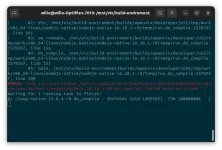
My build has failed but waiting for a running task to complete.
Been waiting nearly 4 hours! Any way of stopping it gracefully?

Screenshot from 2023-05-06 17-38-07.webp
 
BB_NUMBER_THREADS, PARALLEL_MAKE set to number of threads supported by the CPU

Is this best left as 8 which seems to be default? I think the box is quite low spec by today's standards.
Probably, although it will not be the best setting. You'll end up with ~40 runnable processes at some points (which will increase cache misses and system CPU usage). But there's no way to work out a really better answer.
ideally you could mark each build file with whether it is also going to use nCPU threads and bitbake coudl take account of this when deciding how many jobs to have running. But you can't, so leaving the default is as good an answer as any.
(And, for anyone - like me - who might switch an external drive between systems - you have to generate this at each start if these systems have different nCPU).
also


ERROR: Task (virtual:native:/mnt/vix/build-enviroment/meta-openembedded/meta-oe/recipes-devtools/nodejs/nodejs_16.18.1.bb:do_compile) failed with exit code '1'
That might need a lot of mmeory (~12GB). Towards the end the could be (at least) 4 ld processes running each using ~2.8GB memory (spotted this a few days ago). Weird build process....
I think you can stop it being build, but can't remember how.
 
Towards the end the could be (at least) 4 ld processes running each using ~2.8GB memory (spotted this a few days ago). Weird build process....
I think you can stop it being build, but can't remember how.

Read as reference to post #581

The ld linker stage is a monster memory hog and you can bypass building nodejs simply by uncommenting #STATIC_FEED = "1" in openvix.conf

no need for any oe-alliance-feeds.bbappend shenanigans as mentioned in post #580
 
That makes sense now. I've never had a site.conf to update unless I save one somewhere or run a build first.

BB_NUMBER_THREADS, PARALLEL_MAKE set to number of threads supported by the CPU

Is this best left as 8 which seems to be default? I think the box is quite low spec by today's standards.

View attachment 65348


My current build has failed at about 48% so doing better than before.
I seem to remember having the same problem before at some point :confused:

ERROR: Task (virtual:native:/mnt/vix/build-enviroment/meta-openembedded/meta-oe/recipes-devtools/nodejs/nodejs_16.18.1.bb:do_compile) failed with exit code '1'

I don't think you have enough ram for today's image, unless you cut some things. Maybe try in site.conf.:
BB_NUMBER_THREADS = "4"
PARALLEL_MAKE = "-j 4"

Granted it will take about double time to build like this, but cutting back might make it easier on the build machine.

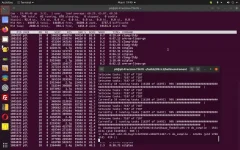
I have ancient computer for image building. It's just a little better equipped with dual cores and about 64GB ram. 16GB of ram may not be quite enough anymore. Seems 16GB was the minimum standard for image building years ago? Shown below is a screencap of top, and then another window inside showing the image build in progress. The computer ram is being drained with only two processes. Qtwebengine and Kodi is all that is running in the build. All other tasks on the computer are idling.

Screenshot from 2023-05-06 19-40-41.webp
 
On OE-A 5.2/5.3., if you build everything, I have frequently seen over 24GB ( that was just compiling 2 elements QT and something else) in use and once hit 32G….. I think the read.me says 24GB ….so you guys need a swap
 
Read as reference to post #581

The ld linker stage is a monster memory hog and you can bypass building nodejs simply by uncommenting #STATIC_FEED = "1" in openvix.conf

no need for any oe-alliance-feeds.bbappend shenanigans as mentioned in post #580

The .bbappend method predates the existence of static feeds, which is why it is in this thread, but agreed, your method is simple.
 
Hi all, the build has now completed successfully, thank you all for the help :)

I think my main problem was that the filesystem was corrupted so formatting the drive has sorted that.
Uncommenting the line in openvix.conf also increased the build speed significantly :thumbsup:

I have also edited the site.conf so that feeds build with the correct address of my server.

I have upgraded the ram in my linux box to 16gb which is the maximum it will take and created an 8gb swap file.
This will have to do until I can afford something better!

Thanks everyone for all the help, it's very much appreciated :)
 
I think your swap file needs to be at least the size of your RAM, and some sources say it should be three times the size. This applies to Windows, I don't know the recommendations for Linux.
 
I put ubuntu on a spare partition on my main box yesterday and current spec is 32gb ram and 12gb swap and it's building okay.
 
I think your swap file needs to be at least the size of your RAM, and some sources say it should be three times the size. This applies to Windows, I don't know the recommendations for Linux.
I would recommend never needing to use swap (it's actuallly paging) at all.
But adding some "just in case" is useful. I usually add about as much as I have RAM - on the grounds that I always have more disk-space than I really need anyway. But when i was running systems with 512GB (~10 years ago) RAM they only had a small amount, as they didn't have much local disk space.
 
On OE-A 5.2/5.3., if you build everything, I have frequently seen over 24GB ( that was just compiling 2 elements QT and something else) in use and once hit 32G….. I think the read.me says 24GB ….so you guys need a swap
There is no one fixed amount of RAM you need to build OpenViX.
It depends on some values in your site.conf file which, if you don't change them, seem to get set according to the number of logical processors your development system has.

These are the default values on my, rather ancient, development system:
Code:
BB_NUMBER_THREADS = "4"
PARALLEL_MAKE = "-j 4"

The first one says run up to 4 bitbakes in parallel. The second one says that certain things that bitbakes may do (compilation mainly I think) can use up to 4 threads.
However you don't need both things to happen together for all your logical processors to be busy. Just one bitbake using 4 threads will keep my 4 logical processors busy.
Similarly so will 4 bitbakes running in patrallel each only using 1 thread.

The default values are intended to try and ensure that all your logical processors are busy as much as possible so that big builds get done as quickly as possible.

The maximum amount of RAM you need during a build, (or might need if the most complex parts happen to be being built at the same time) is, I think, proportional to the product of the two numbers.

However, if you are running out of RAM (or of RAM + swap) there is a fair amount of scope to reduce these values without it actually slowing the build down too much. Likewise, if your build is slow because of a lot a swapping you can reduce these values and your build may actually speed up.

I find that reducing the PARALLEL_MAKE value really doesn't slow things as much as you would think, so you can reduce that down, even down to 2 and the effect on long builds is not as much as you would think.

The BB_NUMBER_THREADS value can be reduced too, but I think that slows things down more than reducing PARALLEL_MAKE.

If you have enough RAM then increasing BB_NUMBER_THREADS may actually make things go a little faster by making it so less of the time waiting for disk I/O is wasted.
 
Last edited:
Similarly so will 4 bitbakes running in patrallel each only using 1 thread.
Not true.
When these processes are doing fetches they will not be using much CPU at all.

The default values are intended to try and ensure that all your logical processors are busy as much as possible so that big builds get done as quickly as possible.
Actually they ensure that it won't be done as quickly as possible, since overloading the run queue is inefficient.
What they do is ensure that it will be run reasonably quickly unless you know better.

I find that reducing the PARALLEL_MAKE value really doesn't slow things as much as you would think, so you can reduce that down, even down to 2 and the effect on long builds is not as much as you would think.

The BB_NUMBER_THREADS value can be reduced too, but I think that slows things down more than reducing PARALLEL_MAKE.
Quite likely to be true in general.
Running two makes on one thread each serially (when you have two processors) will be quicker than running them on two threads in parallel as threads are not 100% efficient. (assuming the I/O content is minimal).
There is a reason why Intel made Xeon processors for HPC that did not have any hyper-threading ability. (The tests I ran confirmed it).
 
Not true.
When these processes are doing fetches they will not be using much CPU at all.
Use a fast SSD if you can. Have some extra threads going, but not a massively high number compared to your number of logical processors.
Does waiting for I/O even count as running?


Actually they ensure that it won't be done as quickly as possible, since overloading the run queue is inefficient.
What they do is ensure that it will be run reasonably quickly, unless you know better.
So maybe I'm right that lower values could be a good idea, but not for the reason I thought?

Quite likely to be true in general.
Running two makes on one thread each serially (when you have two processors) will be quicker than running them on two threads in parallel as threads are not 100% efficient. (assuming the I/O content is minimal).
There is a reason why Intel made Xeon processors for HPC that did not have any hyper-threading ability. (The tests I ran confirmed it).[/QUOTE]

Is this bit just about hyper-threading (and whatever the AMD equivalent is called)?
I deliberately ignored the possibility of hyper-threading to simplify things, but I do know more or less what it is and how it works and sometimes doesn't improve things. A lot of the go faster stuff in modern processors has cases where it actually makes things worse.

Anyhow main point still stands: There is no one fixed amount of RAM you need to build OpenViX.
Even with default settings, I can easily build with my 12GB RAM on my little system at more or less the full speed it can achieve.
If you have a huge threadripper you'll need way more RAM to get the best out of it for building OpenViX.
 
Last edited:
I built images some years ago with 8GB of ram, but had problems with it. Upgrading to 16GB of ram helped, and I finally ended up installing 32GB of ram into the computer. But that was some years ago and the requirements for building a complete image and feeds were much less than today.

Today there are some 16000+ processes that need to be done to build a complete OE image with feeds. Now I have an old dual core computer for image building with 64GB of ram installed. My default site.conf. using this computer is 32:
BB_NUMBER_THREADS = "32"
PARALLEL_MAKE = "-j 32"

At some points in the build 32 tasks can be running at the same time without using a lot of ram. At other times, two or three tasks can be running at the same time, and most of the 64GB of ram will be used. I could probably upgrade to 128GB of ram with this computer and see some improvement. Nodesj, QTwebengine, Kodi, and a few others eat ram when being built.

I could remove 48GB of ram from this computer and build a complete OE image with feeds using only 16GB of ram by making a few adjustments. So yeah, you can probably use almost any amount of ram to build an image with feeds. But up to a certain point, the more ram you have, the faster and smoother the build will be.


Also, having a computer that can build an image with up to 32 tasks at a time is nice, but it is misleading. There are many points in the image build where 32 tasks are not being done because we are waiting for other tasks to finish. A faster, better equipped computer that builds with only 16 tasks could easily beat it.
 
Maybe a silly question but would I need to change anything to build 6.4 instead of 6.3 or will it automatically build the new version when available?
 

OpenViX Feeds Status

Back
Top