I'm using an SX88 V2. Trying to set up a mount - my PC and various hard drives in a nearby room. I've browsed the network and can see my PC's ip address. I'm invited to click on OK to expand. It doesn't expand however much I press on OK.

Superb quality and spec AB-Com PULSe 4K SE. Crazy offer! Only £99! FREE UK DELIVERY! 4K UHD, Enigma 2, Multiboot 4 images & more!...
Superb quality and spec AB-Com PULSe 4K Rev II Twin Satellite tuner only £149! FREE UK DELIVERY! 4K UHD, Enigma 2, SATA HDD facility, Multiboot 4 images & more!...
You are using an out of date browser. It may not display this or other websites correctly.
You should upgrade or use an alternative browser.
You should upgrade or use an alternative browser.
[SX88v2] Cannot expand mount setting
- Thread starter Hpavil
- Start date


Do you have Samba and Nfs running on the box as sometimes they wont open for me in Samba but do in Nfs.
Usually found in Utilities.
I have neither running on the box.

birdman
Moderator
You don't need Samba running in order to mount a CIFS share, nor nfsd to mount an NFS one.Do you have Samba and Nfs running on the box
You only need these if you want your box to be a file server.

Joe_90
Moderator
@Hpavil - Win 10/11 has tightened up security on SMB shares. Usually requiring user/password to access unless you have specifically disabled this. As @birdman points out, you do not need Samba/NFS installed on the box unless you are using it as a file server. I usually configure any shares I wish to access from my Vix boxes by specifying their IP addresses and always set a userid and password. Maybe show us a screenshot of your network mount settings?
birdman
Moderator
Is your PC configured to share anything?If I select my PC, I click "OK" to expand but nothing happens.
Joe_90
Moderator
Yes, the PC is discoverable.
What windows version? Have you specified a shared folder on the PC? By default, you will need to supply the windows username and password.
birdman
Moderator
I don't think that's the same thing.Yes, the PC is discoverable.
I believe you still need to make particular file-systems shared.
Joe_90
Moderator
You haven't responded to the questions in #7 and #9. We are trying to determine if the issue lies with the PC configuration or the box settings. It's not as straightforward to access Windows shares since Microsoft tightened up security defaults in Win10/11.
Think this was asked earlier on box have you setup a password with remote and saved it , right it down so you dont forget it.
Right on my laptop my security pops up asking for my credentials , username -root and password you entered and wrote down for your box .
Enter those details should let you into your box.
Usb format to ext4 when recording on box might not be readable on pc if you plugged it in ?
Right on my laptop my security pops up asking for my credentials , username -root and password you entered and wrote down for your box .
Enter those details should let you into your box.
Usb format to ext4 when recording on box might not be readable on pc if you plugged it in ?
Thank you. Windows 11. The PC is configured to share (it does so already with my TV). I have not specified a folder, Windows username or password as I cannot expand the PC's details on the SX88 to input any details. I click on OK to expand and nothing happens.
I'd be interested to know whether this is a problem with the receiver or OpenVix
I'd be interested to know whether this is a problem with the receiver or OpenVix
Thanks for your help. I have a working password on the SX88 V2, used among other things for ftp connection with my PC. My PC also connects without problem to my TV. So I don't see an obvious problem on the PC side of the equation.
Returning to the SX88, when I click "OK" on the IP address of my PC it does not expand. Not sure where security could be blocking a pop up.
Curious to know if you are getting the mount set up to work with an SX 88 V2, or another Octagon.
Returning to the SX88, when I click "OK" on the IP address of my PC it does not expand. Not sure where security could be blocking a pop up.
Curious to know if you are getting the mount set up to work with an SX 88 V2, or another Octagon.
I only have my mounts on my boxes so any box i am on can view recordings on that tv and dont need pc to view their files
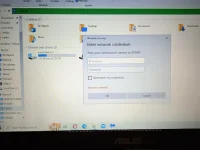
On my laptop i go into MY PC and it opens up a page with all my pc stuff on left and down at the bottom under network i see all my connected boxes on the bottom left and i click on the box and this security box pops up hence why thinking it might be security stopping you?
On my laptop i go into MY PC and it opens up a page with all my pc stuff on left and down at the bottom under network i see all my connected boxes on the bottom left and i click on the box and this security box pops up hence why thinking it might be security stopping you?
Attachments
Password set up on box; box connects to PC via ftp (when ftp works) My PC connects without problem to my TV.
Returning to the SX88, when I click on "OK" to expand my PC's details nothing happens. I am not asked for credentials. I don't get that far.
Curious to know whether you are using an SX88 V2.
Returning to the SX88, when I click on "OK" to expand my PC's details nothing happens. I am not asked for credentials. I don't get that far.
Curious to know whether you are using an SX88 V2.
Similar threads
[GiGaBlue UHD QUAD 4K]
Gigablue UHD QUAD 4k - updating from 5.1.025
- Replies
- 10
- Views
- 1K

- Replies
- 29
- Views
- 7K
