Superb quality and spec AB-Com PULSe 4K SE. Crazy offer! Only £99! FREE UK DELIVERY! 4K UHD, Enigma 2, Multiboot 4 images & more!...
Superb quality and spec AB-Com PULSe 4K Rev II Twin Satellite tuner only £149! FREE UK DELIVERY! 4K UHD, Enigma 2, SATA HDD facility, Multiboot 4 images & more!...

bootlogo.mvi doesn't show when booting

thecaretaker

Forum Supporter
Donated Member
Joined
Apr 22, 2012
Messages
327
Reaction score
4
Points
18
Location
Southern UK
Website
www.thecaretakers.co.uk
I know this isn't a major issue, my VU+ Duo2 4K performs perfectly apart from this little quirk.

The bootlogo.mvi doesn't show when my box boots up. It's been like this since day one. I've had loads of Openvix versions and it has always been this way. But I do like to make my own boot screens and it is annoying that I can't see it boot up as it should. I never had the issue with the VU Ultimo 4K.

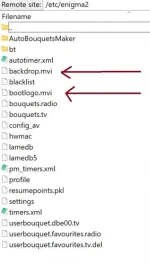
To check which file is not showing, I made 2 mvi images with the words bootlogo and backdrop on the respective image. I only see the backdrop.mvi on booting. Both files are where they should be.

I've tried making them 1280x720 and 1920x1080 but it doesn't make any difference.

I've changed the screen viewing mode size to all sizes but it is the same.

I've made a video to show you what it does.


Are all VU+ Duo2 4K boxes affected by this or is it just mine?
 
To check which file is not showing, I made 2 mvi images with the words bootlogo and backdrop on the respective image. I only see the backdrop.mvi on booting. Both files are where they should be.
I put bootlogo.mvi into /etc/enigma2.
I put a random one in on each boot (except at Christmas, when it always gets the Christmas one). It's always worked for me. It switches half way through boot up (after boot, as enigma2 starts).
 
/usr/share is the system location. You should never use this.

Location priority is like this:
Code:
SEARCHDIRS="/etc/enigma2/${SKIN} /etc/enigma2/skin_common /etc/enigma2 /usr/share/enigma2/${SKIN} /usr/share/enigma2/skin_default /usr/share/enigma2 /usr/share"

So /etc/enigma2 takes 3rd place in priority. And the logo gets saved in the backup for reinsertion on reflash.

If a bootlogo.mvi does not display you need to check in the locations with higher priority to fine what is blocking it.
 
/usr/share is the system location. You should never use this.

Location priority is like this:
Code:
SEARCHDIRS="/etc/enigma2/${SKIN} /etc/enigma2/skin_common /etc/enigma2 /usr/share/enigma2/${SKIN} /usr/share/enigma2/skin_default /usr/share/enigma2 /usr/share"

So /etc/enigma2 takes 3rd place in priority. And the logo gets saved in the backup for reinsertion on reflash.

If a bootlogo.mvi does not display you need to check in the locations with higher priority to fine what is blocking it.

I deleted the 2 files in user/share and ftp the 2 files to etc/enigma2 but I still only get the one showing on boot.
 
Also, no need to be deleting things. That is what priority is about.

If you have backdrop.mvi and bootlogo.mvi in /etc/enigma2 and one does not work, most likely the file is corrupt.
 
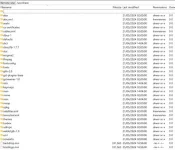
Screenshot 2024-05-26 182933.webp


I've tried various different bootlogo/backdrop files, so it isn't corruption. My original files which worked perfectly on my VU Ultimo4K doesn't show.

What I have noticed, after the original VU logo, I get a black screen for about 2-3 seconds and then for a millisecond I got a dotty screen (for want of a better way of describing it) before returning to black and then the backdrop.mvi showing. It really is quick, I've tried to take a screenshot from the video I uploaded earlier. But the camera had adjusted the brightness setting and it is too quick to show you how it really looks. I'll add it anyway just realise this is normally dark with various screen dots.

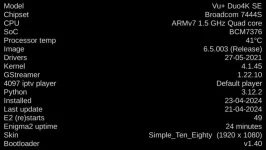
I'm wondering if it could be a fault with the VU Duo 4K SE bootloader.

Screenshot 2024-05-26 182344.webp

Screenshot 2024-05-26 184235.webp
 
AFAIR it only ever looks for bootlogo.mvi.

Actually, that would explain a lot. My VU Ultimo4K always showed both, but maybe the VU Duo 4K SE is different.

As I said in my first post, it isn't a major issue and something I can live with. It works fine otherwise.

EDIT: It's the Backdrop it shows, not the bootlogo.
 
Last edited:
@thecaretaker, do you have bootlogo file here : \Root\var\etc\init.d\

#!/bin/sh
# avoid the console messages clobbering our logo
[ -f /sys/class/vtconsole/vtcon1/bind ] && echo 0 > /sys/class/vtconsole/vtcon1/bind
# and set the correct videomode before showing the bootlogo
[ -f /etc/videomode ] && cat /etc/videomode > /proc/stb/video/videomode

if [ -x /usr/bin/showiframe ]; then
SKIN=`sed -En 's|config\.skin\.primary_skin=(.+)/skin\.xml|\1|p' /etc/enigma2/enigma2/settings`
if [ -z "$SKIN" ]; then
SKIN=`strings -n 10 /usr/lib/enigma2/python/skin.pyc | egrep -o -m 1 ".+/skin.xml" | sed 's|/skin.xml.*||'`
fi
if [ -n "${SKIN}" ]; then
SEARCHDIRS="/etc/enigma2/${SKIN} /etc/enigma2/skin_common /etc/enigma2 /usr/share/enigma2/${SKIN} /usr/share/enigma2/skin_default /usr/share/enigma2 /usr/share"
else
SEARCHDIRS="/etc/enigma2/skin_common /etc/enigma2 /usr/share/enigma2/skin_default /usr/share/enigma2 /usr/share"
fi
for DIR in ${SEARCHDIRS}; do
if [ -d "${DIR}" ] && [ -f "${DIR}/bootlogo.mvi" ]; then
/usr/bin/showiframe "${DIR}/bootlogo.mvi" &
break
fi
done
fi

[ -f /etc/init.d/bootlogo.py ] && /usr/bin/python /etc/init.d/bootlogo.py
[ -f /usr/share/lcd.png ] && /usr/bin/displayvfd -p /usr/share/lcd.png
/bin/true
 
@Orlandox Yes I do. This is what it contains.

#!/bin/sh
# avoid the console messages clobbering our logo
[ -f /sys/class/vtconsole/vtcon1/bind ] && echo 0 > /sys/class/vtconsole/vtcon1/bind
# and set the correct videomode before showing the bootlogo
[ -f /etc/videomode ] && cat /etc/videomode > /proc/stb/video/videomode

if [ -x /usr/bin/showiframe ]; then
SKIN=`sed -En 's|config\.skin\.primary_skin=(.+)/skin\.xml|\1|p' /etc/enigma2/enigma2/settings`
if [ -z "$SKIN" ]; then
SKIN=`strings -n 10 /usr/lib/enigma2/python/skin.pyc | egrep -o -m 1 ".+/skin.xml" | sed 's|/skin.xml.*||'`
fi
if [ -n "${SKIN}" ]; then
SEARCHDIRS="/etc/enigma2/${SKIN} /etc/enigma2/skin_common /etc/enigma2 /usr/share/enigma2/${SKIN} /usr/share/enigma2/skin_default /usr/share/enigma2 /usr/share"
else
SEARCHDIRS="/etc/enigma2/skin_common /etc/enigma2 /usr/share/enigma2/skin_default /usr/share/enigma2 /usr/share"
fi
for DIR in ${SEARCHDIRS}; do
if [ -d "${DIR}" ] && [ -f "${DIR}/bootlogo.mvi" ]; then
/usr/bin/showiframe "${DIR}/bootlogo.mvi" &
break
fi
done
fi

[ -f /etc/init.d/bootlogo.py ] && /usr/bin/python /etc/init.d/bootlogo.py
[ -f /usr/share/lcd.png ] && /usr/bin/displayvfd -p /usr/share/lcd.png
/bin/true
 
enigma2.sh.in only searches for shows backdrop.mvi


Code:
if [ -x @bindir@/showiframe ]; then
	SKIN=`sed -En 's|config\.skin\.primary_skin=(.+)/skin\.xml|\1|p' @sysconfdir@/enigma2/settings`
	if [ -z "$SKIN" ]; then
		SKIN=`strings -n 10 @prefix@/lib/enigma2/python/skin.pyc | egrep -o -m 1 ".+/skin.xml" | sed 's|/skin.xml.*||'`
	fi
	if [ -n "${SKIN}" ]; then
		SEARCHDIRS="@sysconfdir@/enigma2/${SKIN} @sysconfdir@/enigma2/skin_common @sysconfdir@/enigma2 @datadir@/enigma2/${SKIN} @datadir@/enigma2/skin_default @datadir@/enigma2 @datadir@"
	else
		SEARCHDIRS="@sysconfdir@/enigma2/skin_common @sysconfdir@/enigma2 @datadir@/enigma2/skin_default @datadir@/enigma2 @datadir@"
	fi
	for DIR in ${SEARCHDIRS}; do
		if [ -d "${DIR}" ] && [ -f "${DIR}/backdrop.mvi" ]; then
			@bindir@/showiframe "${DIR}/backdrop.mvi" &
			break
		fi
	done
fi
 
For added info: OpenVix distro has a totally different recipes-distros build structure for bootlogo/s whereas every other oe-a team distro has the same.

There are missing fixes pushed to all oe-a team distros except this distro due to this different structure, such as the [vuduo2] update bootlogo.py fix ValueError
 
Vu+ Ultimo 4K:

If you copy this lcd.png to \Root\usr\share\, there is a bootlogo at LCD display.

lcd.webp
 

OpenViX Feeds Status

Back
Top