
Superb quality and spec AB-Com PULSe 4K SE. Crazy offer! Only £129! FREE UK DELIVERY! 4K UHD, Enigma 2, Multiboot 4 images & more!...
Superb quality and spec AB-Com PULSe 4K Rev II Twin Satellite tuner only £179! FREE UK DELIVERY! 4K UHD, Enigma 2, SATA HDD facility, Multiboot 4 images & more!...
You are using an out of date browser. It may not display this or other websites correctly.
You should upgrade or use an alternative browser.
You should upgrade or use an alternative browser.
DreamBox 920 UHD
- Thread starter DR-10
- Start date

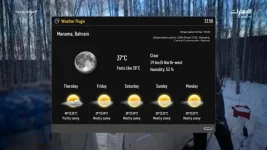
Please try skin e2-darkos.
What about other skins such as YouViX-Blue and other transparent skins

What about other skins such as YouViX-Blue and other transparent skins
YouViX-Blue is an unmaintained skin for several years. "YouViX-Blue-Mod" is a current skin. If it doesn't work in that we can ask the Author to update it.
YouViX-Blue is an unmaintained skin for several years. "YouViX-Blue-Mod" is a current skin. If it doesn't work in that we can ask the Author to update it.
This is a picture of YouViX-Blue-Mod skin and the same problem
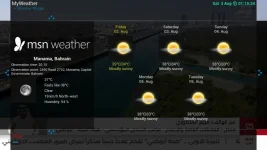
It is fixed. You will have to wait for the next build.
It is fixed. You will have to wait for the next build.
Hi brother
I have now tried the new version openvix-6.6.006 and the problem is still
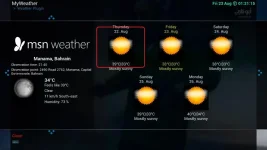
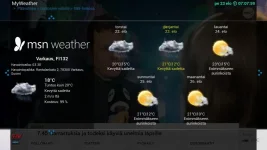
I think brother you are using a Vu+ device
I'm talking about Dreambox 920.
Can you send me msnweatherplugin with the picons you use to test
Can you send me msnweatherplugin with the picons you use to test
Please update your image, then if there is a problem we can look into it.

Joe_90
Moderator
@Huevos - see post #46.
Please update your image, then if there is a problem we can look into it.
This is the last update of the picture
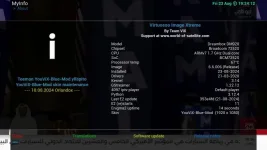
After downloading weatherplugin from the image feed with the addition of picons, it appears like this
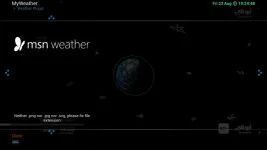
And after downloading another plug with the addition of picons it appears like this
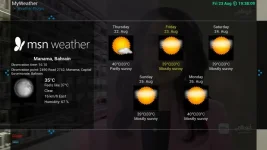
This is the last update of the picture
View attachment 66751
After downloading weatherplugin from the image feed with the addition of picons, it appears like this
View attachment 66752
And after downloading another plug with the addition of picons it appears like this
View attachment 66753
https://github.com/oe-alliance/enigma2-plugins/commit/2578e9f7c89c7f92cef9468c12381fe91cc87d4b
There was that update for the plugin, so maybe the in the next build this will be cured.

https://github.com/oe-alliance/enigma2-plugins/commit/2578e9f7c89c7f92cef9468c12381fe91cc87d4b
There was that update for the plugin, so maybe the in the next build this will be cured.
Hi brother
Thank you for solving the problem
With the new update, the problem has been solved
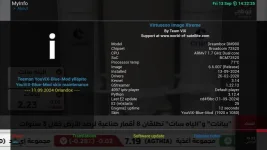
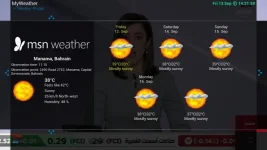
But I faced another problem, which is that the weather picon does not appear on front panel lcd
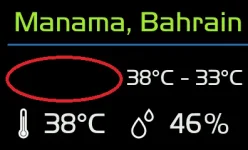
Like this on the previous version
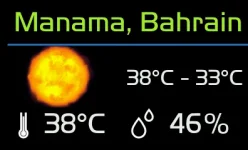
Last edited:

Orlandox
ViX Beta Tester
Hi brother
Thank you for solving the problem
With the new update, the problem has been solved
But I faced another problem, which is that the weather picon does not appear on front panel lcd
Like this on the previous version
View attachment 66817
Hello,
which display skin are you using to show weatherplugin data ? Would like to test.
Hello,
which display skin are you using to show weatherplugin data ? Would like to test.
Hi brother
The name of the skin is 07_Sunny Taken from the opentsimage
This screen I modified to work with skin_default
<screen name="MSNWeatherPluginSummary" position="0,0" size="400,240">
<widget font="LCD1;50" foregroundColor="#00adff2f" halign="center" noWrap="1" position="10,10" render="Label" size="390,50" source="session.MSNWeather" transparent="1" zPosition="1">
<convert type="MSNWeather">city</convert>
</widget>
<ePixmap pixmap="/usr/share/enigma2/display/skin_default/icons/line-lcd.png" position="12,70" size="386,3" zPosition="1" />
<widget position="10,60" render="MSNWeatherPixmap" scale="1" size="170,120" source="session.MSNWeather" transparent="1" zPosition="1" >
<convert type="MSNWeather">weathericon,current</convert>
</widget>
<widget font="LCD1;40" halign="left" position="202,105" render="Label" size="198,40" source="session.MSNWeather" transparent="1" zPosition="2" >
<convert type="MSNWeather">temperature_heigh_low,current</convert>
</widget>
<ePixmap pixmap="/usr/share/enigma2/display/skin_default/icons/temp_indoor.svg" position="10,170" size="55,55" />
<widget font="LCD1;52" position="70,172" render="Label" size="120,50" source="session.MSNWeather" zPosition="1">
<convert type="MSNWeather">temperature_current</convert>
</widget>
<ePixmap pixmap="/usr/share/enigma2/display/skin_default/icons/humidity_indoor.svg" position="200,170" size="55,55" />
<widget font="LCD1;52" position="270,172" render="Label" size="130,50" source="session.MSNWeather" zPosition="1">
<convert type="MSNWeather">humidity</convert>
</widget>
<eLabel font="LCD1;52" position="325,172" size="60,50" text="%" transparent="1" zPosition="1" />
</screen>
Last edited:
Orlandox
ViX Beta Tester
Thanks @buwalla,
made it for Ultimo 4K
<!-- MSNWEATHER -->
<screen name="MSNWeatherPluginSummary" position="0,0" size="800,480">
<widget font="FdLcD;80" foregroundColor="yellow" halign="center" noWrap="1" position="10,10" render="Label" size="780,90" source="session.MSNWeather" transparent="1" zPosition="1">
<convert type="MSNWeather">city</convert>
</widget>
<eLabel position="10,110" size="780,5" backgroundColor="blue" zPosition="1" />
<widget position="10,135" render="MSNWeatherPixmap" scale="1" size="270,270" source="session.MSNWeather" transparent="1" zPosition="1" >
<convert type="MSNWeather">weathericon,current</convert>
</widget>
<ePixmap pixmap="/usr/share/enigma2/display/skin_default/temperature_high_low_icon.png" position="280,120" size="60,60" scale="1" transparent="1" zPosition="1" />
<widget font="FdLcD;60" position="350,120" render="Label" size="400,70" source="session.MSNWeather" zPosition="1" >
<convert type="MSNWeather">temperature_heigh_low,current</convert>
</widget>
<ePixmap pixmap="/usr/share/enigma2/display/skin_default/temperature_icon.png" position="280,200" size="60,60" scale="1" transparent="1" zPosition="1" />
<widget font="FdLcD;60" position="350,200" render="Label" size="400,70" source="session.MSNWeather" zPosition="1">
<convert type="MSNWeather">temperature_current</convert>
</widget>
<ePixmap pixmap="/usr/share/enigma2/display/skin_default/humidity_icon.png" position="280,280" size="60,60" scale="1" transparent="1" zPosition="1" />
<widget font="FdLcD;60" position="350,280" render="Label" size="400,70" source="session.MSNWeather" zPosition="1">
<convert type="MSNWeather">humidity</convert>
</widget>
<eLabel font="FdLcD;60" position="470,280" size="70,70" text="%" zPosition="1" />
<ePixmap pixmap="/usr/share/enigma2/display/skin_default/wind_icon.png" position="280,360" size="60,60" scale="1" transparent="1" zPosition="1" />
<widget font="FdLcD;60" position="350,360" render="Label" size="440,70" source="session.MSNWeather" zPosition="1">
<convert type="MSNWeather">winddisplay</convert>
</widget>
</screen>
made it for Ultimo 4K
<!-- MSNWEATHER -->
<screen name="MSNWeatherPluginSummary" position="0,0" size="800,480">
<widget font="FdLcD;80" foregroundColor="yellow" halign="center" noWrap="1" position="10,10" render="Label" size="780,90" source="session.MSNWeather" transparent="1" zPosition="1">
<convert type="MSNWeather">city</convert>
</widget>
<eLabel position="10,110" size="780,5" backgroundColor="blue" zPosition="1" />
<widget position="10,135" render="MSNWeatherPixmap" scale="1" size="270,270" source="session.MSNWeather" transparent="1" zPosition="1" >
<convert type="MSNWeather">weathericon,current</convert>
</widget>
<ePixmap pixmap="/usr/share/enigma2/display/skin_default/temperature_high_low_icon.png" position="280,120" size="60,60" scale="1" transparent="1" zPosition="1" />
<widget font="FdLcD;60" position="350,120" render="Label" size="400,70" source="session.MSNWeather" zPosition="1" >
<convert type="MSNWeather">temperature_heigh_low,current</convert>
</widget>
<ePixmap pixmap="/usr/share/enigma2/display/skin_default/temperature_icon.png" position="280,200" size="60,60" scale="1" transparent="1" zPosition="1" />
<widget font="FdLcD;60" position="350,200" render="Label" size="400,70" source="session.MSNWeather" zPosition="1">
<convert type="MSNWeather">temperature_current</convert>
</widget>
<ePixmap pixmap="/usr/share/enigma2/display/skin_default/humidity_icon.png" position="280,280" size="60,60" scale="1" transparent="1" zPosition="1" />
<widget font="FdLcD;60" position="350,280" render="Label" size="400,70" source="session.MSNWeather" zPosition="1">
<convert type="MSNWeather">humidity</convert>
</widget>
<eLabel font="FdLcD;60" position="470,280" size="70,70" text="%" zPosition="1" />
<ePixmap pixmap="/usr/share/enigma2/display/skin_default/wind_icon.png" position="280,360" size="60,60" scale="1" transparent="1" zPosition="1" />
<widget font="FdLcD;60" position="350,360" render="Label" size="440,70" source="session.MSNWeather" zPosition="1">
<convert type="MSNWeather">winddisplay</convert>
</widget>
</screen>
Similar threads
- Replies
- 12
- Views
- 1K
- Replies
- 13
- Views
- 637

- Replies
- 8
- Views
- 897
- Replies
- 2
- Views
- 229