Superb quality and spec AB-Com PULSe 4K SE. Crazy offer! Only £99! FREE UK DELIVERY! 4K UHD, Enigma 2, Multiboot 4 images & more!...
Superb quality and spec AB-Com PULSe 4K Rev II Twin Satellite tuner only £149! FREE UK DELIVERY! 4K UHD, Enigma 2, SATA HDD facility, Multiboot 4 images & more!...

Transponder update confusion

MonkeyBoy

New member
Joined
Apr 5, 2024
Messages
4
Reaction score
0
Points
1
Hi,
I have been using the box with no issues for about 6 months now and have a custom Bouquet I have made with all the channels I want to see in the order I want them.

Recently I believe that a few of the channels have been reshuffled on the transponder, manly the higher ITV channels like ITV2 ITV3 and ITV4.

For the life of me I cannot work out of you get the box to “refresh these channels” so they work again, the only thing I can seem to do its run the auto Bouquet that will scan all of the channels again, but this just cleans out my custom Bouquet and replaces it with the new one.

Is there a way I can get it to rescan/ fix my custom Bouquet without me having to make it again as that took ages.

I have done a lot of searching on here and the web but not found anything.

Regards
Steve
 
use DBE is much easyer if you do it on your PC.Just scan the new transponder and edit your bouquet
 
Not sure when you say custom bouquet does it mean you just added all your most viewed to Favourites or made a named one yourself but in configure for ABM you can say yes to keep all non ABM bouquets.
 
Hi,
I have been using the box with no issues for about 6 months now and have a custom Bouquet I have made with all the channels I want to see in the order I want them.

Recently I believe that a few of the channels have been reshuffled on the transponder, manly the higher ITV channels like ITV2 ITV3 and ITV4.

For the life of me I cannot work out of you get the box to “refresh these channels” so they work again, the only thing I can seem to do its run the auto Bouquet that will scan all of the channels again, but this just cleans out my custom Bouquet and replaces it with the new one.

Is there a way I can get it to rescan/ fix my custom Bouquet without me having to make it again as that took ages.

I have done a lot of searching on here and the web but not found anything.

Regards
Steve

I'm guessing a bit about what you have created but try

menu/setup/system/customise settings/setup mode = expert then press green to save

menu/setup/tuners and scanning/autobouquetsmaker/configure/keep all non-ABMbouquets = no then press green to save

Do you now have another menu option in
menu/setup/tuners and scanning/autobouquetsmaker/
labelled "Keep bouquets"
and within that new menu option is there an entry for your custom bouquet with a tick box to keep it?

If so, in
menu/setup/tuners and scanning/autobouquetsmaker/
first select "update provider files"
then "scan"

If ITV2,ITV3 etc. doesn't still work

menu/plugins/openwebif/ click on it to open the configuration screen
openwebinterface enable = yes
Use modern interface = yes
press green to save

Now open the Web Interface(webif) in your internet browser on your PC/Laptop by typing the IP address of your box in the Internet Browser address box
The IP address for your box can be found on your box menu/information/network/IP = 192.xxx.xxx.xx

The webif should open in your browser
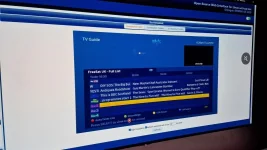
Go down to the bouquet editor

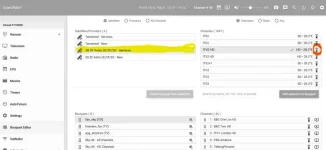
you should see something like

Screenshot 2024-10-28 135121.webp

Select the satellite provider as highligted above in yellow

Below this select your "custom bouquet"

In the top right hand list of channels scroll down to, say, ITV2 HD. Clicking on the symbol in the above screenshot highlighted in red will immediately change the channel on your box and viewed on the TV.
If that entry in the channel list doesn't work just select the next in the list labelled ITV2 HD and repeat.

Having identified the new working entry for your missing channel click on the entry to make sure a tick appears. With the button "add selection to the bouquet" you have chosen and is displayed in the bottom right hand corner of the screen. The entry will appear at the end of the list where you can select it and drag it to any position in the list. You can also select the defunct entry and delete it.
After getting a tick in the entry hover your mouse over the symbol with 6 dots next to the channel names and you will get a move icon.

When you quit the webif on your computer (close down the web browser) all the changes you have made will be back on your box.
 
Last edited:
Did you modify the bouquets ABM created? If so, how did you do so? This is a definite no-no and leads to the situation where you cannot run ABM again. The best thing to do is to create a favouries.xml file or custommix.xml file to so that ABM creates the bouquets how you want them. I'll await your answer as to how you did your customisation before suggesting how you proceed.

For now, please backup your bouquets using the export function in OWIF bouquet editor. Upload it to the forum unless you have IPTV.
 
I am new to this so maybe using the wrong language and a bit lost by what you are asking me, I will tell you how I made the Bouquet, on the box I used the auto Bouquet and it created the freesat and sky Bouquet.

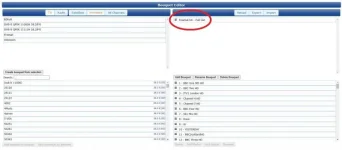
Then I logged on the web control and used the Bouqueteditor to create my own Bouquet on the right (see picture), I made a new name for it and then just went through the freesat and sky list on the lift and moved over the channels I wanted to put in my the list on the right (this is what is showing on the box).

If I go back on to the box and rerun the auto Bouquet it wipes my list and puts in the standard freesat and sky lists on the right, but the channels like ITV2 HD will have no epg info or signal.

So I have used the import function to restore my list from back up.
Capture.webp
 
ABM does not wipe out other bouquets by default. The standard option is to keep non-abm bouquets. Please double check this. If it was changed, please put it back then run ABM again.

As you created that bouquet yourself, you will have to update it yourself. But you must first obtain the new channels. Easiest option is to run ABM. Let us know how the option in ABM is set.

Can you please backup your bouquets and then upload here.there is an export function in bouquet editor
 
Easiest way if it is your own bouquet (not a modified ABM bouquet)...

  • Do an ABM scan of Sky or Freesat, or do a manual scan of 28E complete (with Network and clear old).
  • Delete the non working channels from your bouquet.
  • Use "Add service or stream to current bouquet" (in ChannelSelection context menu) to reinsert working versions.
 
Easiest way if it is your own bouquet (not a modified ABM bouquet)...

  • Do an ABM scan of Sky or Freesat, or do a manual scan of 28E complete (with Network and clear old).
  • Delete the non working channels from your bouquet.
  • Use "Add service or stream to current bouquet" (in ChannelSelection context menu) to reinsert working versions.

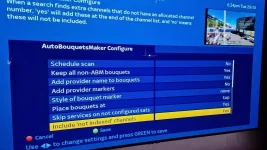
I believe this what I am doing, here are the setting I see on the box.
ABM Settings.webp

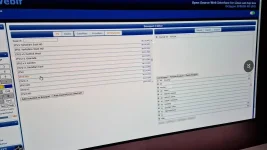
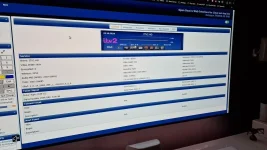
Then on the PC I see this list of channels on the left, I removed ITV2 HD from my list on the right, and replaced it with ITV2 HD from the left list.
List of channels.webp

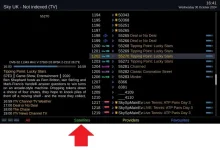
But the new channel seems to have the same issue, this is how it looks in the EPG and the signal for it.
Planner.webp
Signal.webp

It seems to me that the list on the left is not being updated correctly, so it still has the old transponder information, is there a way to clear all of the scans on the left side and start again?
 
I said ChannelSelection context menu. i.e. open the channel list in your bouquet and press menu, not use OpenWebIf.
 
Was it mentioned to check in Menu>Tuners & Scanning>Miscellaneous>Disable background scanning? Set it to Yes.
If you name your scanned channels differently (ex: from satellite charts). Leaving the setting to No will rename it to what it was scanned in eventually.
But do use a channel editor. I personally prefer E-Channelizer. Helps make those RCU keys live longer.
 
Thanks for the pictures, they help clarify things. Here is a guide to screenshots if you want to getter better pictures next time.
https://www.world-of-satellite.com/showthread.php?44054-How-to-take-screen-shots-How-to-attach-files

You are probably adding dead channels sill in your lamedb file. The "clear before scan" should have done it, but only works if the frequency is still listed in the xml file used by Enigma2. I would suggest you clear out your 28.2 channels and then use ABM (or use Enigma2 scanning) again to ensure that only have working channels on your receiver. Please note, your bouquet will show N/A for the removed channels. I have asked twice for you to upload your bouquets as that creates a reference point.


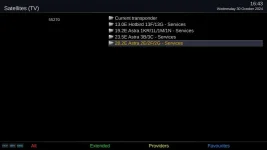
Press Up (next to OK on remote)

Press Green for satellites
2 Green satellite .webp

Press up/down on remote to highlight 28.2
3 Highlight select satellite.webp

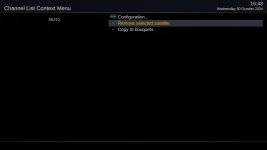
Press Menu and then select "Remove selected satellite"
4 remove satellite.webp

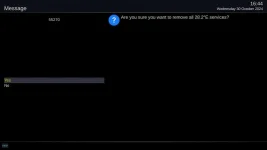
Confirm the removal
5 confirm removal.webp

Run ABM and then restart. You can then re-add the working channels.
 
Last edited:
Thanks for the pictures, they help clarify things. Here is a guide to screenshots if you want to getter better pictures next time.
https://www.world-of-satellite.com/showthread.php?44054-How-to-take-screen-shots-How-to-attach-files

You are probably adding dead channels sill in your lamedb file. The "clear before scan" should have done it, but only works if the frequency is still listed in the xml file used by Enigma2. I would suggest you clear out your 28.2 channels and then use ABM (or use Enigma2 scanning) again to ensure that only have working channels on your receiver. Please note, your bouquet will show N/A for the removed channels. I have asked twice for you to upload your bouquets as that creates a reference point.


Press Up (next to OK on remote)

Press Green for satellites
View attachment 66985

Press up/down on remote to highlight 28.2
View attachment 66986

Press Menu and then select "Remove selected satellite"
View attachment 66987

Confirm the removal
View attachment 66988

Run ABM and then restart. You can then re-add the working channels.

Is this the Bouquet you wanted uploading https://drive.google.com/file/d/1ql4_Y7RWw9IOV5s0XyOhiay7c0CtgZM3/view?usp=sharing
 
The problem is that you had somehow edited the "last scanned" bouquet. This is a system and dynamic bouquet. It changes after every scan whether you use the inate scanning in Enigma2 or plugins like ABM.

Anyway, I have renamed your bouquet it so it does not get overwritten when you scan. I have updated most of the entries, I used the entries for London. You can do the rest at the bottom of the list.

Stop enigma2 with an "init 4" command
Using FTP (Filezilla etc) transfer the two files attached to /etc/enigma2

bouquets.tv
userbouquet.monkeyboy.tv

You will have to unzip "themonkeyboy_2024.10.31.zip" first. Guide to issuing commands is here if you need it. https://www.world-of-satellite.com/showthread.php?40948-How-to-use-Putty-for-Unix-Linux-commands

Ideally, you should create a favouroites.xml so that ABM updates the channels automatically. You should only need to amend it when channels change numbers. Attached is an excel file to help you. It is from 2015, I have updated the Sky UK sd and freesat columns. In the xml tool tab, you select the provider and the official numbers and it will help you create the xml file. You then place it in /etc/enigma2/AutoBouquetsMaker/custom
 

Attachments

Last edited:
Here is a favourites.xml file for you. Place in /etc/enigma2/AutoBouquetsMaker/custom In the providers menu of ABM, set the all the create bouquet options to no. Then run ABM again. You might have to tweak the numbers a bit. Your receiver has hardware multiboot, so use one partition/slot for experimenting.
 

Attachments

OpenViX Feeds Status

Back
Top