Superb quality and spec AB-Com PULSe 4K SE. Crazy offer! Only £99! FREE UK DELIVERY! 4K UHD, Enigma 2, Multiboot 4 images & more!...
Superb quality and spec AB-Com PULSe 4K Rev II Twin Satellite tuner only £149! FREE UK DELIVERY! 4K UHD, Enigma 2, SATA HDD facility, Multiboot 4 images & more!...

[VU+ Duo4K SE] pausing live tv pauses,plays then actually pauses

satteliter

Forum Supporter
Donated Member
Joined
Feb 20, 2021
Messages
108
Reaction score
0
Points
16
Box is set to timeshift live tv (only when paused) to HDD.

video (hdmi capture) of issue: https://www.youtube.com/watch?v=58--DC5mqK0

i first pause channel 'sky news' at 6 seconds.
expected behaviour: video and audio pause when button pressed.
actual behaviour: video and audio pause, then briefly play, then actually pause.

happens again with channel 'bloomberg news' at 24/25 second mark.

happens with all satellite and terrestrial channels.

pausing when playing back from recorded program works as expected.

screenshot of timeshift settings attachedtimeshift settings.webp
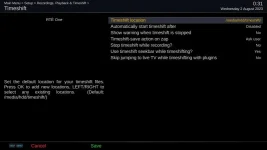
anyone seen this issue before?
 
Bumping on this. Issue has persisted and is still present on latest Openvix 6.7.

Behaviour happens whether timeshift location is spinning hard drive or usb flash drive.
 
I have noticed this slight stutter on pausing TV on my new VuUno4kSE. This didn't happen on my old GB Quad Plus, but I put it down to a quirk in the drivers on the Vu. Not a big issue and unlikely to be anything to do with the image, but you could try OpenATV and see if it happens there also. It's similar to the quirk in HiSilicon boxes (AX 61HD), where you get a slow-motion effect momentarily when you change channels - just a characteristic of the chipset and manufacturer drivers.I did look at your YouTube video!
 
That’s another thing iv noticed as well not just u
 
Bumping on this. Issue has persisted and is still present on latest Openvix 6.7.

Behaviour happens whether timeshift location is spinning hard drive or usb flash drive.

Old (2015) Xtend ET1000 box running openvix V6.7.xxx

If in timeshift I have the "automatically start timeshift" set to disable and my hard disk is in standby (not spinning) when I press pause on live TV I get a blank screen (no video or audio) for around 1 second and then the static paused screen. On my box the blank screen could be equivalent to you seeing video and audio for a short time before the actual pause.

Repeating the exercise with the hard disk not going to standby (always spinning) I see the same behaviour when pausing.

If I change "automatically start timeshift" to 5 seconds then pause it is near instant, possibly a blank screen for a very small fraction of a second (possibly the stutter Joe_90 is seeing on his box).

Possibly what you are seeing is the time taken for the timeshift to be activated for the first time because of "automatically start timeshift = disable" and whereas on my box the image and audio is blanked out while this is happening on your box it's not blanked out. Looking at your Youtube video the timing appears to be very similar.

When "automatically start timeshift = 5 seconds" recording to the timeshift buffer starts every time you switch channels and so when you press pause nothing has to start up - timeshift is already running in the background, and also enabling you to go back and see the part of the program before your pressed the pause button.

Assuming the timeshift location is the hard disk, having automatically start timeshift = 5 seconds (or any other configurable start time) means that the disk will always be spinning while you have your box on. IMO not a problem as disks are more likely to fail with constant switching on/off.
 
Last edited:

OpenViX Feeds Status

Back
Top