Superb quality and spec AB-Com PULSe 4K SE. Crazy offer! Only £99! FREE UK DELIVERY! 4K UHD, Enigma 2, Multiboot 4 images & more!...
Superb quality and spec AB-Com PULSe 4K Rev II Twin Satellite tuner only £149! FREE UK DELIVERY! 4K UHD, Enigma 2, SATA HDD facility, Multiboot 4 images & more!...

[ET10x00] open TV zapper

adm

Forum Supporter
Donated Member
Joined
Sep 9, 2014
Messages
1,767
Reaction score
18
Points
38
Location
Southend on Sea, UK
Watching live TV at 1:00am I got a message on the screen indicating the the OpenTV zapper was about to run.

It's NOT enabled in the menu. Menu/setup/epg/openTV EPG downloader/enable OpenTV download = no

If I do enable it to check what settings may have been set the schedule scan is set for 1:00am BUT it shouldn't be enabled at all.

I did use the OpenTV downloader for a short time when it was first incorporated into the image but soon after I reverted back to having two timers to fetch the over the air epg. I have both terrestrial and satellite tuners and need the EPG for both platforms.

It looks as if with 6.7.001 the "Enable OpenT|V download = no" is not being honoured.
 
Last edited:
That's very odd inddeed. Any debug log of the incident @adm? I'll check it out later today.
 
That's very odd inddeed. Any debug log of the incident @adm? I'll check it out later today.

To reproduce the bug I enabled openTV download and set the time for scan to 17:30 and pressed green to save

I put the box into deep standby

On starting up the box again I set enable openTV download = no and pressed green to save

I put the box into deep standby

I then started to box and waited.
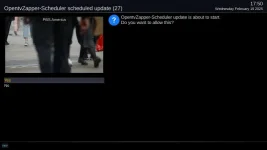
At 17:30 the picture changed from displaying live TV to a menu type display similar to that show below

zapper.webp

Note : the time shown in the screen shot is a subsequent change in zapper setting to just get a screen shot. The debug log below is for a 17:30 setting

View attachment Enigma2_debug_2025-02-19_17-20-57.zip

In both instances (screen shot and debug log) was with the enable OpenTV download disabled.

Although I cannot be 100% sure I think this must be a bug introduced in 6.7.xxx as I watch a lot of TV at 1am when running 6.6.xxx and I would have seen the zapper screen appearing. Initially, when I reported this problem the zapper was set to 1am, although disabled in the menu.
 
Can you try switching back auto before disabling and see what happens.
 
@adm - it looks like OpenTV zapper is following its previously set schedule - 17.30 each day. At startup and at shutdown it is setting the next schedule timer and ignoring the fact that you have it set to disabled. Try as @Huevos suggests and see it that resolves it. Looks like a tweak is needed to the code.
 
Can you try switching back auto before disabling and see what happens.

That may have worked.

I set the scan to "auto" and the schedule scan period to 3 hours (the minimum allowed) and pressed green to save
I then set "enable opentv download = no" and pressed green to save
I cleared the EPG cacche and waited 3.5 hours. The zapper hasn't triggered and the EPG hasn't been updated so indicating that it hasn't triggered in the background.

The assumption I'm making is that the 3 hours starts at the time where saved the settings. Any future testing/observation is going to have to wait until Thursday evening
 
That may have worked.

I set the scan to "auto" and the schedule scan period to 3 hours (the minimum allowed) and pressed green to save
I then set "enable opentv download = no" and pressed green to save
I cleared the EPG cacche and waited 3.5 hours. The zapper hasn't triggered and the EPG hasn't been updated so indicating that it hasn't triggered in the background.

The assumption I'm making is that the 3 hours starts at the time where saved the settings. Any future testing/observation is going to have to wait until Thursday evening

Maybe not a fix :(

I turned on my box from deep standby at 06:24 this morning and almost immediately had a on screen message saying that openTV zapper was about to start. This wasn't the full screen message seen before but a small box in the middle of a full screen live TV picture.

After the openTV download had completed I got another message saying it would trigger again in 3 hours time.

This was with "enable openTV download = no"

In my previous post that indicated that this may a have fixed the bug I hadn't put my box into deep standby between changing the settings. The box was only put in deep standby overnight.
 
Maybe not a fix :(

I turned on my box from deep standby at 06:24 this morning and almost immediately had a on screen message saying that openTV zapper was about to start. This wasn't the full screen message seen before but a small box in the middle of a full screen live TV picture.

After the openTV download had completed I got another message saying it would trigger again in 3 hours time.

This was with "enable openTV download = no"

In my previous post that indicated that this may a have fixed the bug I hadn't put my box into deep standby between changing the settings. The box was only put in deep standby overnight.

Update:

After the zapper incident at 6.24am I put the box into deep standby and then switched the box back on.
I cleared the EPG cache and the box has been on for 7.5 hours. The openTV zapper has not triggered again.


So, it does look as though configuring openTV for auto and 3 hours before disabling it again does work.
 
https://github.com/OpenViX/enigma2/commit/2d6ddfe2d9842e984961b7f2673b12b3f1b4a73d

That should fix the schedule not stopping. Can you test please.

Renamed /usr/lib/enigma2/python/Plugins/SystemPlugins/OpentvZapper/opentv_zapper.pyc to opentv_zapper.old
Upload the modified opentv_zapper.py to same location
Rebooted the box.

Configured OpenTV EPG downloader for:
enabled, custom and 15:50 for a scan. Green to save
This worked at expected and at 15:50 it put up a message and scanned

Then
Configured OpenTV EPG downloader for
enabled, custom and 16:05 for a scan. Green to save
Then
Enable openTv download = no. Green to save

Waited until 16:10. The download did not trigger.
It looks like this modification has cured the bug


Thank you


To clean up: deleted /usr/lib/enigma2/python/Plugins/SystemPlugins/OpentvZapper/
opentv_zapper.old and opentv_zapper.py
 
Unfortunately I've just had a quick opentv zapper message flash up on my screen whilst watching live tv - small box in the centre of the screen for a few seconds!

The dispaly box on the screen was on or around 16:06/16:07

The box rebooted soon after, no crash log but there seems to be zapper errors in this log file.


View attachment Enigma2_debug_2025-02-23_16-06-36.log


Edit:
A quick check of other debug files generated earlier today show entries "[opentv_zapper] starting...", followed a 3 to 4 seconds later by "[Notifications] RemovePopup, id = ZapError"

I haven't touched openTV zapper today (23 Feb 2025) and left it yesterday as in post #11
The box was in deep standby overnight until around 11am this morning.
 
Last edited:
Unfortunately I've just had a quick opentv zapper message flash up on my screen whilst watching live tv - small box in the centre of the screen for a few seconds!

The dispaly box on the screen was on or around 16:06/16:07

The box rebooted soon after, no crash log but there seems to be zapper errors in this log file.


View attachment 67288
Where?
16:07:01.5959 [OpentvZapper-Scheduler][Scheduleautostart] reason(0), session <__main__.Session object at 0x6fdaa450>
16:07:01.5964 [OpentvZapper-Scheduler][Scheduleautostart] AutoStart Enabled
16:07:01.5972 [OpentvZapper-Scheduler][AutoScheduleTimer] Schedule Enabled at Sun 23 Feb 2025 16:07:01 GMT
16:07:01.5988 [OpentvZapper-Scheduler][scheduledate] Time set to Mon 24 Feb 2025 16:05:00 GMT (now=Sun 23 Feb 2025 16:07:01 GMT)
16:07:01.6767 [ImageManager] AutoStart Enabled
 
Where?
16:07:01.5959 [OpentvZapper-Scheduler][Scheduleautostart] reason(0), session <__main__.Session object at 0x6fdaa450>
16:07:01.5964 [OpentvZapper-Scheduler][Scheduleautostart] AutoStart Enabled
16:07:01.5972 [OpentvZapper-Scheduler][AutoScheduleTimer] Schedule Enabled at Sun 23 Feb 2025 16:07:01 GMT
16:07:01.5988 [OpentvZapper-Scheduler][scheduledate] Time set to Mon 24 Feb 2025 16:05:00 GMT (now=Sun 23 Feb 2025 16:07:01 GMT)
16:07:01.6767 [ImageManager] AutoStart Enabled

What question are you asking
Why autostart?

Opentv download (zapper) is disabled so why is it doing anything?

The problem with opentv zapper running whilst disabled as shown in posts #1 and #4 was only seen on the upgrade to Openvix 6.7. on my box openTV zapper has been disabled for some considerable time and I would have noticed the problem if it ocurred in 6.6.xxxxx
 
What exactly was the message?

Unfortunately I wasn't expecting it, it was only on the screen for a short time and I didn't take note of the exact wording but the word "zapper" was in the message.
The debug log shows that something was happing with the opentv zapper at the same time.

As in post #1 the the setting for zapping was for once every 24 hours prior to the open tv zapper being disabled very many months ago.

Yesterday the schedule was set to Auto, 3 hours before disabling the opentv zapper.

As I now have multiple occasions of openTV zapper starting in today's set of debug logs it looks as if it is trying to run 3 hours(?)
 
I don't see anything in that log that shows it running.
 
I don't see anything in that log that shows it running.

I cannot confirm it's running in the background as I already have a populated EPG. Yesterday whilst testing the modified file I cleared the EPG and it didn't re-populate indicating that the download wasn't happening in the background.

Perhaps its just the message now appearing on the screen rather than a openTV download????

Note: at the time I had the message I had nothing scheduled to record or zap channel so it wasn't a message about zap to the record channel. That message also is on screen for a lot longer.

If it happens again whilst I'm taking more an interest on what's on TV I will try and get the whole message.
 

OpenViX Feeds Status

Back
Top