Superb quality and spec AB-Com PULSe 4K SE. Crazy offer! Only £99! FREE UK DELIVERY! 4K UHD, Enigma 2, Multiboot 4 images & more!...
Superb quality and spec AB-Com PULSe 4K Rev II Twin Satellite tuner only £149! FREE UK DELIVERY! 4K UHD, Enigma 2, SATA HDD facility, Multiboot 4 images & more!...

[SF8008] Not Booting?

ACWhitehouse

Forum Supporter
Donated Member
Joined
Sep 29, 2023
Messages
82
Reaction score
4
Points
8
What type of support thread are you creating?
Possible bug
What OpenViX Image build number are you using?
Using 6.7 007 trying to update to 6.8
Have you tried re-flashing WITHOUT settings restore?
YES
Have you tried re-flashing WITH a settings restore?
YES
Hi All, I have 4 Octagon SF8008, one which is a Supreme, non of them will load the latest OpenVix Version, if I do a Software update or a clean install to a new slot, after flashing they reboot and stick on stage 13, I end up having to power off and go into recovery and back to the older version 6.7
 
If you flash online to a new slot, it boots and then ....? What is stage 13?
Can you access the box via Putty?
If so type init 4 (space between) then enigma2 and see where it hangs/breaks
 
If you flash online to a new slot, it boots and then ....? What is stage 13?
Can you access the box via Putty?
If so type init 4 (space between) then enigma2 and see where it hangs/breaks
I have attached as a txt file the Debug info, I had to reboot back into slot 2, this time it booted to 49 before freezing.
 

Attachments

It appears to stop in a different place each time, after running enigma2 in putty, I restart with init 3 and it stops at 34, tbis is the same on 3 of my boxes I have tried.
 
boots fully here but on update from apps or image channellist/bouquets get lost and have to be FTPed again to box
 
Not sure how you are getting there, but this is the issue….
297.858848> 10:32:57.8616 File "/usr/lib/enigma2/python/Screens/MovieSelec tion.py", line 7, in <module>
< 297.859309> 10:32:57.8621 from Components.DiskInfo import DiskInfo
< 297.859578> 10:32:57.8623 ModuleNotFoundError: No module named 'Components.D iskInfo'

The current version of MovieSelection doesn,t call DiskInfo, so this is an old version.
So you online flash, boot and crash without getting to the restore wizard?
 
Not sure how you are getting there, but this is the issue….
297.858848> 10:32:57.8616 File "/usr/lib/enigma2/python/Screens/MovieSelec tion.py", line 7, in <module>
< 297.859309> 10:32:57.8621 from Components.DiskInfo import DiskInfo
< 297.859578> 10:32:57.8623 ModuleNotFoundError: No module named 'Components.D iskInfo'

The current version of MovieSelection doesn,t call DiskInfo, so this is an old version.
So you online flash, boot and crash without getting to the restore wizard?
Sorry for the delay, been away....Tried a new install again today, Flash from Network download, exit all the wizards and setup manually, that works but if I try to do a settings restore it crashes, my settings backup was done with version 6.7 005, the fresh install without the restore is a long way away from where I like things, is there a way for me to view the old settings to implement on the newly flashed box, I can then put a new backup on my other boxes.
 
Not sure how you are getting there, but this is the issue….
297.858848> 10:32:57.8616 File "/usr/lib/enigma2/python/Screens/MovieSelec tion.py", line 7, in <module>
< 297.859309> 10:32:57.8621 from Components.DiskInfo import DiskInfo
< 297.859578> 10:32:57.8623 ModuleNotFoundError: No module named 'Components.D iskInfo'

The current version of MovieSelection doesn,t call DiskInfo, so this is an old version.
So you online flash, boot and crash without getting to the restore wizard?
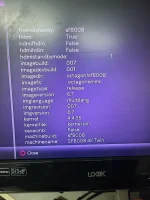
Just to add, you say MovieSelection is an old version, but all of my boxes were flashed with the previous version 6.7 007 as per attached image, this is the image that provided the backup in slot1 and I am doing the fresh flash into slot 2
 

Attachments

  • 20250428_182445.webp
    20250428_182445.webp
    175.7 KB · Views: 2
Not sure how you are getting there, but this is the issue….
297.858848> 10:32:57.8616 File "/usr/lib/enigma2/python/Screens/MovieSelec tion.py", line 7, in <module>
< 297.859309> 10:32:57.8621 from Components.DiskInfo import DiskInfo
< 297.859578> 10:32:57.8623 ModuleNotFoundError: No module named 'Components.D iskInfo'

The current version of MovieSelection doesn,t call DiskInfo, so this is an old version.
So you online flash, boot and crash without getting to the restore wizard?
Just to add, you say MovieSelection is an old version, but all of my boxes were flashed with the previous version 6.7 007 as per attached image, this is the image that provided the backup in slot1 and I am doing the fresh flash into slot 2.

Is there a way for me to update MovieSelection, so that I can create a backup that will not crash the new flash? I have looked through all of the installed plugins to remove but it is not there?
Thanks for your time in helping to sort my issue.
 
OK .... 1st check here....
Blue button, ViX, BackupManager, Menu, Yellow button (Choose files) ---> check that usr is not ticked, usr/lib is not checked and all the way upto usr/lib/enigma2/python/Screens/MovieSelection.pyc
It maybe that only the very last entry is ticked... but that is the likely way that MovieSelection is being restored to old version.
 
OK .... 1st check here....
Blue button, ViX, BackupManager, Menu, Yellow button (Choose files) ---> check that usr is not ticked, usr/lib is not checked and all the way upto usr/lib/enigma2/python/Screens/MovieSelection.pyc
It maybe that only the very last entry is ticked... but that is the likely way that MovieSelection is being restored to old version.
I have followed your steps and there is nothing checked for any of the files in any of the directories.
Just a side question is there an issue with Rytec sources today, non of my Rytec are updating, since I reflashed I noticed but my other boxes aren't updating either, only my iptv source is downloading?
 
OK .... 1st check here....
Blue button, ViX, BackupManager, Menu, Yellow button (Choose files) ---> check that usr is not ticked, usr/lib is not checked and all the way upto usr/lib/enigma2/python/Screens/MovieSelection.pyc
It maybe that only the very last entry is ticked... but that is the likely way that MovieSelection is being restored to old version.
Thx for all your help, I started from scratch and redid my setup on one box then Folezilla'd the backup to my other boxes, just had to remember to change the hostname on each of them and reboot my router. Non of them are receiving the Rytec data still. Thx again appreciated.
 
So you are now booting up OK?
Haven't seen any issues with EPG data on my main box...... but to be honest been busy on OE-A changes
 
So you are now booting up OK?
Haven't seen any issues with EPG data on my main box...... but to be honest been busy on OE-A changes
Yes, Thx, created a clean install and new backups, long winded because I have my own button settings and mapped all of my channels, fixed Ip's and hostnames, different Video settings and display areas between boxes a few plugins that are from external sources(Kiddac) etc, 3 boxes done 1 to do, but needed doing.
Thankyou for giving me some time.

p.s The Rytec Files are back updating this morning.
 

OpenViX Feeds Status

Back
Top