Superb quality and spec AB-Com PULSe 4K SE. Crazy offer! Only £99! FREE UK DELIVERY! 4K UHD, Enigma 2, Multiboot 4 images & more!...
Superb quality and spec AB-Com PULSe 4K Rev II Twin Satellite tuner only £149! FREE UK DELIVERY! 4K UHD, Enigma 2, SATA HDD facility, Multiboot 4 images & more!...

[VU+ Duo4K SE] Deleted items / Trash can ?

Aust-VAST

Forum Supporter
Donated Member
Joined
Jan 4, 2018
Messages
95
Reaction score
4
Points
8
Location
Central NSW Australia
What type of support thread are you creating?
Support question
What OpenViX Image build number are you using?
6.7.008
Have you tried re-flashing WITHOUT settings restore?
YES
Have you tried re-flashing WITH a settings restore?
YES
Hi all,

As we have abundant storage space (new Seagate 4TB drives in some) and I always like to leave deleted files for a year mostly (about 40% free disk).

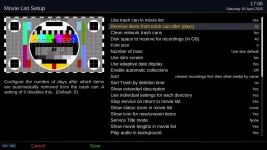
Is there a way to leave the files there, greater than 31 days?
1745046774846.webp
 
The real question is why are you putting something in the trash can if you don't want it deleted?
 
Just set the delete days option to zero and manually delete them from the Trash whenever the mood strikes you!
 
Files are only deleted if you are low on space.
Ah, that would explain why when I was testing with a small disk, using '0' (disabled) didn't work and that set in my memory.

Have two boxes on '0' and as below now and will occasionally make room with a delayed deletion session. Thanks all. :)

Just set the delete days option to zero and manually delete them from the Trash whenever the mood strikes you!

Well, on the random occasion I have gone searching for a particular documentary or event, only to realise that it 'was there, but now deleted' oh well.

The real question is why are you putting something in the trash can if you don't want it deleted?
 
G'day all from the 'other side' in planetary terms.

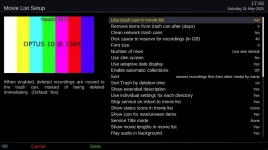
Just noticing all three boxes in regular use have the movie list trash can as below, but at the roll over of the month all files were deleted.

What am I doing wrong here, all these years?

All drives have more than 30% free space and in the example below it is 1.58TB available.

1748677493012.webp
 
Just set the delete days option to zero and manually delete them from the Trash whenever the mood strikes you!
@Aust-VAST, this info is false.

If you set the days to zero, all files in the trash will be deleted directly irrespective of other settings.


Also anything past its date will be deleted directly.

Remaining files will be deleted based on disk space.

The task is called by RecordTimer when preparing a recording.
 
@Aust-VAST, this info is false.

If you set the days to zero, all files in the trash will be deleted directly irrespective of other settings.


Also anything past its date will be deleted directly.

Remaining files will be deleted based on disk space.

The task is called by RecordTimer when preparing a recording.
hmmmm... bit harsh maybe, @Huevos?

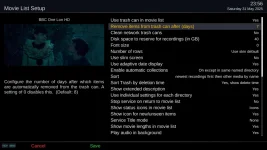
I gave the advice in good faith based on the help text in the settings menu. Maybe "A setting of 0 disables this." doesn't mean what I inferred from the text? As in, setting 0 disables deletion. See screenshot:

trashcan_settings.webp
 
If you set the days to zero, all files in the trash will be deleted directly irrespective of other settings.
Interesting, as I'd assumed that 0 meant there would be no deletion (never looked into it as I want thing to hang around for a few days).

This means that "Use trash can in movie list" == Yes with a setting of 0 would be the same as "Use trash can in movie list" == No. Which seems to be rather odd.
 
Apols @Aust-VAST - I had assumed (wrongly) that "A setting of 0 disables this" meant that Trashcan items were retained indefinitely. After @Huevos' comment on my fake news, I set my own Trashcan to 0 and after boot up this morning all items were deleted. It too, seems odd to me that setting to 0 basically has the same function as not using the Trashcan.
 
I wasn't being harsh. I just wanted to be clear, and I don't think the texts in the setup are. Think about a better description text.
 
Interesting, as I'd assumed that 0 meant there would be no deletion (never looked into it as I want thing to hang around for a few days).

This means that "Use trash can in movie list" == Yes with a setting of 0 would be the same as "Use trash can in movie list" == No. Which seems to be rather odd.
Not quite. If you use "Remove item from trash after (days)" == 0, the file will be moved to the TrashCan folder and survive until the next RecordTimer is being prepared, whereas "Use trash can in movie list" == No means the file will be deleted directly and not be sent to the TrashCan folder.
 
I wasn't being harsh. I just wanted to be clear, and I don't think the texts in the setup are. Think about a better description text.
Maybe 0 should mean retain indefinitely? Otherwise, 0 has the same function as no Trashcan.
 
Not quite. If you use "Remove item from trash after (days)" == 0, the file will be moved to the TrashCan folder and survive until the next RecordTimer is being prepared, whereas "Use trash can in movie list" == No means the file will be deleted directly and not be sent to the TrashCan folder.
I had figured that it wasn't exactly as no Trashcan, as I had tested the effect this morning, but functionally 0 means don't keep the contents.
 
I had figured that it wasn't exactly as no Trashcan, as I had tested the effect this morning, but functionally 0 means don't keep the contents.
Yes, and if I delete something by accident I can recover it.
 
Ok, I realise that if you don't want to delete something (now or soon or in x days) you can just leave it in the movie folder forever or until you get low on disk space, but the Trashcan is handy for "tidying away" the clutter of recordings that you probably won't watch again but someone else in the household might just want to because they saw it mentioned in a review or on "Gogglebox" or whatever. I usually set the value to 7, but I thought that using 0 to keep indefinitely would be useful. Your scenario of recovering a recording deleted by accident only gives you a window of time until the next recording takes place. I'd vote for whatever option users found most useful overall.
 
max=31,

Do you really want to keep stuff in the dustbin longer that this?

To me it sounds like want to use the trash can as a storage folder.
 
Well, I just use the Trash as temporary storage for 7 days, then it's gone. But, it might be useful for some users to have an option to keep for longer than 31 days if that's the way they like to organise their files. Personally, I use a 1TB main drive on the receiver and I archive mostly music programmes to my NAS. Over the past 10 years I don't think I've ever used more than 60% storage of 1TB on my main receiver even when I had dedicated folders for various programme genres prior to the "collections" option being introduced.
 

OpenViX Feeds Status

Back
Top