Superb quality and spec AB-Com PULSe 4K SE. Crazy offer! Only £99! FREE UK DELIVERY! 4K UHD, Enigma 2, Multiboot 4 images & more!...
Superb quality and spec AB-Com PULSe 4K Rev II Twin Satellite tuner only £149! FREE UK DELIVERY! 4K UHD, Enigma 2, SATA HDD facility, Multiboot 4 images & more!...

[Zgemma H7] Backup is too heavy?!?

Ale a

New member
Joined
Jan 4, 2026
Messages
14
Reaction score
0
Points
1
What type of support thread are you creating?
Support question
What OpenViX Image build number are you using?
6.8.002
Have you tried re-flashing WITHOUT settings restore?
YES
Have you tried re-flashing WITH a settings restore?
YES
Hi, I recently uploaded this image to my Zgemma H7 and Octagon SF8008, both versions 6.7.001 and 6.8.002, and I don't understand the backup that's done with vix>>image management... (I'll start by saying I haven't changed any settings.)
1) zGemmaH7 6.7 & 6.8 performs full backups of 7-800MB... why??? (4 times more than normal?!)
2) Octagon, 6.7.001 slot1, I did two full backups, and one was 200MB and the other 400MB .
3) Octagon, 6.8.002 SD-slot5, the backup it does is only Recovery type (normal 214MB)....but why Recovery??
help ;))
regards, Ale

ciao, ho da poco messo questa image su Zgemma H7 e octagon SF8008,sia versione 6.7.001 che 6.8.002 e non capisco il backup che viene fatto con vix>>gestione immagine....(premetto che non ho modificato le impostazioni)
1) zGemmaH7 6.7 & 6.8 mi esegue backup completi da 7-800MB..... perché??? (4 volte più del normale?!)
2) octagon, 6.7.001 slot1, ho fatto due backup completi, e son venuti uno di 200mb e l'altro da 400mb .
3) octagon, 6.8.002 SD-slot5, il backup che fa e' solo di tipo Recovery (214mb normale).... Ma perché Recovery??
aiuto ;))
saluti ale
 
Hi, I recently uploaded this image to my Zgemma H7 and Octagon SF8008, both versions 6.7.001 and 6.8.002, and I don't understand the backup that's done with vix>>image management... (I'll start by saying I haven't changed any settings.)
1) zGemmaH7 6.7 & 6.8 performs full backups of 7-800MB... why??? (4 times more than normal?!)
2) Octagon, 6.7.001 slot1, I did two full backups, and one was 200MB and the other 400MB .
3) Octagon, 6.8.002 SD-slot5, the backup it does is only Recovery type (normal 214MB)....but why Recovery??
help ;))
regards, Ale

ciao, ho da poco messo questa image su Zgemma H7 e octagon SF8008,sia versione 6.7.001 che 6.8.002 e non capisco il backup che viene fatto con vix>>gestione immagine....(premetto che non ho modificato le impostazioni)
1) zGemmaH7 6.7 & 6.8 mi esegue backup completi da 7-800MB..... perché??? (4 volte più del normale?!)
2) octagon, 6.7.001 slot1, ho fatto due backup completi, e son venuti uno di 200mb e l'altro da 400mb .
3) octagon, 6.8.002 SD-slot5, il backup che fa e' solo di tipo Recovery (214mb normale).... Ma perché Recovery??
aiuto ;))
saluti ale
Because most of this code was added originally for non multiboot boxes, and needed the ability to be able to perform a usb flash.
When the original multiboot boxes were added (e.g. hd51) the ability to usb flash was retained and boxes like the h7, sf8008 and osmio4k boxes have a complex restore which means backing up the whole eMMC.

The way that multiboot boxes are now supported, there is in my view no reason to run an image backup, when providing you run a settings backup (which is the default setting for ImageManager flash), you can flash to an alternative slot, restore settings and have a perfect running image with all your settings and plugins……. Without loss of the original image.
 
....
The way that multiboot boxes are now supported, there is in my view no reason to run an image backup, when providing you run a settings backup (which is the default setting for ImageManager flash), you can flash to an alternative slot, restore settings and have a perfect running image with all your settings and plugins……. Without loss of the original image.
I see your point ;)))
 
The way that multiboot boxes are now supported, there is in my view no reason to run an image backup, when providing you run a settings backup (which is the default setting for ImageManager flash), you can flash to an alternative slot, restore settings and have a perfect running image with all your settings and plugins……. Without loss of the original image.
Although that requires a full flash, reboot, restore, reboot to work.
An image backup + on-line update might be quicker.
 
'tis true! But to do that you have to backup first to an image backup that takes 15 minutes and save the large file to the hard drive or memory stick. If a clone could somehow take place it would cut out that middleman. This, I expect is why birdman made his comment (not wanting to put words in his mouth obviously).
 
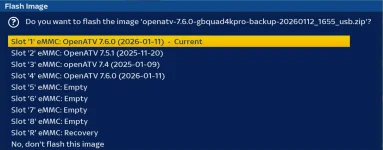
The image backup process creates a complete backup of the whole flash memory. How do you then flash it into one segment of it? I don't know if there is function to backup an image on a USB flash drive. If there is, is it just one slot/directory or the whole flash drive?

An image backup of just the image in a chosen slot/directory/partition would be the ideal solution. Until them a settings backup will have to do. But that won't solve the issue of people wanting to flash an image that has no plugin server.
 
The image backup process creates a complete backup of the whole flash memory. How do you then flash it into one segment of it? I don't know if there is function to backup an image on a USB flash drive. If there is, is it just one slot/directory or the whole flash drive?

An image backup of just the image in a chosen slot/directory/partition would be the ideal solution. Until them a settings backup will have to do. But that won't solve the issue of people wanting to flash an image that has no plugin server.
Yes it is full image backup, As just normal user I get choice of which slot because thats what it is saying I don't know about one segment.
But i can backup image on current slot and restore to any other slot. Or are there limitations on older recievers as twol mentioned.
Capture.webp
 
If a clone could somehow take place it would cut out that middleman. This, I expect is why birdman made his comment (not wanting to put words in his mouth obviously).
It could also just run in the background (since it could just be an rsync to an inactive slot) with just a pop-up at the end reporting success/(failure?).
 
We have different implementations of multiboot, code should handle all of them.

@,urie you are showing the flashing process. We are talking about creation of an image backup. On my duo 4k, an image backup will backup the whole flash memory, i.e all 4 directories . How does the 4 images then fit into one directory and strip out the 3 i don't want to be flashed.
 
that is an image backup of slot1 i flashed to slot4 and the image is only 181MB
 
Your screenshot quite clearly shows you are at the flashing stage, not backing up. Your receiver has hardware multiboot (I.e it has separate partitions), so that probably explains why it's working. However, you have posted screenshots from ATV. Please confirm an image backup also works in same way on ViX.
 
but you can flash image backup to any slot
The image backup process creates a complete backup of the whole flash memory. How do you then flash it into one segment of it? I don't know if there is function to backup an image on a USB flash drive. If there is, is it just one slot/directory or the whole flash drive?

An image backup of just the image in a chosen slot/directory/partition would be the ideal solution. Until them a settings backup will have to do. But that won't solve the issue of people wanting to flash an image that has no plugin server.
The only time the complete eMMC is backed up for usb recovery is for Osmio4K , sf8008 (and clones) and hd51/h7, the rest backup current kernel, root and in some cases special files needed for that receiver e.g. zgemma
 
We have different implementations of multiboot, code should handle all of them.
I was just thinking that, in a multi-boot system, it runs off a selected root file-system. There are other selectable root filesystems.
So all you need to do(?) is mount another one of those selectable filesystems somewhere and rsync the current one into it.
 
Interesting thread. Seems the current image backup system for OpenVix is a bit of a mess?

Has anyone considered just using a set of customized scripts to backup a slot or maybe clone what you want, regardless of image distro? Probably easy enough to do this for one receiver model. Might be a bit more challenging to do for several receiver models.
 
The Backupsuite plugin uses a set of scripts to backup a single image or slot. The plugin is incompatible in its present form for OE Alliance images. Plus it is a bit dated.

The SF8008 Partition Structure is set like this:
(Uses single partition (mmcblk0p16) with subdirectories)
- linuxrootfs1 → Slot 1
- linuxrootfs2 → Slot 2
- linuxrootfs3 → Slot 3
- linuxrootfs4 → Slot 4

Kernel Partitions:
- Slot 1: mmcblk0p12
- Slot 2: mmcblk0p13
- Slot 3: mmcblk0p14
- Slot 4: mmcblk0p15

Attached Script Safety Features:
- Cannot overwrite currently running slot
- Confirmation prompts for destructive operations
- Read-only mounts when possible
- Automatic cleanup of temporary files

To test, unpack files and send them to /tmp
Use terminal:
cd /tmp
chmod +x *.sh


List slots:
./list_slots.sh

To Clone slots:
(Clone slot 3 to slot 4)
./clone_slot.sh 3 4

Backup a slot:
./backup_slot.sh [SLOT_NUMBER] [OUTPUT_DIR]
Example
./backup_slot.sh 3 /media/usb/image-backups

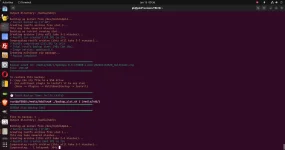
The attached scripts are just a starting point. Clone a slot, backup a slot works for me. The scripts seem to work across different enigma2 distros.
 

Attachments

The attached scripts are just a starting point. Clone a slot, backup a slot works for me. The scripts seem to work across different enigma2 distros.
but are very specific to your particular type of multiboot.

They will not work with USB multi-boot.

Running dd to copy one device file to another isn't going to work for a USB multi-boot, as there all of the slots are on the same device.

Probably much better (in that it's more general) is to mount the source and target slots somewhere then rsync (-aWHiv --del) the source to the target.

And, of course, the whole thing should be driveable from within the Vix menus, including reporting back what has happened.
 
Have you ever heard of a concept or a bare bones design. That's what it is at this point....An idea that works....Well...sorta, right???

You're absolutely right that these are SF8008-specific and won't work with USB multiboot - that's by design. Different hardware needs different tools.

However, you might want to actually read the scripts before critiquing them:
Does use rsync for rootfs (with -aAX flags, even better than your suggestion)
dd is only for separate kernel partitions, where it's appropriate
Vix/OpenPLi menu integration (the Enigma2 plugin) with full progress reporting is next or simply a personal plugin for myself.
The clone_slot.sh script is ~340 lines with proper error handling, progress indicators, safety checks, and uses the exact rsync approach you're suggesting. Perhaps give it a read?

As for USB multiboot - you're welcome to adapt the approach. The plugin architecture that is shown could work, you'd just need different backend scripts for USB-based systems.


Get one thing working perfectly, then expand. .Gotta start somewhere.

Bottom line:
Read the code.

Note:
If you backup the slot you are in using the earlier scripts, then it tries to backup everything! Plus there is an useless loader script. Progress and time along with backing up the current slot is fixed with attached scripts.


command-line-backup-2026-01-15 00-36-45.webp
 

Attachments

OpenViX Feeds Status

Back
Top