Superb quality and spec AB-Com PULSe 4K SE. Crazy offer! Only £129! FREE UK DELIVERY! 4K UHD, Enigma 2, Multiboot 4 images & more!...
Superb quality and spec AB-Com PULSe 4K Rev II Twin Satellite tuner only £179! FREE UK DELIVERY! 4K UHD, Enigma 2, SATA HDD facility, Multiboot 4 images & more!...

Plugin LCD4linux

@Huevos , If it's not too much trouble, please contact @MrServo he responded to my request to fix the L4L plugin on the GitHub website (I'm attaching the link), Thank you in advance for your response!
 
Last edited:
@Huevos I'd like to ask you if a solution has been made regarding the LCD4Linux plugin so that it displays correctly on the OpenViX image. If so yes, what is it? Thank you in advance for your response
 
LCD4linux works perfectly here on vu duo 4K SE.
 
@bellejt You probably didn't read this thread very carefully post #13
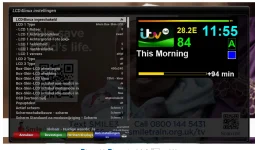
so you can see what the problem is it...Can't you see from the screenshot that not all the icons fit?
 
Last edited:
in #13 settings are to high .Here it is 400x240 Intern box skin LCD
 
@bellejt You probably didn't read this thread very carefully post #13
so you can see what the problem is it
See post #18. The list is the same size as all other screens. The problem is in the plugin. That image is not scalable. I am not redesigning the skin because a plugin does not work properly.
 
it is not about the icons but the screen size.
 
See post #18. The list is the same size as all other screens. The problem is in the plugin. That image is not scalable. I am not redesigning the skin because a plugin does not work properly.
@Huevos That's all I wanted to hear: will you be redoing anything or not? Now you've given me a complete answer. Thank you
 
it is not about the icons but the screen size.
@bellejt The Vu+Duo4KSE receiver has a Box-Skin-LCD size of 480x320 and is configured for this size, if possible show me a screenshot of the L4L plugin settings as I have shown in the post #1
 
@bellejt Please give me a link where I can download this plugin for OpenViX image because I also have the same version but on a completely different side. Everything shows as if the sides need to be swapped from left to right and right to left when open the plugin settings...Although I downloaded this plugin from the feed
 
it should be in the feeds but you will have to remove it first after saving your config from etc/enigma2 to PC
 
So I downloaded the plugin from the feed, but on the other hand, everything is displayed in the plugin settings. I have the plugin settings on the right side, and you have the plugin settings on the left side. That's why I say it's as if the windows need to be swapped from left to right and from right to left...You can see this in the screenshot of post #15
 
if I make changes I do them on my computer .Set change ,save and double click on image and you directly see the LCD on your screen.I always keep an original in other directory. I just make a permanent shortcut on desktop :
http://x.x.x.x/lcd4linux/config where x.x.x.x = ipaddress box
 
if I make changes I do them on my computer .Set change ,save and double click on image and you directly see the LCD on your screen.I always keep an original in other directory. I just make a permanent shortcut on desktop :
http://x.x.x.x/lcd4linux/config where x.x.x.x = ipaddress box
I know all these and I do the same...You Try deleting the plugin and reinstall it again from the feed and you'll see the difference
 
now I see what you mean that the images are reverst on the screen. Checked settings and cannot find anything that changes that but still the size is to large.Change it to my size and should be oke
 
now I see what you mean that the images are reverst on the screen. Checked settings and cannot find anything that changes that but still the size is to large.Change it to my size and should be oke
I'm very glad that in the end you understood me, changing the size doesn't do anything the icons are still not fully visible...The problem is with the skin as MrServo wrote
 

OpenViX Feeds Status

Back
Top