Superb quality and spec AB-Com PULSe 4K SE. Crazy offer! Only £129! FREE UK DELIVERY! 4K UHD, Enigma 2, Multiboot 4 images & more!...
Superb quality and spec AB-Com PULSe 4K Rev II Twin Satellite tuner only £179! FREE UK DELIVERY! 4K UHD, Enigma 2, SATA HDD facility, Multiboot 4 images & more!...

[GiGaBlue UHD UE 4K] Front panel OSD

Robgh

Member
Joined
Sep 26, 2024
Messages
64
Reaction score
4
Points
8
What type of support thread are you creating?
Support question
What OpenViX Image build number are you using?
6.9.003
Have you tried re-flashing WITHOUT settings restore?
NO
Have you tried re-flashing WITH a settings restore?
NO
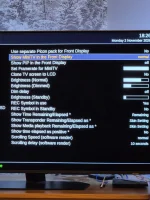
Since I basically had to start afresh with my Gigablue box, ie new disc and making sure all was well etc. It is running ok, but now the front panel OSD does not show the picons for the channel I am watching. It used to show BBC1, CH5 etc, but now all it shows is HD DD in the top right corner of the front display.
I've tried changing settings to other options but all I can get is the actual video of what is on the tv, no channel numbers etc .
Any ideas please on how to get them back .

Thanks
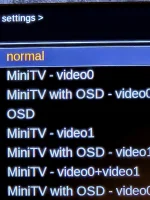
20261102_182514.webp
 

Attachments

  • 20261102_182654.webp
    20261102_182654.webp
    167.9 KB · Views: 8
Menu/setup/userinterface/frontpaneldisplay ……..skin , choose with picons…….settings, clone tv No
 
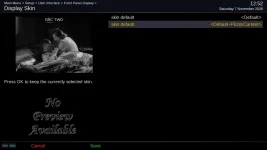
Thanks but for some unknown reason, I get the emergency skin which is OE, even though I have the default skin selected.
 
Just a though, as I have the setting to use picons, where are they located, as I'm thinking that there may not be any to use. But then again they are used on the guide listings.
 
Which skin are you using for the front panel please? You will find it in the following menu:
Menu > Setup > User Interface > Front Panel Display > Skin

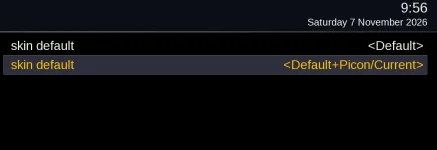
Please post a screenshot instead of a picture. ( Link for screenshots are in my signature if you need it). On my Duo 4k, I have two called "skin default"
 
Yes please I will need to know how to do a screenshot. Sorry I couldn't see your signature on my phone
 
Last edited:
 
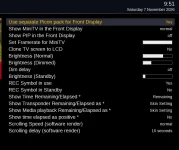
As you see, 2 screenshots, 1 of Front Panel settings, and 1 of the Front Panel Display skin showing the default skin, but on the actual display, it shows the emergency skin.
I hope these are sufficient for you
 

Attachments

  • 1_0_19_18E3_7FD_2_11A0000_0_0_0_20261107095137.webp
    1_0_19_18E3_7FD_2_11A0000_0_0_0_20261107095137.webp
    78.1 KB · Views: 8
  • 1_0_19_18E3_7FD_2_11A0000_0_0_0_20261107095624.webp
    1_0_19_18E3_7FD_2_11A0000_0_0_0_20261107095624.webp
    15.1 KB · Views: 8
You are using a separate set of picons for the LCD screen, where are they? What folder have you put them in?
Am I?? I didn't know I was, as I thought that they would be included in the image.
I downloaded a picon ipk file from github, but I don't know what to do with them or where to put them.
All I remember from about 6 or 7 years ago I had them on a usb stick plugged into the back of the box. is that still the case
 
Change the option to use a separate pack back to no, then restart. (I'm sure it should use the default picons if separate folder is not present- but let's play safe)

Sorry to ask, did you manually change/delete any files from your receiver?

Are the picons on the main TV screen working?
 
Ok
Oops, yes it does,, and you are the first person to tell me, doh!

No as far as I know I haven't deleted any files from the receiver, as I would be wary about that.

I changed 'Use separate picons' to NO
Front Panel to OSD
Nothing showing so I rebooted, but still nothing showing on the FSD
Yes the picons are working fine in the guide.

Thanks
 
picons go in /usr/share/enigma2/picon and 220x132 pixels, RGB PNG
 
I'll connect my GB UE 4K and check if I have any issues. I don't understand what you mean by "Front Panel to OSD". Please re-phrase


Can you please issue these commands and post back the results. Please do one at a time. Better to copy and paste instead of typing.

df -Th

find / -type d -name picon

opkg list-installed | grep picon


If you need a tutorial on Putty, see this thread.
 
The picons are showing on the front LCD for me. The screen is not that big, so it is just the picon with no other information.

One issue I did find is that most of picon packs on the plugin server won't fit on internal flash memory. They are too big. Best to use a flash drive or SSD hard drive. They must be in in ext file system otherwise they will not be offered as a usable location.


Code:
root@gbue4k:~# df -Th
Filesystem           Type            Size      Used Available Use% Mounted on
/dev/root            ext4          771.4M    427.0M    288.4M  60% /
devtmpfs             devtmpfs      434.2M     96.0K    434.1M   0% /dev
tmpfs                tmpfs          64.0K         0     64.0K   0% /media
/dev/mmcblk0p1       vfat            3.0M      8.0K      3.0M   0% /boot
tmpfs                tmpfs         442.4M      8.5M    433.9M   2% /var/volatile
root@gbue4k:~#


Code:
root@gbue4k:~# find / -type d -name picon
/picon
root@gbue4k:~#


Code:
root@gbue4k:~# opkg list-installed | grep picon
enigma2-plugin-picons-srp.220x132-190x102.light.on.transparent - 28-2e-19-2e-13e-freeview-nld-ziggo-quad-ziggo-freeview-2026-09-13--19-39-59
oe-alliance-picon-feed - 1.0-r0
root@gbue4k:~#
 

Attachments

  • 1_0_1_10BF_1044_233A_EEEE0000_0_0_0_20261107125238.webp
    1_0_1_10BF_1044_233A_EEEE0000_0_0_0_20261107125238.webp
    35.1 KB · Views: 2
picons go in /usr/share/enigma2/picon and 220x132 pixels, RGB PNG
There are no picon files in that folder on my box
Also when I find out how to run Putty on my Linux mint machine, I do as you say.
I do have it installed but don't know how to run it. And yes I have used google but all the links so far tell me how to install it and not run it
 
Please ignore the post about /usr/share/enigma2/picon location.

I assumed you were using windows, sorry. You don't have to use Putty. Use the Terminal client on your OS to connect and issue the commands on your receiver.
 
Please ignore the post about /usr/share/enigma2/picon location.

I assumed you were using windows, sorry. You don't have to use Putty. Use the Terminal client on your OS to connect and issue the commands on your receiver.
Sorry for being a bit .......... but how do I connect to the reciever from a linux terminal, because when I do the ip address it returns command not found. I've also tried sudo ip address with same result

Ok it hit me and I am using the terminal of the reciever on my computer
 
Last edited:

OpenViX Feeds Status

Back
Top