Superb quality and spec AB-Com PULSe 4K SE. Crazy offer! Only £129! FREE UK DELIVERY! 4K UHD, Enigma 2, Multiboot 4 images & more!...
Superb quality and spec AB-Com PULSe 4K Rev II Twin Satellite tuner only £179! FREE UK DELIVERY! 4K UHD, Enigma 2, SATA HDD facility, Multiboot 4 images & more!...

Gigablue 4K receivers and USB tuners

It seems PnP blindscan was added to the dvb.ko when they fixed usb tuners:
Here is output from OE Alliance image without blindscan plugin installed, but with gbbs installed in /usr/bin:

root@gbue4k:~# /usr/bin/gbbs 1100 2150 0.25 45 1 1 9
OK VERTICAL 11768000 8748000 DVB-S2 INVERSION_AUTO PILOT_AUTO FEC_5_6 8PSK ROLLOFF_AUTO
OK VERTICAL 11795000 8747000 DVB-S2 INVERSION_AUTO PILOT_AUTO FEC_5_6 8PSK ROLLOFF_AUTO
OK VERTICAL 11821000 34276000 DVB-S2 INVERSION_AUTO PILOT_AUTO FEC_9_10 16APSK ROLLOFF_AUTO
OK VERTICAL 12023000 2274000 DVB-S2 INVERSION_AUTO PILOT_AUTO FEC_3_4 QPSK ROLLOFF_AUTO
OK VERTICAL 12141000 29993000 DVB-S2 INVERSION_AUTO PILOT_AUTO FEC_3_4 8PSK ROLLOFF_AUTO
root@gbue4k:~# init 3
root@gbue4k:~#

Build gbbs from sources on github.
Add gbbs to meta-gigablue.
Add gbbs to the blindscan plugin and it should work for everyone with silabs dvb PnP tuner

Although this thread is about USB tuners, the following commit is for the blind scan for the PNP tuners.


USB tuners and blind scan will work in next ViX image.

Many thanks to el bandido for doing the work in tracing where the driver fault lay.
 
I have a GigaBlue UHD Quad 4K Pro (gbquad4kpro) running OpenViX 6.9.007, and I have a Sundtek DVB-T2 USB tuner that I would like to use with it.

I saw that the October 2026 gb7252 driver update (20261009.r0) fixed the vtuner issue and got Sundtek tuners working on the standard Quad 4K. On my Quad 4K Pro, the installed driver package is:
gigablue-platform-util-gb7252pro - 4.1.20+20261020.r0-r1

Before I install the Sundtek drivers on my receiver, could anyone confirm:
1. Does this gb7252pro (20261020.r0) driver include the exact same USB tuner / vtuner fix as the gb7252 update?

2. Is there any new information from Sundtek, or has anyone actually tested a Sundtek DVB-T2 USB stick on the Quad 4K Pro with this driver version?

3. Is it mandatory to install the Sundtek Control Center plugin, or will the tuner work without it (for example, by installing just the core Sundtek driver/installer script via SSH so Enigma2 sees it directly as a standard tuner)?

Thanks in advance for any confirmed test results!
 
I have tested the drivers on a GB Quad 4K and GB UE 4K, the Sundtek tuner worked fine. I am pretty sure your receiver will use the same updated drivers.

Sundtek didn't need to do anything to get the tuner to work. It was an issue with the drivers that has finally been resolved.

Most users install the control centre. It fetches and installs the drivers and adds some startup scripts to the receiver. If you are able to do this on your own, you don't need the control centre.

Thanks a lot for the info, maybe I will try it tomorrow.
 
Update with test results:
I went ahead and installed the latest Sundtek driver (2026-11-13) on my GigaBlue UHD Quad 4K Pro (gbquad4kpro) running OpenViX 6.9.007 with the gigablue-platform-util-gb7252pro - 4.1.20+20261020.r0-r1 driver.
Unfortunately, the vtuner issue is still present on the Quad 4K Pro (gb7252pro):
  • Hardware & Driver detection: The tuner (Sundtek MediaTV Digital Home III (EU)) is properly recognized, mediasrv is running, and it appears in OpenViX Tuner Configuration.
  • Direct signal lock test (mediaclient): When tuning directly via command line to a known working local DVB-T2 mux (562 MHz), the stick locks onto the signal immediately:

root@gbquad4kpro:~# /opt/bin/mediaclient -m DVBT2 -f 562000000 -b 8 -d /dev/dvb/adapter1/frontend0 && /opt/bin/mediaclient --readsignal=2 -d /dev/dvb/adapter1/frontend0
Using device: /dev/dvb/adapter1/frontend0
Tuning to DVB-T2 channel
Checking for lock:
. [LOCKED]

  • Enigma2 scan result: Despite the tuner locking onto the signal without issues, a full DVB-T2 service scan in OpenViX still returns 0 channels.
It looks like the October vtuner fix from gb7252 (20261009.r0) either did not make it into the gb7252pro (20261020.r0) driver, or there is still a compatibility issue between gb7252pro and Sundtek's userspace vtuner implementation.
Could this please be passed on to the GigaBlue driver team so gb7252pro gets the same working vtuner fix as the standard Quad 4K?
 
Please try using the control centre, it adds a script to the receivers startup process. If that still doesn't work, please send a PM to Sundtek, he may need to adjust something for your receiver. Sorry, I just remembered he had made an edit many months ago before the Gigablue drivers were fixed.

If you have another USB tuner that you can test, that will rule out the GB drivers.

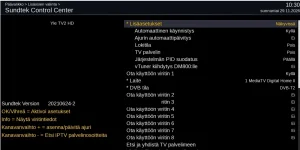
Thanks for the tip! I tested with Sundtek Control Center (set to DVB-T2 and autostart enabled + full reboot), and it still scans 0 channels. I don't have another USB tuner to test with at the moment, so I have now sent a PM directly to Sundtek as suggested.

{9F01B763-C50B-42B2-B770-12A52F686B05}.webp
 
Last edited:

OpenViX Feeds Status

Back
Top