Superb quality and spec AB-Com PULSe 4K SE. Crazy offer! Only £129! FREE UK DELIVERY! 4K UHD, Enigma 2, Multiboot 4 images & more!...
Superb quality and spec AB-Com PULSe 4K Rev II Twin Satellite tuner only £179! FREE UK DELIVERY! 4K UHD, Enigma 2, SATA HDD facility, Multiboot 4 images & more!...

mgcamd autostart does not work.

  • Thread starter Thread starter mbo
  • Start date Start date
Status
Not open for further replies.
M

mbo

Guest
Hi,
I setup the cam on Vix 2.1 and it runs ok. I set autorestart but every time the box or GUI restarts I need to go to the cam control and press "restart" for the cam to work again. Is there a problem with this? Can it be somehow fixed manually?

Thanks
 
personally i still dont see what the problem is with cams not auto starting, considering it takes seconds to start them manually.
 
its the principle pheonix :p it says "autostart" on the tin and ppl want it to auto start lol i know what you mean though it only takes seconds ... im not having a problem though just to let u know lol
 
In my case the problem is that if the power goes out ( it happens) and the box restarts without cccam I lose all the recordings of the day ( I have several) as the box cannot read the card without it.

G
 
point taken, i can see where you are coming from. i my self rely heavily on scripts such as the batch file i wrote to backup my pc's every night at 22:00 i'd be totally lost without that.
 
its the principle pheonix :p it says "autostart" on the tin and ppl want it to auto start lol i know what you mean though it only takes seconds ... im not having a problem though just to let u know lol

Hi,
that's the major problem and the second is wife.... rings me at work what to do, every time this happens. Oh well... :)
My box sometime freeze and the only option is the back power switch.

Cheers

EDIT: oh, wrong quote, should be about power dips...
 
I use a watchdog-script and put it in crontab. Now, every minute mgcam is checked if it is running, if yes, nothing happens, if not, it will be started ;-)

cu
KJ
 
I use a watchdog-script and put it in crontab. Now, every minute mgcam is checked if it is running, if yes, nothing happens, if not, it will be started ;-)

cu
KJ

Hi,
if I remember, the softcam panel actually "thinks" the cam is running, no "start" option is availible, just "restart" to get it running again.
Happy Easter.
Thanks
 
Hi,
any news on that one? I actually noticed that it is the problem with my n*s card, for i*deto card running on newcs there is no need to hit the cam restart button, works as it should.

Thanks
 
In 2.2 this problem is still around. CCcam starts up without a hassle, MGCamD does not. And I am no star at making scripts myself. If someone has a solution please attach the script that makes the autostart working or otherwise.
 
In 2.2 this problem is still around. CCcam starts up without a hassle, MGCamD does not. And I am no star at making scripts myself. If someone has a solution please attach the script that makes the autostart working or otherwise.

what happens ?, are you adding them to the autostart in the order you want them to start in ? you dont need scripts for ViX softcam manager, just the softcam
 
What happens is that the cam just won´t start automatically. I have to restart the mgcamd to get it working. And that every time after I start my Vu from standby or otherwise.,
 
What happens is that the cam just won´t start automatically. I have to restart the mgcamd to get it working. And that every time after I start my Vu from standby or otherwise.,

ANd you actually have the cam set to autostart?

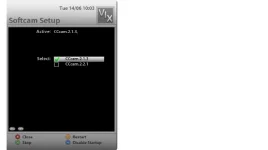
softcam.webp

Does it have the green tick next to it, as in the picture below? (forget about it saying CCcam, will be exactly the same for mgcamd)
 
Yes, I am not stupid and I know what a green tick means.... Plus: I am not the only one with this problem.
 
Yes, I am not stupid and I know what a green tick means.... Plus: I am not the only one with this problem.

Who said anything about you being stupid?! You've just prooved that you are arrogant and ignorant however.

I tried to help. There are a lot of users who do know very little, and hence it's better to ask simple questions, than assume you have already done this, and find out that you overlooked it after hours of trying to help you...

But instead, you get all hot headed and give attitude.

Your actions have been noted, thank you

Sent with Tapatalk
 
Hi!

I had the same problem.

Solution: Stop all cams and disable all autostarts. Reboot (not restart GUI!) your box. After that start your cam. After that enable autostart. Reboot your box and see if cam is autostarted.

cu
KJ
 
Who said anything about you being stupid?! You've just prooved that you are arrogant and ignorant however.

I tried to help. There are a lot of users who do know very little, and hence it's better to ask simple questions, than assume you have already done this, and find out that you overlooked it after hours of trying to help you...

But instead, you get all hot headed and give attitude.

Your actions have been noted, thank you

Sent with Tapatalk

Send with an HP laptop: I had no meaning to come over as hot headed or anything. I felt as being talked to as if I was six years old and that is years ago.... Excuses if I offended anyone.

Thanks to kleinerjunge everything with the cam is hunky dory now. Great and thanks!
 
Status
Not open for further replies.

OpenViX Feeds Status

Back
Top