Superb quality and spec AB-Com PULSe 4K SE. Crazy offer! Only £129! FREE UK DELIVERY! 4K UHD, Enigma 2, Multiboot 4 images & more!...
Superb quality and spec AB-Com PULSe 4K Rev II Twin Satellite tuner only £179! FREE UK DELIVERY! 4K UHD, Enigma 2, SATA HDD facility, Multiboot 4 images & more!...

Review and Guide to setup the Tenda W150M WiFi N 150mbps Wifibridge for all Receivers

Status
Not open for further replies.

Sicilian

The Boss
Staff member
Joined
Mar 22, 2010
Messages
29,869
Reaction score
332
Points
83
Website
www.world-of-satellite.com
I've been testing the Tenda W150M AP/Router/Wirelessbridge for the last month or so to test its stability and reliability as found the Vonets VAP11G can be hit and miss. Well I've got to say the Tenda W150M works as good as any 85MBPS Homeplugs! Its works absolutely superb and is a doddle to setup!
The Tenda W150M can be purchased from World-of-Satellite.co.uk http://www.world-of-satellite.co.uk...s-Point-Router-Wireless-wifibridge-WIFI-W150M

Its can either be powered by supplied USB lead or supplied 3PIN PSU. This is great for Satellite receivers such as the Blade BM7000S or the Technomate TM5402HD that only have one USB port, even better news for receivers like the TM500 Super that dont have any USB ports. This really is the WiFi Solution for ALL receivers! You won’t believe how good this WiFi Solution really is until you try it. Once configured you can easily tuck behind your receiver/set top box.

To setup the Tenda W150M follow the attached guide. You'll be amazed as to how easy it really it!
 

Attachments

Using the Tenda W150M in Client+AP mode makes is the perfect WIFI adapter/solution for receivers such as the VU+ Solo, Technomate TM5402, Blade BM7000S as they only has one USB port. The W150M does NOT require the use of any USB ports. So in affect its perfect for any receiver and allows you to use your valuable USB port's for other things such as USB HDD storage.
 
Hi,

Any idea what would the distance of this be ..
my father lives on the same road but approx 80m away.. he has no broadband...
Could i set up a dm500s at his house with this devise so he could use my internet
 
Hi,

Any idea what would the distance of this be ..
my father lives on the same road but approx 80m away.. he has no broadband...
Could i set up a dm500s at his house with this devise so he could use my internet

i think that might be a little far away

do a test if you have a wifi phone connect to yr wifi and walk down the street

when you disconnect that is the distance you can expect

my iphone i can connect no more than 2 houses away
 
if it were just your house a vast open space then his house you could easily rig something up to cover that distance however in the confines of a ordinary street you will be very limited due to the signal having to pass through walls and cars etc.
 
Hi,

Any idea what would the distance of this be ..
my father lives on the same road but approx 80m away.. he has no broadband...
Could i set up a dm500s at his house with this devise so he could use my internet

I think that would be too far through buildings etc...

I've been testing with router upstairs, front of house and Tenda W150M connect to receiver at the furthest point at rear of house, been excellent. Vonets adapters where always hit & miss, Tenda W150M is great :D
 
Ok guys thanks for all the replys..
When my kid comes home i will try the ipod toutch to get a very rough idea
 
I take it this will work on Sony Bravia TV's to get bbc iplayer working ? Instead of using sonys expensive USB Dongle
 
Another pointer, when you first connect to your receiver you need to restart the receiver to renew the ip address.

Ive followed it to the letter as far as I can see.

I assume the SSID of the bridge needs to match the SSID of your internet connection yes?

I will give it aniother go tonight as Im not sure Ive done a full restart since installing it.
 
Ive followed it to the letter as far as I can see.

I assume the SSID of the bridge needs to match the SSID of your internet connection yes?

I will give it aniother go tonight as Im not sure Ive done a full restart since installing it.

These bridges work with ANY receiver, if your not getting internet access its becuase you've not configured it correclty. Test on the pc that your configuring the adapter with to check you've configured it correctly.
 
Sorted - a reboot fixed it!

Working well...it also works on a normal $ly receiver for Anytime! ;)
 
Just got myself one of these from the sponsor, what a doddle to set up and a great piece of kit.. Thanks for the recommendation...:thumbsup::thumbsup:
 
Just bought two of these from the sponsor but cannot make it working.. I have followed the guide.. Tried various things . Still not working
My requirement is to configure this device in a way so that this can repeat the Wifi and also the ip box can connect to this device and get internet connection.
For that the mode Seems to be Client + AP Mode according to the manual . I am putting my settings below .

My Main router is Netgear WGR614v7 Firmware Version-V2.0.23_1.0.23
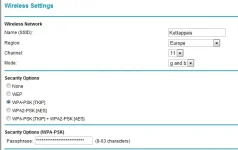
And the wifi settings are as follows
HomeRouterSettings.webp

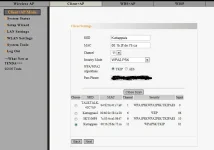
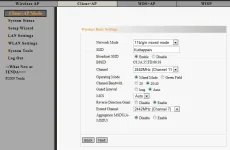
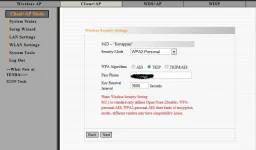
Tenda Client + AP Settings Below

Tenda-Page1.webpTenda-Page2.webpTenda-Page3.webp

somehow Internet is not being shared..

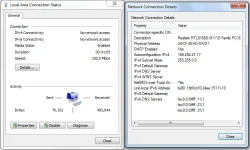
When I change the ipv4 settings so that ip can be automatically obtained form the device on computer. It's not getting a right IP..

NetworkStatus.webp

I have tried rebooting . Still no luck .. Any guidance will be appreciated .. I have been on this for hours now..
 
Last edited by a moderator:
Thanks Sicilian..

Sorry was out yesterday afternoon. Will be leaving for work soon.. I haven't connected the adapter to the receiver yet.. I connected the adapter to the pc and set it to receive ip automatically(DHCP) .. which it could not. Can try to connect to receiver if that's the way in the evening.. ..
 
Has anyone managed to set this up with a Spiderbox ? I tried yesterday but still not managed to sort it out. Trying to set it up in Client+AP mode
 
Status
Not open for further replies.

OpenViX Feeds Status

Back
Top