Superb quality and spec AB-Com PULSe 4K SE. Crazy offer! Only £99! FREE UK DELIVERY! 4K UHD, Enigma 2, Multiboot 4 images & more!...
Superb quality and spec AB-Com PULSe 4K Rev II Twin Satellite tuner only £149! FREE UK DELIVERY! 4K UHD, Enigma 2, SATA HDD facility, Multiboot 4 images & more!...

VU+ UNO help needed please

  • Thread starter Thread starter DeGea468
  • Start date Start date
So it looks like you need to rescan. You didn't by any chance disable "backgroundscan" did you?
silverfox0786 said he noticed the same channels having problems but he managed to fix it.. but i did what he suggested which didn't work.. I did a re-scan yesterday night when i saw the "service unavailable, Check tuner configuration" message after doing the telnet, but after the re-scan it still had the same message :confused:.. hmm i don't think so, where is that setting located so i can check?

Edit: I found it under 'Customize' and nope i didn't turn it off.
 
Last edited by a moderator:
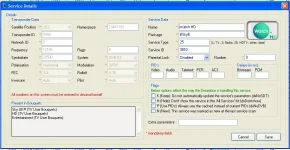
Doing a scan will cause dave and watch HD to not scan there is a problem there but if you use a premade bouquet like mine then dave and watch will show up
 
Doing a scan will cause dave and watch HD to not scan there is a problem there but if you use a premade bouquet like mine then dave and watch will show up

you can check pids in dbedit in the pid section click on edit on a channel to add em in manually
I couldn't find the PIDs, which bit does it get typed into 'Video' 'Audio' 'Teletext' 'PCR' or 'AC3'?

Untitled-2.webp

I've managed to get the two channels watchable again so i no longer get "service unavailable, Check tuner configuration" so some progress made, However i still have this issue.

IMG-20111103-00116.webp

I wonder why you was able to fix it but i can't :(
 
the pid section on the right is where its added

you can get them from king of sat
 
Thank you very much to silverfox0786, pheonix and Rob van der Does for taking the time to respond to the problem i was having. I'm happy to say its now fixed :D (Hope it stays fixed)

What i did for anyone else who experiences a problem like this or similar..

1, Was delete all epg related data from the epg folder and epg.dat

2, Downloaded the epg data from a different source in my case XMLTV (I usually use OPENTV) the purpose of this was to see if OPENTV was causing the issue.

My suspicions were right, once XMLTV was downloaded the issue of Watch HD and Dave HD not showing info in the epg was gone.

3, Delete all related epg data again from the epg folder and epg.dat

4, Re-download the usually data source that you use for me its OPENTV

5, Not sure if a restart is needed but i did it anyway and in my case the info for Watch HD and Dave HD was still there.

Note: only time will tell if this is a perm fix, Hopefully it is but for now its sorted.
 
Last edited by a moderator:
well i'm happy you got there in the end, and i hope you enjoy using your receiver.
 
well i'm happy you got there in the end, and i hope you enjoy using your receiver.
Me too, I'am very much enjoying it despite the few hick ups.

Is there any answers/suggestions to this,

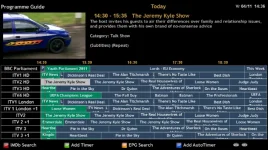
Q, How do i set the time along the top so that it increments by :00 and :30? like how it is on the sky epg.. like this...

12:00 - 12:30 - 13:00 - 13:30 - 14:00 - 14:30

at the moment its :45 and :15 like this

12:45 - 12:15 - 13:45 - 13:15 - 14:45 - 14:15

which is odd and a pain to see when programmes start and end its easier if its by :00 and :30.


Q, Also is there a way to change the format to 12 hours rather than 24 hour format? so it looks like this

12:00 - 12:30 - 1:00 - 1:30 - 2:00 - 2:30
 
Q1: This is about ViX-EPG (the graphical EPG)? If so, try changing the timescale (ViX-EPG --> Menu) to a larger value and see what happens.

Q2: No (and I'm glad it is 24hrs; how else could you tell 2.30 to be AM or PM, especially when scrolling further to the right?).
 
Q1: This is about ViX-EPG (the graphical EPG)? If so, try changing the timescale (ViX-EPG --> Menu) to a larger value and see what happens.

Yes its the EPG, Oh okay thank you i'll try that.

Does anyone who knows more/played with the timescale setting more know which value is best?

Q2: No (and I'm glad it is 24hrs; how else could you tell 2.30 to be AM or PM, especially when scrolling further to the right?).

Couldn't PM and AM be able to the 12 hour format?


To my previous issue, Nope not a perm fix unfortunately.. In 6 days there will be no epg info for Watch HD and Dave HD again so i didn't fix it totally.

Q, Is there a way to report bugs to OPENTV? cause with XLMTV there isn't a problem. if not hopefully they are aware of the problem and will fix it soon.
 
Yes its the EPG, Oh okay thank you i'll try that.
Does anyone who knows more/played with the timescale setting more know which value is best?
Well, that depends on your own preferences, and off course to the skin used.
Attached you see my lay out & settings.
 

Attachments

  • ViX-EPG Settings.webp
    ViX-EPG Settings.webp
    23.5 KB · Views: 22
  • ViX-EPG LayOut.webp
    ViX-EPG LayOut.webp
    59.4 KB · Views: 24
Thanks for the images.. i'll see what happens changing the time scale
 
Hello

I need some help on how to uninstall an ipk file? more specifically "enigma2-plugin-cams-mgcamd.1.35a_1.0-r3_mipsel.ipk".

Thanks in advance.
 
1: The easy way:
use DCC, find the package and click "deinstall";

2: the manual way:
Type in telnet
"opkg list"
This will list all installed packages. Find the package name of the item you want to remove then
type:
"ipkg remove package" (changing "package" to actual package name without the .ipk)
 
yes DCC is pc software it stands for Dreambox Control Center
 
Downloaded DCC and deleted the IPK i didn't need anymore, worked a treat.. Nice and easy :thumbsup:
 
Hi,

Everything has been fine then all of a sudden today everything has stopped working and i keep getting 'Tune Failed' on the channels i have tried.

I'm not sure what to do.. all i've done so far is restarted the receiver which didn't fix it.

Any suggestion?

Thanks in advance
 
Update 1:

When i went into the tuner setup, it had turned itself off :confused:, I set it back up and done a re-scan and i now have some channels working but now some are grayed out and not working and i get this message, 'Service unavailable, Check tuner configuration'

Channel 4 HD
Sky Living HD
GOLD
ITV2 HD
ITV3 HD
ITV4 HD
Sky Livingit

just to name a few..

have the grayed channels moved?
 
Update 2:

All sorted now :D

I re-sent the channel bouquets to the receiver and it sorted out all the grayed out channels.

Not sure what happened but if anyone encounters this don't panic ( i nearly did lol)

1) Setup your tuner(s) again - Setup > Service Searching > Tuner Configuration

2) Re-scan channels - Setup > Service Searching > Automatic Scan

3) Resend channel bouquets to receiver

Then your all sorted :thumbsup:
 

OpenViX Feeds Status

Back
Top