Superb quality and spec AB-Com PULSe 4K SE. Crazy offer! Only £129! FREE UK DELIVERY! 4K UHD, Enigma 2, Multiboot 4 images & more!...
Superb quality and spec AB-Com PULSe 4K Rev II Twin Satellite tuner only £179! FREE UK DELIVERY! 4K UHD, Enigma 2, SATA HDD facility, Multiboot 4 images & more!...

New skin: Simple Ten Eighty

And what for changes In skin Templates?
The user skin mod has your edit and overrides the skin and saved in settings backup so you don't need to edit the skin after updating the image.
 
The user skin mod has your edit and overrides the skin and saved in settings backup so you don't need to edit the skin after updating the image.
I understand that,but it's only for Changes in skin.xml? I have Changes in skin_templates.xml ,too. How can i save them in a User Override,too?
 
Hello @Orlandox, Thank you very much for the file and if I have a Vu+ Duo4KSE receiver, am I correct in understanding that this is the name that will be displayed on it?
 
I understand that,but it's only for Changes in skin.xml? I have Changes in skin_templates.xml ,too. How can insave them in a User Override?
Look at the XML file.


You save the screen name section in the XML file. Hopefully someone else can go into more details on how skin mods work.

Add your edited screen after QuitMainloopScreen

Ensuring </skin> stays at the bottom of the file.

Once done save a copy of your original edited files. Uninstall the skin and reinstall to see if it works.
yes, i understand that. but my question is, if the user skin only overrides the skin.xml or the skin_templates.xml too? so i would copy the changed lines from skin_templates.xml to the user skin, too?
 
@Orlandox, I have another question: would it be possible to have this included permanently in the new image, so that no further manual adjustments are needed? Thank you in advance for your response—if this is possible, please go ahead and do it... I would be very grateful
 
@Orlandox, I have another question: would it be possible to have this included permanently in the new image, so that no further manual adjustments are needed? Thank you in advance for your response—if this is possible, please go ahead and do it... I would be very grateful
S1080 skin is maintained by @Huevos . Only he can answer that.
 
You must take into account that BoxLogo.py is installed when E2-DarkOS skin is installed, it is not a part of OpenViX image. So I doubt that it will not be implemented to S1080.
 
BoxLogo renderer is installed with boxlogos package that is enforced as dependency in DarkOS skin. Any skin can use it if install the package. Logos itself are also part of that package.
 
yes, i understand that. but my question is, if the user skin only overrides the skin.xml or the skin_templates.xml too? so i would copy the changed lines from skin_templates.xml to the user skin, too?
Yes it will override any parts of the skin including templates
 
DimitarCC, in the DarkOS skin You really did everything beautifully and perfectly (y) It would be absolutely great will be if this could be done on this image!
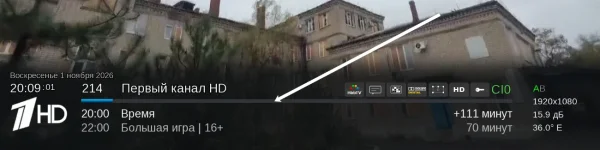
 
Please tell me how to correctly configure and add this line to the skin_display file for that it appears on the LCD display
 

Attachments

  • 43.webp
    43.webp
    44.3 KB · Views: 14
Last edited:
Which receiver? Has to be one capable of rendering it.
 
Same as in the parent. Compare the widgets. The one in the GUI uses a graphic. That is the only difference.
 
I'll take a look at that. Could you please tell me what to call this line? If I have an icon, can I call it “sprogress”? If so, how do I set it up as a PNG icon?
 

OpenViX Feeds Status

Back
Top