Superb quality and spec AB-Com PULSe 4K SE. Crazy offer! Only £129! FREE UK DELIVERY! 4K UHD, Enigma 2, Multiboot 4 images & more!...
Superb quality and spec AB-Com PULSe 4K Rev II Twin Satellite tuner only £179! FREE UK DELIVERY! 4K UHD, Enigma 2, SATA HDD facility, Multiboot 4 images & more!...

[VU+ Solo2] 760 build onwards

  • Thread starter Thread starter impoundeddog
  • Start date Start date
Mr. Mister was asked question at the beggining of this thread but never came back with answers, only want this sorting

Cheers
 
There is too much going on in this thread to keep up with.

It would be best for individual users to create their own bug report threads. please include which build exactly your using and how it came to be, IE a reflash with nothing restored, or a online update from xxx build etc. also please include any debug or crash logs to go with the report so that we have the best chance of chasing down your problems.
 
can anyone tell me the difference between a boot debug log and a serial boot debug log ?
have been asked to supply a serial boot debug log but cant get putty to connect to the solo2 ?
can anyone help with the com port settings ?
 
Well, different names for the same I would say.

I think the official name would be 'bootlog'; a log made from the start of the boot process.
As one needs a serial connection for that, names like 'serial log', 'RS232-log' (the name of the connector), 'Putty-log' (the name of a much used program for that) etc are being used.

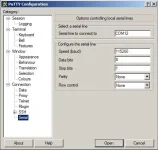
See screenshot for settings. Be aware that the COM-port number can be different on your PC.
 

Attachments

  • Serial log settings.webp
    Serial log settings.webp
    20.8 KB · Views: 22
thanks rob, will give this a try tonight when i get home,
have been into device manager and the comm port on my pc is comm 1
 
ok a little bit further forward guys but still cant get into the box with serial lead ??

for some reason i missed rob van der does first post about the lan cable and hdd.

unplugged the lan cable and it has resolved the issue, the box no longer hangs
when i plug it back in the problem returns, so deffo a lan problem.
any further assistance appreciated
as i cant get to the boot log, debug log is attached

Dog.
 

Attachments

Debuglog starts when E2 starts, so that's after the boot (so when the issue is over).

Regarding LAN: please check if any (temporary) unavailable mounts are present in the mountmanager. If so just delete them and see if that helps.
 
only showing my internal hdd and usb stick in mount manager
media/hdd ext4 R/W
media/usb ext4 R/w
any further thoughts on the serial connection ?
 
Can you change usb to ext3 or even hdd and see if that makes any difference? Make sure both are different.
 
only showing my internal hdd and usb stick in mount manager
media/hdd ext4 R/W
media/usb ext4 R/w
That are the local mounts. LAN-mounts are in Menu --> Network --> Mounts (or so).


any further thoughts on the serial connection ?
Not really, assuming you made the correct settings.

You have the connection active at the moment you toggle the powerswitch of the box? As soon as E2 kicks in, the debuglog takes over (so no more in serial log).
 
Rob you are the man
my nas drive was in there and on the wrong ip address so not connecting.
should this not have been deleted on a fresh install with no backups used ?
anyway all sorted now and i have my solo2 back , thanks again Rob van der Does
this one been messing my head for a while now lol
 
Last edited by a moderator:
my nas drive was in there and on the wrong ip address so not connecting.
should this not have been deleted on a fresh install with no backups used?
Pretty sure an entry doesn't come in there by itself.
If you flash: no mount-entries are there.
If you don't restore and don't make an entry yourself, it stays empty.
So not sure who/what/when made an entry, but 'something' did.

Anyway: glad to see the issue sorted !
 

OpenViX Feeds Status

Back
Top