Superb quality and spec AB-Com PULSe 4K SE. Crazy offer! Only £99! FREE UK DELIVERY! 4K UHD, Enigma 2, Multiboot 4 images & more!...
Superb quality and spec AB-Com PULSe 4K Rev II Twin Satellite tuner only £149! FREE UK DELIVERY! 4K UHD, Enigma 2, SATA HDD facility, Multiboot 4 images & more!...

[VU+ Solo2] A few bugs with my solo2

  • Thread starter Thread starter stewartie4
  • Start date Start date
S

stewartie4

Guest
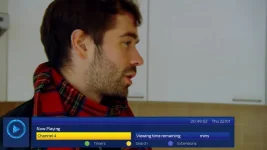
This has been a bug from I got the box about a year ago and seems to have been missed in subsequent updates. When watching back a recording in the "movie player" if you then open the EPG and choose a live channel to watch, the playback will stop and the box will switch to the channel as you would expect, however the infobar says "playing [channel name] remaining time [blank] minutes" where it would normally say the name of the recording and the remaining time if a recording is being played or now and next if a live channel is on.

If the stop button is pressed the box switches to the channel that was being watched when the recording was originally played. If the stop button is not pressed the box will eventually crash with the picture freezing and the sound continuing.

The issue seems to be that the box still thinks it is playing a recording when in actual fact it is playing a live channel.
 
Sorry to bump but this issue makes the box unusable someone must have come across this
 
No such issues on a Solo2 here.
Any extra plugins installed that might be causing this?
 
I confirm that I can re-create this....

Box: Solo2, clean usb install build 126 (with no setting restored) and just mgcamd 138 installed as well as TSMedia (no other plugins manually installed).

How I re-created it:

Viewed a previously recorded programme for a few minutes and then whilst this was being played back, I immediately pressed the EPG button (without pressing STOP first) so went directly from movie player to EPG list. From with EPG I selected a live TV channel to view (which of course interrupted the movie playback) and it started displaying this channel as you would expect.

However, the info bar that would normally display now & next didn't display now & next as expected and whilst viewing live TV this way the zap up/down doesn't work neither just displays the prohibited symbol when trying to zap channels. This happens with either BlueHD or default skin.

It looks like to me that live TV is actually being displayed through the movieplayer. I confirmed this by pressing STOP button whilst watching live TV this way and it went directly to movie list.

I don't know if I would call it a bug though because normally one would press the STOP button when finished viewing something via the movieplayer which then take you to movie list where you press EXIT and EPG and then select any live TV to view. This way works as you would expect.

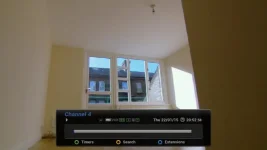
Attached are debug logs and screen shots...

RecordingtoLiveTVBug2.webp RecordingtoLiveTVBug1.webp

View attachment Enigma2-22-01-2015_20-55-39.log
 
Exactly 100% what happens to me. Did a fresh reflash with no plugins and the same.e happens. Treats a channel as a movie and picture will eventually freeze and a hard reboot is needed
 
Viewed a previously recorded programme for a few minutes and then whilst this was being played back, I immediately pressed the EPG button (without pressing STOP first) so went directly from movie player to EPG list. From with EPG I selected a live TV channel to view (which of course interrupted the movie playback) and it started displaying this channel as you would expect.

However, the info bar that would normally display now & next didn't display now & next as expected and whilst viewing live TV this way the zap up/down doesn't work neither just displays the prohibited symbol when trying to zap channels. This happens with either BlueHD or default skin.

It looks like to me that live TV is actually being displayed through the movieplayer. I confirmed this by pressing STOP button whilst watching live TV this way and it went directly to movie list.
I still can't reproduce it. :confused:
I don't know if I would call it a bug though because normally one would press the STOP button when finished viewing something via the movieplayer which then take you to movie list where you press EXIT and EPG and then select any live TV to view. This way works as you would expect.
If this happens, it is a bug. Just one I can't reproduce here yet.
Any default image settings changed?
 
I still can't reproduce it. :confused:

If this happens, it is a bug. Just one I can't reproduce here yet.
Any default image settings changed?

Here are the exact steps I did today to reproduce the issue:
1. Flashed ViX apollo 127
2. Did not restore settings
3. Ran autoboquetmaker after configuring tuners (weirdly the channels no longer have sky numbering)
4. ran crossepg
5. Tuned into BBC1
6. Opened the recordings page and selected a recording
7. While the recroding was playing I pressed the EPG button WITHOUT pressing stop
8. I select a new channel, say Channel 4, the recording stops and the solo2 switches to channel 4 as you would expect.
9. When I press "OK" the title says "channel 4" and nothing else.
----I have 2 options from here:

1. press the stop button in which case the channel changes back to BBC 1 as if channel 4 was a recording, the box will not freeze
2. do nothing, and continue to use the box as normal switching channels etc. eventually (not consistant timing) the picture will freeze and sound will continue and the box will need to be powered off and on again.

Please note I did not install any plugins or skins,(although in my old setup I had mgcamd for my FTV card), my recordings are stored on a USB external HDD which is mounted as a hard drive.

I'm surprised no one else has reported this as it is a bug that I noticed the first day I got the box over a year ago
anyway thanks for the help guys :)
 
Last edited by a moderator:
I'm surprised no one else has reported this as it is a bug that I noticed the first day I got the box over a year ago
anyway thanks for the help guys :)
It's not a year old reported bug that i know of, could be a bug with merging ViX, OE, PLI... but I still can't reproduce no matter how many times I've tried this evening.
 
Any default image settings changed?
Yes. When I get time I shall re-flash clean with no settings changed and post back.

I doubt it's related to ABM but I use ZZL's sky uk SD and just selected Yes to generate sectional bouquet and main bouquet (all others on no).
 
...Just one I can't reproduce here yet.
Any default image settings changed?
I followed exactly all your steps 1-9 and I can't reproduce this. Playback switches to live-TV and all is fine.
I believe I've found out what it is...

Within GraphicalEPG settings, I normally have "OK button (short)" set to ZAP & Exit.

If I set this to just ZAP so now I have to press OK button twice to zap to a channel then I don't have this problem.

As soon as I switch it back to "Zap + Exit", I then have this little problem.

It's like the "Exit" side of "Zap + Exit" doesn't close down movieplayer so live TV is then viewed within movieplayer!!!
 
This bug wouldn't be just related to Solo2 would it? I'm assuming it applies across the board although I only have a Solo2 so can't confirm this.
 
I believe I've found out what it is...

Within GraphicalEPG settings, I normally have "OK button (short)" set to ZAP & Exit.

If I set this to just ZAP so now I have to press OK button twice to zap to a channel then I don't have this problem.

As soon as I switch it back to "Zap + Exit", I then have this little problem.

It's like the "Exit" side of "Zap + Exit" doesn't close down movieplayer so live TV is then viewed within movieplayer!!!

110% mate that is EXACTLY the same issue with me when I use that setting!!! Sorry guys I forgot to add I did that I completely forgot I'm on autopilot I've re-flashed so many times!

Can anyone confirm if this is image-wide or just solo2?
 
I thought I'd bump this thread as the bug is still here. When is it likely to be fixed? I hate to nag but it's a real pest!
 
As I said: I filed a bugreport. And how could we possibly give an ETA (supposing we can fix it at all)?

I don't see how it's not possible for someone on here involved in development to give an ETA based on past experience of how long bug reports normally take to be acted upon. But sorry if i touched a nerve my bump seems to have annoyed you.
 

OpenViX Feeds Status

Back
Top