


abu baniaz
Moderator
From ABM 3.1, a new feature will be available in ABM to scan for local masts. This is for changes as well as for adding regions.
Enable Expert mode
You will see the new option "Show DVB-T frequency finder". Enable it.
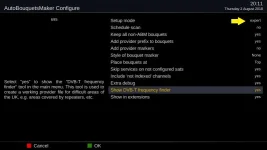
Exit out of the "Configure" menu.
Highlight DVB-T Frequency finder.
Press OK to start. Note: Pressing Green will run ABM.
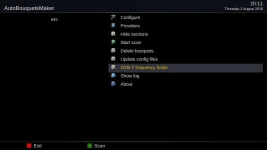
The frequencies will be probed. This will take a while.
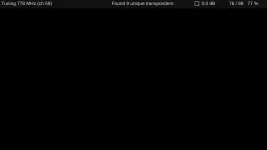
At the end of this stage of the process, a new ABM provider will be created. Names will vary. In this example it is called "London Terrestrial".
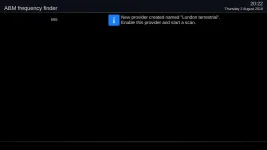
Disable the "official" ABM provider called "Freeview (UK)". It isn't working fully for you, so no point using it.
You can re-enable it after the ABM file has been updated with the details you upload.
Select the newly created provider and then run ABM (perfom an ABM scan). In this example, the new provider is called "London Terrestrial".
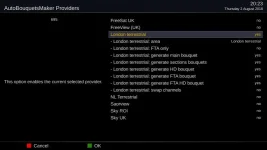
The new provider file will be called terrestrial_finder.xml and located in /usr/lib/enigma2/python/Plugins/SystemPlugins/AutoBouquetsMaker/providers
To save you having to run the scan again, save the file.
Better still, submit a pull request on Github so that details can be added to ABM.
If not possible or unsure, upload to forum and someone will do it.
This has been done primarily for the UK, but may work for other countries too.
Enable Expert mode
You will see the new option "Show DVB-T frequency finder". Enable it.
Exit out of the "Configure" menu.
Highlight DVB-T Frequency finder.
Press OK to start. Note: Pressing Green will run ABM.
The frequencies will be probed. This will take a while.
At the end of this stage of the process, a new ABM provider will be created. Names will vary. In this example it is called "London Terrestrial".
Disable the "official" ABM provider called "Freeview (UK)". It isn't working fully for you, so no point using it.
You can re-enable it after the ABM file has been updated with the details you upload.
Select the newly created provider and then run ABM (perfom an ABM scan). In this example, the new provider is called "London Terrestrial".
The new provider file will be called terrestrial_finder.xml and located in /usr/lib/enigma2/python/Plugins/SystemPlugins/AutoBouquetsMaker/providers
To save you having to run the scan again, save the file.
Better still, submit a pull request on Github so that details can be added to ABM.
If not possible or unsure, upload to forum and someone will do it.
This has been done primarily for the UK, but may work for other countries too.
Last edited:


