Superb quality and spec AB-Com PULSe 4K SE. Crazy offer! Only £99! FREE UK DELIVERY! 4K UHD, Enigma 2, Multiboot 4 images & more!...
Superb quality and spec AB-Com PULSe 4K Rev II Twin Satellite tuner only £149! FREE UK DELIVERY! 4K UHD, Enigma 2, SATA HDD facility, Multiboot 4 images & more!...

[VU+ Zero4K] Ask for support plugin "AtileHD" to view multiple choices from skin component

biko_73

New member
Joined
Nov 19, 2019
Messages
12
Reaction score
0
Points
0
Dear developers

Thank you for all image team for continuous efforts to serve Enigma users

I had a query..

Now I am modifying the skins with some simple additions by adding posters or data on the different screens in the skin, and some of them are based on separate renderers or renderers using the xtraEvent plugin

There are plugin with the name "AtileHD" present in the image, openatv - vti.
It allows making a list of choices to display differently according to the user's taste by showing one or more posters. (attached)
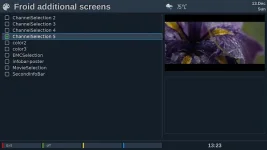
c+.webp

Is it possible to support the presence of this plugin to work in full with the openvix image - as I installed it by moving the plugin folder to /usr/lib/enigma2/python/Plugins/Extensions/ and it did not appear and the list of options did not work
Thank you to the team for their continuous support
I attached the plugin link on the github

https://github.com/linuxbox10/enigma2-plugin-skins-atilehd/tree/master/usr/lib/enigma2/python/Plugins/Extensions/AtileHD
 
Which version of ATV?

The plugin you have linked is Python 2.
 
Which version of ATV?

The plugin you have linked is Python 2.


Thank you for your interest in replying :thumbsup:

The version is available and upgraded to Python3 on openatv 7.0 and i already use it
I was inquiring about accepting support for the idea
Meaning the work of the plugin on the vix image
I did not mean to refer to a specific version

attached py3 version
 

Attachments

Last edited:
The plugin does not load because it is looking for a module called "Tools.WeatherID". So you need to try loading that module into your OpenViX install.
 
The plugin does not load because it is looking for a module called "Tools.WeatherID". So you need to try loading that module into your OpenViX install.

Thank you for your interest in responding

I didn't understand what the plugin had to do with the weather!!
what related connection
The plugins belong to the skins and activate the pro menus
To display the choices of the screen components

but i will look for tool as your advise on feed
 
Last edited:
i looking for "Tools.WeatherID".
i just find python file named as you mention , couldn't know how it work or what need to install
 

Attachments

Last edited:
Um, weather ID is part of the ATV image(tools/weatherID) so could be non py3 import thats failing
 
Thank you for your interest in responding

I didn't understand what the plugin had to do with the weather!!
what related connection
The plugins belong to the skins and activate the pro menus
To display the choices of the screen components

but i will look for tool as your advise on feed
No idea why someone thought it would be a good idea to add weather functions to this tool but they did.

Code:
	def keyOk(self):
		sel = self["config"].getCurrent()
		if sel is not None and sel == self.set_new_skin:
			self.openSkinSelector()
		elif sel is not None and sel == self.find_woeid:
			self.session.openWithCallback(self.search_weather_id_callback, InputBox, title=_("Please enter search string for your location"), text="")
		else:
			self.keyGreen()

	def openSkinSelector(self):
		self.session.openWithCallback(self.skinChanged, SkinSelector)

	def openSkinSelectorDelayed(self):
		self.delaytimer = eTimer()
		self.delaytimer.callback.append(self.openSkinSelector)
		self.delaytimer.start(200, True)

	def search_weather_id_callback(self, res):
		if res:
			id_dic = get_woeid_from_yahoo(res)
			if 'error' in id_dic:
				error_txt = id_dic['error']
				self.session.open(MessageBox, _("Sorry, there was a problem:") + "\n%s" % error_txt, MessageBox.TYPE_ERROR)
			elif 'count' in id_dic:
				result_no = int(id_dic['count'])
				location_list = []
				for i in list(range(0, result_no)):
					location_list.append(id_dic[i])
				self.session.openWithCallback(self.select_weather_id_callback, WeatherLocationChoiceList, location_list)

	def select_weather_id_callback(self, res):
		if res and isInteger(res):
			print(res)
			config.plugins.AtileHD.woeid.value = int(res)
 
it mean can only use on openatv image only
No. It means if you want the plugin to work you will have to uploaded all the needed modules to your box.

Or delete the requirement in the plugin.
 
Could you supplement your generosity by advise how to do it?
by delete the requirement in the plugin or get all component to work

Yes, I hope doing that to have choices selection menu for the components of the skin work on the wonderful image vix
 
I have no clue what this plugin is supposed to do, but, I have commented out the weather stuff and now at least it starts.
 

Attachments

any new news from last conversation

It is the plugin you posted in post #3.

HI, team

Thanks for your always developing and supporting
any new news about add this real important feature to install from image feed to support skin pro function

Thanks, greetings
 
Images have moved on to 6.4 now and depends if supported on that one.
 
HI, team

Thanks for your always developing and supporting
any new news about add this real important feature to install from image feed to support skin pro function
I already fixed the plugin to run in ViX and uploaded the file in post #13, 2 years ago.

What is the "really important feature" of this plugin that you can't live without?
 
I already fixed the plugin to run in ViX and uploaded the file in post #13, 2 years ago.

What is the "really important feature" of this plugin that you can't live without?

"All respect ....
attached on post #13 are Python2.
The importance of the plugin is providing the user with the ability to benefit from displaying different design screens for skins prepared by that way, which improve developing skins for display in the image."
 
"All respect ....
attached on post #13 are Python2.
The importance of the plugin is providing the user with the ability to benefit from displaying different design screens for skins prepared by that way, which improve developing skins for display in the image."
If you want to modify the current skin you just make a skin_user.xml with the changes and put it in /etc/enigma2. No need for a plugin.
 

OpenViX Feeds Status

Back
Top