Superb quality and spec AB-Com PULSe 4K SE. Crazy offer! Only £129! FREE UK DELIVERY! 4K UHD, Enigma 2, Multiboot 4 images & more!...
Superb quality and spec AB-Com PULSe 4K Rev II Twin Satellite tuner only £179! FREE UK DELIVERY! 4K UHD, Enigma 2, SATA HDD facility, Multiboot 4 images & more!...

[ET9x00] Backup fails

Ramme

Forum Supporter
Donated Member
Joined
Aug 18, 2012
Messages
35
Reaction score
0
Points
0
Hey. I updated my ET9000 to the latest OpenVIX image today.

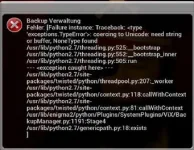
After I have configured everything I would like to do a backup, but it seems to fail. The errormessage is shown in the attached screenshot. Does anyone know what I am doing wrong?
img_001.webp
 
I got the same message on mine

Sent from my Galaxy Nexus using Tapatalk
 
yes we are looking into it thanks. dont forget to send us your logs.
 
I would like to provide any logs. But since the backup script does not crash the box it does not generate a crashlog. Is there a debuglog I can contribute?
 
you can enable debug logs in menu>setup>system>logs>settings
 
It seems like even with debuging enabled I did not get a logfile from the failing backup. Sorry
 
It seems like even with debuging enabled I did not get a logfile from the failing backup. Sorry

After the backup fails reboot the box and a debug log will be written for that time. Upload that debug log here or send it directly via he logs manager.

Sent from my GT-I9300 using Tapatalk 2
 
Thanks a lot and sorry for now knowing ;-)

I can provide this log by tomorrow. Stay tuned!
 
The settings backup stems from extra plugins location not set. To set:
BackupManager --> Menu --> blue --> go in a folder and press green.

Will be fixed in next build.
 
Thanks for your help!

Unfortunately I always get this message when I try to choose a folder:
"Please choose a folder that contains some packages."

Which folder would be the right one?

Btw:
The image for et5000 does not have this bug.
 
Unfortunately I always get this message when I try to choose a folder:
"Please choose a folder that contains some packages."
Which folder would be the right one?
Open any folder that contains an IPK.
Next build with fix for this is underway.
 

OpenViX Feeds Status

Back
Top