
autoart
New member
- Joined
- Oct 23, 2013
- Messages
- 20
- Reaction score
- 0
- Points
- 0
- Age
- 38
- Location
- Nottinghamshire, United Kingdom
Love it so does the missus :thumbsup:


Love it, couple of little things.
For Vu+ solo2 on Vix, the EPG rows set to 7 and not 8 as you advise as 8 doesn't look right, cuts bottom of text in boxes. 7 rows looks perfect.
When playing media from a NAS (network hard drive) the time gets cut off on info banner, it doesn't show the last digit. eg, (3.15pm 25 seconds) 15:10:25 shows as 15:10:2 yet shows correctly when playing media from internal hdd or watching a programme.
It would be great if the recordings list was taller so I wouldn't have to scroll down so much for recordings.
So far this skin is fantastic I have set it on both my vu+ boxes. Best sly blue skin by far. EPG looks really nice and clear, makes it easier to find stuff to watch, etc.

Followed your instructions to the letter on two vu+ solo2 boxes. using 8 lines means the space below the text in a box on the epg is much much thinner than the top and text slightly cut off. It looks perfect with 7 lines instead. Maybe this is box specific?Thanks for your input. I'm back tomorrow from working away. I will look at what you suggested and make the necessary adjustments and put out an online update. Cheers
Edit. Did you change the timeline font in the epg as well to -3? If so can I have a screenshot of the text problem with 8 rows. I thought I had it done perfect
)
Just a small bug I've picked up on.
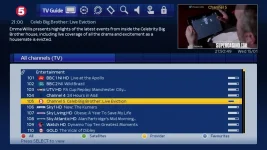
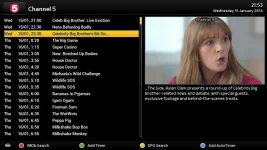
When in the channel list (1st pic) if the info button is pressed it brings up the 2nd image. The bar that highlights the channel has been changed but as you can see the background is black.
View attachment 31944
View attachment 31945

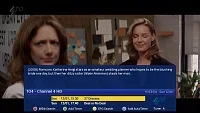
virtual zap does the same as quick-epg doenst it?

I disabled the icon flashing as it wasn't working correctly on one of my boxeslater tonight, im just doing more work to the menu screens.
when updates are available, i will post here and also your infobar will flash with the update icon so you know theres an update.


