Superb quality and spec AB-Com PULSe 4K SE. Crazy offer! Only £129! FREE UK DELIVERY! 4K UHD, Enigma 2, Multiboot 4 images & more!...
Superb quality and spec AB-Com PULSe 4K Rev II Twin Satellite tuner only £179! FREE UK DELIVERY! 4K UHD, Enigma 2, SATA HDD facility, Multiboot 4 images & more!...

Box appears to be affecting the internet connection.

Willmoore

Forum Supporter
Donated Member
Joined
Jan 19, 2015
Messages
848
Reaction score
1
Points
0
Age
68
Location
Stafford
In the past when I have changed a skin it knocks my internet off. I remove the LAN cable and my connection re-appears. Change the skin back and all works again. Yesterday I downloaded Dreambox Edit, re-arranged my channels and added picons and all was good. This morning my internet was off and would not come back on untill I removed box LAN cable. When the internet came back on I then replaced the cable and all is working again. It is definately the box that is causing the problem. Why would this be ?

TIA
Will
 
Not a skin issue, more than likely a plugin issue. Any flakey plugins installed or incorrectly configured cams?
 
Are you using mgcamd?
What is the logging setting in mg_cfg? Is it this
L: { 03 } 172.16.1.1 28007 /tmp/mgcamd.log
 
I used to have this problem then I stopped using mgcamd and never had the problem again...
 
I used to have this problem then I stopped using mgcamd and never had the problem again...

Then you had a incorrectly configured config file, MGcam it self is fine and I have been running it on a number of receivers for over two years without issues.
 
We had one chap come on forum saying that there was something wrong with OpenVix. It was killing his internet at home. In the end, it was the mgcamd and teh logging option. It basically tries to send the log file to a non-existent address and floods your network

Best to replace the line with
L: { 00 }
 
We had one chap come on forum saying that there was something wrong with OpenVix. It was killing his internet at home. In the end, it was the mgcamd and teh logging option. It basically tries to send the log file to a non-existent address and floods your network

Best to replace the line with
L: { 00 }

I'm new to all this and I'm not really sure how I would go about replacing it

Thanks
Will
 
I have saved the mg_cmd file and opened it with Notepad++ altered the line to read as follows (then saved it)
# Log option, summ of:
# 00 off
# 01 network udp log
# 02 log to console
# 04 file, appended ! delete it by yourself, before it eat all your hdd
# + IP udp-port log-file-name
L: { 00 }

Do I now use Filezilla to drag and drop for it to overwrite the original.
Sorry, if it's a stupid question but as I said, I'm new to all of this - but have learned quite a lot of the last few days thanks to Abu.

Will
 
Last edited:
If the edited file is on your PC, yes drag and drop it. Replace the one on the receiver. Restart mgcamd so that it uses the new settings, or better still restart the receiver.

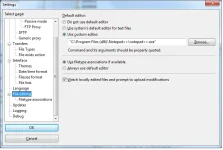
Tip:
In Filezilla there is an option to choose the editor. You can then view/edit directly.
attachment.php


May I ask you to note the following:
Thread will be moved to the ViX-Team-Images-Support-Discussion section. It is best to use the image support section for image issues as problems/solutions are usually the same irrespectve of receiver. It also helps others searching for the same issue although they may have another receiver.

Please read the thread in link below which explains things better.

http://www.world-of-satellite.com/showthread.php?33155-ALL-MEMBERS-PLEASE-READ!-New-method-of-posting-in-ViX-Support-Section!

No harm has been done, no need to apologise. Please bear in mind for future support questions.
 

Attachments

  • Filezilla editor options.webp
    Filezilla editor options.webp
    31.3 KB · Views: 111
same problem for me. not using mgcam but cccam. no such lines in cccam.cfg. other ideas what might cause this issue?
 
Hi,

I would start your own thread in ViX-Team-Images-Support-Discussion section.you will get a better response.
 
If the edited file is on your PC, yes drag and drop it. Replace the one on the receiver. Restart mgcamd so that it uses the new settings, or better still restart the receiver.

Tip:
In Filezilla there is an option to choose the editor. You can then view/edit directly.
attachment.php


May I ask you to note the following:

Thanks a lot for your help - the tip for editing straight from Filezilla makes it very simple. Hopefully all sorted now.
As for where I posted the problem, due to my lack of knowledge I did not realise it was a ViX image problem. I thought it was the box. Always learning :-)
Cheers
Will
 
defo mgcamd i same problem and is was down to misconfiged file, all sorted know.
 
@Willmoore - your problem was NOT a ViX image problem, nor was it a box problem - the mg_cfg file does not form part of the image, therefore you (or someone helping you) had to FTP that file into your box at some point. Many newbies seem to use that particular dubious version of mg_cfg which they have downloaded from somewhere or other, without understanding that it requires editing (logging and box type generally) before squirting into the box and starting MGCamd.
You did well to receive such excellent help from Abu Baniaz et al whilst avoiding mentioning the taboo topic - well done!
 
@Willmoore - your problem was NOT a ViX image problem, nor was it a box problem - the mg_cfg file does not form part of the image, therefore you (or someone helping you) had to FTP that file into your box at some point. Many newbies seem to use that particular dubious version of mg_cfg which they have downloaded from somewhere or other, without understanding that it requires editing (logging and box type generally) before squirting into the box and starting MGCamd.
You did well to receive such excellent help from Abu Baniaz et al whilst avoiding mentioning the taboo topic - well done!

I assumed it was a Vix image problem as Abu moved it to ViX-Team-Images-Support-Discussion section
 
having the same problem,but using cccam.cfg. however there are no similar lines to edit.... any other ideas what might be causing this? I am on build 166, solo2. however, the problem has been there with every build. thanks for help.
 

OpenViX Feeds Status

Back
Top