Superb quality and spec AB-Com PULSe 4K SE. Crazy offer! Only £99! FREE UK DELIVERY! 4K UHD, Enigma 2, Multiboot 4 images & more!...
Superb quality and spec AB-Com PULSe 4K Rev II Twin Satellite tuner only £149! FREE UK DELIVERY! 4K UHD, Enigma 2, SATA HDD facility, Multiboot 4 images & more!...

[TM-NANO-2-SUPER] Can not Flash Box again

  • Thread starter Thread starter jwestwood74
  • Start date Start date
J

jwestwood74

Guest
Hi i got my new nano2 super in the week and straightaway updated the bootloader and put Vix image on it since then i have tried a few times to change to a different image to see what they are like and also have tried to reinstall vix image but everytime i try i turn box off insert memory stick thats been formated to fat32 and got the update folder on it but it just keeps booting to the logo screen then onto loading the vix image thats already in the memory it does not at any point tell me to press ok to update image what am i doing wrong
 
Why are you changing bootloaders? There is no need.

Format your stick with the HP format tool first. Do you have any oither USB devices connected to unit?
 
If you are using an OpenVix image and the image pack you want to install does not contain a bootloader in the zip file, use the image manager to install the image.

Blue > Vix > Image Manager
 
Last edited:
i out everything on the usb in the update folder as described but when i got to

Blue > Vix > Image Manager

nothing shows up
 
Ok managed to do via Blue > Vix > Image Manager i never realised when using the image manager you put the whole zip on the usb

I think i flashed something when i first got it as never used to have the technomate logo come up on screen at the begining and do now and wonder if thats whats stopping me being able to boot and flash from usb
 
What image are you on. Name and number please.
What image do you want to flash.
If you are using the Image Manager, you do not have to extract the image. It will install a compressed image. Sorry, should have said earlier

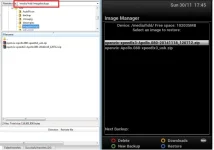
We are now in the realm of assumptions and guess work. Here is a picture of the images on my HDD that Image Manager can choose to install. One is one I downloaded off teh server and one is a full image backup. Hopefully picture explains better what to do. You get the option to select backup location if you have more than one device connected by pressing Menu
 

Attachments

  • image manager.webp
    image manager.webp
    23.5 KB · Views: 14
Oops, took long to type that. Glad you are sorted.

The splash images are separate from image. You normally show the older pictures until they are replaced. Subject to size, you can put any picture you like.

Ok managed to do via Blue > Vix > Image Manager i never realised when using the image manager you put the whole zip on the usb
This has been termed "couch flashing"
 

OpenViX Feeds Status

Back
Top