Superb quality and spec AB-Com PULSe 4K SE. Crazy offer! Only £129! FREE UK DELIVERY! 4K UHD, Enigma 2, Multiboot 4 images & more!...
Superb quality and spec AB-Com PULSe 4K Rev II Twin Satellite tuner only £179! FREE UK DELIVERY! 4K UHD, Enigma 2, SATA HDD facility, Multiboot 4 images & more!...

[ABM-DVB-S/S2] Combining Sky EPG with Saorsat

Will do - but needs to wait until the weekend.
Is there a config file that I can upload for the tuner setups?

As I said previously, there is no transponder setup for the Saorsat service, so I had to manually set up the transponder. Could that be related?
It does not appear to hold this information when I examine the tuner setup. However I am able to view the channels!
 
The Satellites.xml file was indeed corrupted as I noted in post 18. This resulted in the tuner status being incorrect. I've generated a new one for just 9.0E and 28.2E. I then manually added the Saorsat transponder as follows:

<transponder frequency="10765000" symbol_rate="25000000" polarization="1" fec_inner="2" system="1" modulation="1"/>

and it picked up the channels. It would nice if this could get added to the generator.

So, I'm currently reinstalling all the programs and then I'll run ABM again. Then I'll need to read up on the Custom Mix file generation.
 
Last edited:
Can you help me with the settings in the Advanced menu for this and 28.2 please?
I'm sorry, but I can't pick up Saorsat with these settings. What have I done wrong?

The new satellites.xml has the following:

Code:
<transponder frequency="12475000" symbol_rate="27500000" polarization="0" fec_inner="2" system="1" modulation="2" />
</sat>
<sat name="9.0E Ka-band Eutelsat 9B & Ka-Sat 9A" flags="1" position="92">
<transponder frequency="20185000" symbol_rate="25000000" polarization="2" fec_inner="2" system="1" modulation="1" />
</sat>
<sat name="10.0E Ku-band Eutelsat 10A" flags="1" position="100">
 

Attachments

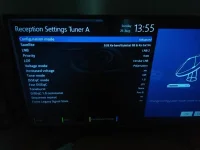
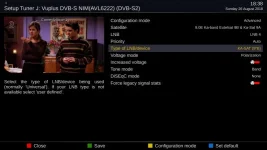
  • Tuner_A_90E_Config.webp
    Tuner_A_90E_Config.webp
    28.6 KB · Views: 7
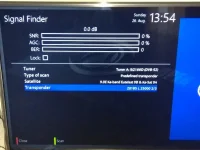
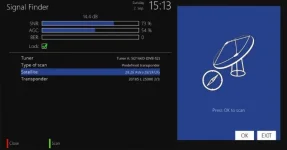
  • Signal_Finder.webp
    Signal_Finder.webp
    40.3 KB · Views: 7
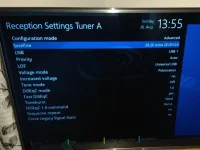
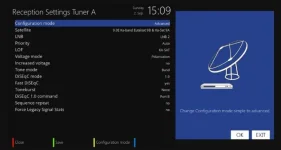
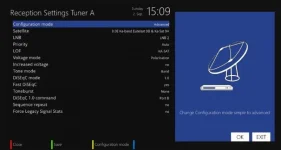
  • Tuner_A_282E_Config.webp
    Tuner_A_282E_Config.webp
    36.7 KB · Views: 6
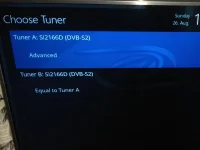
  • tuners.webp
    tuners.webp
    21.5 KB · Views: 6
Last edited:
111.webp

Like that, plus whatever DiSEqC commands your switch requires to route to the LNB.
 
Okay - working through it again. It was a bit more painful than I thought. Was going to give up until I found the correct info in the header of sat_0090_saorsat.xml - I don't have KA-SAT option which was causing the confusion.

<!-- The Saorsat LNB must be correctly set up in advanced tuner settings to enable Ka band reception. Select LOF: KA-SAT if this setting is available in your Enigma 2 image, otherwise configure the local oscillator frequency manually as follows:LOF: User definedLOF/L: 0000021200LOF/H: 0000021200Threshold: 0000021200 -->
 
Done an update and found KA-SAT.
However, it is not picking up a signal for the KA-SAT whereas it was for 10.765 with the same diseqc setup.
 
The reason you don't have the option is because you are not using OpenViX.
 
KA-SAT is not picking up a signal for me. Can you inform me why this would be or what I need to post in order for it to be debugged?

I've noticed that there is a provider number mismatch between Satellites.xml and sat_0090_saorsat.xml. The former refers to Sat position = 92, whereas the latter refers to an orbital position of 90 - which is the same as the Ku band satellite.

Also, Saorsat requires a DVB-S2 receiver - I notice that the saorsat.xml is referrinf to a DVBS streamtype - is this the correct option as I could only see dvbt and dvbc as alternative options?

Here is some info from wiki on the Saorsat setup - might it be better to switch to the "fake" frequency 10.765 vertical as many other possible users of this may only have this option - indeed I am struggling to get it to work with the 20.185 transponder setup.

Parameters are:

KA-SAT @ 9E[12]
20.185 GHz, Left Circular Polarisation,
DVB-S2 QPSK,
SR 25000 with 2/3 FEC[13] (was 1/2 FEC which allows about 25 Mbit/s data, about the same as the Terrestrial Mux),
Irish spot (there are 82 spots on KA-SAT)
It's likely a second carrier will be used to carry material on the second Terrestrial PSB mux. The second DTT mux is running with no services on many sites and there is a second DVB-S2 carrier in the same part of the Ku band for Internet Services using SR 50000 with adaptive modulation and FEC.

Any DVB-S2 HD satellite receiver can in theory be used to receive Saorsat as the Ka band LNBF converts to a regular IF in the 950 MHz to 2,100 MHz band. If the receiver does not have a setting for the Ka band LNBF Lo, then a "fake" frequency 10.765 vertical rather than the real 20.185 may be entered when using the Inverto LNB with local oscillator of 21.2.


Saorsat.webp
Sky28_2.webp
Sky28_2_Signal.webp
Saorsat_Signal.webp
satellitesXML.webp
Saorsat_provider_file.webp
 
Last edited:
I've noticed that there is a provider number mismatch between Satellites.xml and sat_0090_saorsat.xml. The former refers to Sat position = 92, whereas the latter refers to an orbital position of 90 - which is the same as the Ku band satellite.
The value in sat_0090_saorsat.xml was incorrect. I have updated it to reflect the value used in satellites.xml.

https://github.com/oe-alliance/AutoBouquetsMaker/commit/d8a7a3712a322f27debd3721c3664996f26b488c

If this is correct Saorsat will show in the ABM providers menu.
Also, Saorsat requires a DVB-S2 receiver - I notice that the saorsat.xml is referrinf to a DVBS streamtype - is this the correct option as I could only see dvbt and dvbc as alternative options?
Those settings are correct. All internal tuners in enigma2 receivers are DVB-S2 capable.

Here is some info from wiki on the Saorsat setup - might it be better to switch to the "fake" frequency 10.765 vertical as many other possible users of this may only have this option - indeed I am struggling to get it to work with the 20.185 transponder setup.
Forget that stuff. We are trying to set up correctly, so we don't want a hack confusing the issue. Those instructions are for use where the STB has deficient firmware.
 
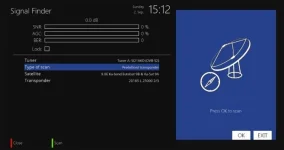
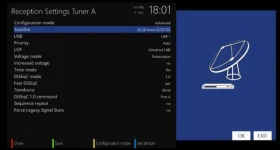
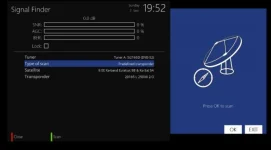
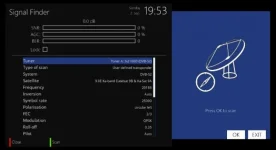
To debug use signal finder. Set the tuner up as in your images and try to open the transponder in signal finder.

If that doesn't work temporarily bypass the switch so you have a direct connection to your Ka LNB.
 
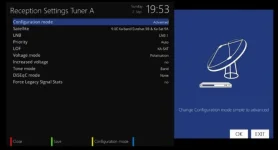
Now have a direct feed bypassing the multiswitch into the receiver. Still, unable to obtain a signal using KA-SAT on the advanced setup shown below - on either transponder setup.
However, using the simplified setup, just referring to Ka-Sat, the receiver can pick up a signal using the fake transponder setup.

Advanced setup:
advsetup.webp
20185_Adv.webp
20185_Adv_man.webp
 
Last edited:
By the way it would help if you were using OpenViX, otherwise you are asking us to debug someone else's image, which we don't have time for.
 
I've been told that the KA-SAT will only work on 20.185 for the following reason:

20.185 GHz will only work if the receiver has a setting for the relevant LNB LO (local oscillator) frequency.
The 'fake' TP allows it to tune to the correct part of the IF (intermediate frequency), thinking a 'universal' Ku-band LNB is fitted, switched to low band LO (9.75 GHz).
 
I've been told that the KA-SAT will only work on 20.185 for the following reason:

20.185 GHz will only work if the receiver has a setting for the relevant LNB LO (local oscillator) frequency.
The 'fake' TP allows it to tune to the correct part of the IF (intermediate frequency), thinking a 'universal' Ku-band LNB is fitted, switched to low band LO (9.75 GHz).
That is not required in OpenViX.

https://github.com/OpenViX/enigma2/...886ff21#diff-021996494dde61d73519d0ab55099cb4

If you need more help you will have to flash your receiver with OpenViX.
 
Last edited:
universal lnb settings when doing a scan for 9.0 east (Ka Band)
(so called "Fake TP")
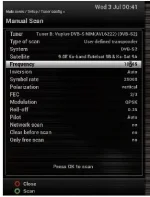
(fake) transponder frequency = 10.765 (Vertical)
symbol rate = 25000
FEC = 2/3

Capture.webp
 

OpenViX Feeds Status

Back
Top