Superb quality and spec AB-Com PULSe 4K SE. Crazy offer! Only £99! FREE UK DELIVERY! 4K UHD, Enigma 2, Multiboot 4 images & more!...
Superb quality and spec AB-Com PULSe 4K Rev II Twin Satellite tuner only £149! FREE UK DELIVERY! 4K UHD, Enigma 2, SATA HDD facility, Multiboot 4 images & more!...

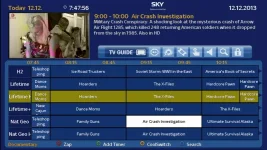
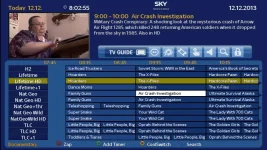
Cool epg Guide Sky Skins by fraggle121

  • Thread starter Thread starter fraggle121
  • Start date Start date
really like the looks of this skin. Please excuse me for being a thicko. I would like to install this on my Solo2 currently running Open PLI 4.0, but although I have read all this thread several times I am still not sure how to do it. Any help appreciated

thanks
 
hello there if u know how to install a ipk file on your box and u know how to ftp your box its pretty easy.

if u have got cool tv guide on your box uninstall it.

now that that u have no cool tv guide on your box . ftp your box and put this file in the temp folder and install it.

its called enigma2-plugin-extensions-cooltvguide_coolman_v2.2.2_all.ipk you can find it here..

http://www.world-of-satellite.com/showthread.php?33788-Cool-epg-Guide-Sky-Skins-by-fraggle121/page4

ok now test it to see if its all installed and working fine u might have to reboot the box if its not working..it wont be anything like my skin yet but just make sure its all working ok.. when done let me know here and I will post the skin u want and tell u what u need to do next don't worry its easy if u can install the ipk file the next part is as easy..i am always on and of this forum so I will get back very soon after u have installed the cool tv guide..

just to let you know it works fine on my dreambox with a pli image,,so u should not have any problems at all


ill post the rest of the instructions and the files in a few mins...
 
Last edited:
next and last step

ok now cool tv guide is installed...

download this file ive posted here and extract it to your desk top..

now ftp your box and got to

/usr/lib/enigma2/python/Plugins/Extensions/
you will see a folder called CoolTVGuide delete that folder and transfere my folder I posted called CoolTVGuide...

now go to

/usr/share/enigma2/skin_default/buttons/ u will see lots of files u now need to transfer the 4 butons i posted here it will ask you if you want to overright them just say yes...

all done now start cool tv guide u will now see my skin if not reboot box then it will be my skin.

when cool tv guide is started press menu and and scroll down to Left Width for 60 Height change it to 180 now press green for cool and scroll down to Blue Button (Search) and change it to bouquetlist now press the red button to save it ...
that's it all done.

u will now have this cool tv guide skin..grab.webpgrab2.webp
 

Attachments

Last edited:
Hi Fraggle,
thanks for that M8. Tried to ftp to temp folder but not working after reboot. Don,t really know about ipk files. How do I install

thanks
 
give me a few mins to find out how u install plugins on your box in the meen time if someone else knows please tell him saves me reading up..

I have a dreambox so it might be different..but this should work on your box.back in a min...
 
I think u will need to telnet the box and install it.
try looking for software manager if your box has it press blue button.
I don't have a solo box so I cant help to much with installing plugins on it..
or wait for a little bit and someone might tell u how to install the plugin or whare to look..
with my box I go to plugings software manager and then instal local file. but u need to ftp the file to tmp first if u rebooted the box the file will be deleted. i think think if u don't know how to install a plugin u should not continue or try reading up on how to install plugins on a solo2 with pli

as I say hopefully someone will tell u how to install it on your box

someone will tell u soon I hope its not hard to do it buy telnet but best u read up on how to do it first..
 
OK,
I have installed using software manager and then removed the Cool Guide folder as you said and replaced with your file, then gone to the usr/share / enigma/ skins default, but then got stuck regarding the 4 buttons to be overwritten. Not quite sure what you mean. Thanks for your patience. Also do I need to download cool guide as well as your files
regards
 
ok don't worry about the buttons for now they aint important.
now start the cool guide..
on my box I press blue but on some other boxes u press and hold the epg button.
do u see my skin.if yes while when cool tv guide is started press menu and and scroll down to Left Width for 60 Height change it to 180 now press green for cool and scroll down to Blue Button (Search) and change it to bouquetlist now press the red button to save it ...
that's it all done.

let me know how u get on.
if u want the buttons ill talk u through that after u have tested cool guide to see if its working.

u might have to restard the box if u cant get cool guide to start after u installed it

when u say u removed cool tv guide folder and replaced with my file u do meen u replace the folder with my cool tv guide folder.
u did extract the fraggle121 cool tv sky mod files.rar to your desk top didn't u in ther u will see a cool tv guide folder just like the one u deleted that's what needs to be transferd

you install the ipk which is the cool tv guide
then extract my fraggle files to your desck top then u just replace the cool tv guide folder on your box with the cool tv guide folder u extracted to your desk top.u will see it in the fraggle folder on your desck top,,
 
Last edited:
Thanks Fraggle, rebooted but not working. Must have done something wrong
 
did u extract the fraggle folder on your desk top.if you did extract it it will create a yellow folder called fraggle121 cool tv sky mod files
inside that folder is the folder that u need to copy across its identical to the cool guide folder u deleted on your box.
if u installed the ipk and u found u have have folder on your box called cool tv guide then u have installed it ok may be just a case of finding the right button on the remote to start the tv guide

if u deleted the cool tv guide folder on your box and u didn't replace it with my cool tv guide folder then cool tv wont work.

have u got WinRAR on your pc u need that to extract the fraggle121 cool tv sky mod files.rar
 
Last edited:
Baffled now. Can't get it to work. Have reinstalled your file after extracting to desktop, and rebooted but no joy. Must be missing something. thanks for helping
 
ok ftp the ipk to temp folder again then install it with software manager.
when its installed
then reboot your box

when box has booted up again then try to start cool tv guide if it starts it wont have my skin yet but lets just make sure its starts first before u start to add my skin..

let me know if it starts

don't delete anything just install the standard guide and test if its working.if it does then I will talk u through the next step

try holding the epg button for a long time see if that start cool guide
 
Last edited:
Done that but not working, however when I go to my plugins screen it says that there is (Bad magic number in usr/lib/enigma2/python/plugins/extensions/Cool TV Guide init pyo) Any ideas
 
make sure the cool tv guide folder is on on box it hasent been removed has it.ftp your box and go to /usr/lib/enigma2/python/Plugins/Extensions/ see if the cool tv guide folder is there..don't delete it
ive read up and there are loads of vu solo pli images with cool tv guide already installed so I cant see any reason for this

if it is there and its not working may be best to go without it or download a image with cool tv guide installed already but that's hassle for u to do that just to get cool guide running..
 
Last edited:
yes M8 is definitely there. Do I have to change attributes The top three folders are 755 and all the rest are 644
 
cool

no if its there then its installed ok...

try installing this one its the latest version

if this one dosent work then im baffled

it might be because the one u installed is to old for the image u have

if this one works ill sort the files out for that...

there are 2 versions of cool tv guide the one u have already tried which is for older oe1.6 images
and this one for later 2.0 images

ive just read up yours pli 4.0 is based on a oe 2.0 so this is the one u need
 

Attachments

Last edited:
re installed got same message. Think I'll leave it for tonight and start from fresh in the morning. My brain aches
 
I cant work it out on cool tv guide website

Code:
http://www.cooltvguide.com/

there is only two versions and he has tried them both.may be try unistalling cool guide then reboot box then try reinstalling enigma2-plugin-extensions-cooltvguide_Coolman_V6.4.0_mips32el.ipk on this page again.

if that does not work then u have 2 choices go without it or try installing a image which has cool tv guide installed..there are a lot of images with it already installed out there for your box.

it is a lot of work though putting a image on the box just to have cool tv guide u aint missing much it looks nice but that's all..

its up to you eather way I will try to help u the best I can..
 

OpenViX Feeds Status

Back
Top