Superb quality and spec AB-Com PULSe 4K SE. Crazy offer! Only £129! FREE UK DELIVERY! 4K UHD, Enigma 2, Multiboot 4 images & more!...
Superb quality and spec AB-Com PULSe 4K Rev II Twin Satellite tuner only £179! FREE UK DELIVERY! 4K UHD, Enigma 2, SATA HDD facility, Multiboot 4 images & more!...

[VU+ Duo] cross epg help with menu location

  • Thread starter Thread starter grantsmith82
  • Start date Start date
G

grantsmith82

Guest
hi all
I had an issue with cross epg today so uninstalled and then reinstalled the ipk

however now that I reinstalled it I noticed the location in the menu has changed for cross epg .. before I would goto menu , setup, system, epg, and cross epg would be an option with vix epg itself.

however now I reinstalled it its now in menu, setup, cross epg.

is there a way I can move it back under the vix epg menu option?

thanks
 
Why uninstall & why use such an old image?
 
the reason i unstalled and reinstalled as the issue i had with cross epg I notived that even thought the tv programmes are populated for the channels some of the programmes are missing the synopsis info.

eg. sky1 all programmes listed this week if I goto wed at 9pm there a programme called strikeback. all the synopsis is missing for this channel. there are a few others missing. some oddly show on the sky1+1 so the info is there..


what is the latest vix version? is there a way to update the vix from the menu or it is a reflash?
 
Reflash will be required. You can download images from
You should also add a swap file for your Duo as the Cross EPG downloader is RAM intensive process.

EDIT:
Install 010, not 011. You can perform an online update to 012 later.
 
Last edited:
is that link for the images for both clone and original or just original as I own both original vu+duo and vu+duo2 and also own clone vu+duo (so don't want to brick the clone box in the kids room)

ive now installed hades on the vu+duo original set it all up... ran crossepg but its just stuck on "starting download"
 
We don't support clones here.

What aspect of crossepg downlaoader are you using? OpenTV epg or from the internet?
 
I have it set to my hdd and using open tv on 28.2 (I don't see 28.4 anymore)
it just seems to freeze on starting downloading.. usually you see it change to parsising and saving .. etc.. is there a way to clear all the EPG data and start again ( It would be saved on the hdd) and not wiped from the reflash)
 
In the epg menu, there is an option to load/save/delete. You can delete from there.

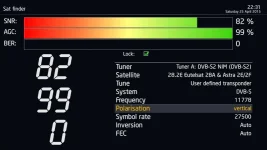
However, I think you have an issue with your dish. Do you get a lock on this transponder? Go into Menu > Setup > Service Searching > Sat finder. Enter the deatils as pictured.
 

Attachments

  • ABM and CrossEPG 11778 satfinder.webp
    ABM and CrossEPG 11778 satfinder.webp
    22.7 KB · Views: 24
In the epg menu, there is an option to load/save/delete. You can delete from there.

However, I think you have an issue with your dish. Do you get a lock on this transponder? Go into Menu > Setup > Service Searching > Sat finder. Enter the deatils as pictured.

yep dish signal on both tuners full lock
 
Can you enable debug logs, restart receiver. Try cross EPG downloaded again and then upload the debug log?
 
Can you enable debug logs, restart receiver. Try cross EPG downloaded again and then upload the debug log?

where in vix is the debug logs to enable and where do they store that a can upload from filezilla
 
Menu > Setup > System > Logs > Settings > Enable debug logs
You must restart receiver after seting it to yes.

Default location is /home/root/logs/
Attach to thread instead of pasting contents.
 
On OE-A images, you can specify the default location where EPG is stored. Menu > Setup > System > EPG > Settings > EPG location

Cross EPG downloader does not acquire EPG for all services. Other images do not have option of where to save EPG, you have to install the EPG cache plugin to decide where to store the EPG. I see the thread on the other forum. There is nothing wrong with the version of crossepg that is built into the image, I would strongly discourage you from removing it. The tuner usage logic is also different.

Owing to the fact that all three receivers had an issue more or less the same time, I thought the issue would be dish related. Your test discount this.

Other possibility is selecting automatic when selecting satellite in tuner configuration or indeed tuner config itself.
Another is your mount points.
 
Last edited:
HI abu,
The boxes are on different dishes as I have 2 dishes on my house. I actually upgraded the VU+duo original today from vix hades 10 to 12 (via the menu update) I then tried cross epg again
and this time it started and ran almost the entire process until the last section where vix span in the corner and just hun for 5min before crossepg stopped and it reverted back to full tv picture again.

I know this forum doesn't support clones boxes but I was going to try a newer vix on them and see how they go.. with regards to where cross epg installs to I know it doesn't really matter but I think looks a lot tidy being withing the epg menu option itself (how can I move it? )
 
We cant help you with your clone here, we are more than happy to help with your genuine receivers.

My advice is as follows:

Flash fresh again. Please do not install a separate CrossEPG. The one already in the image is fine.
Setup a swap file on your receiver.
Setup the EPG location to media/hdd
Delete the EPG data on the HDD, just in case it has become corrupt.
Setup and run cross EPG downloader

You should be fine then.
 
We cant help you with your clone here, we are more than happy to help with your genuine receivers.

My advice is as follows:

Flash fresh again. Please do not install a separate CrossEPG. The one already in the image is fine.
Setup a swap file on your receiver.
Setup the EPG location to media/hdd
Delete the EPG data on the HDD, just in case it has become corrupt.
Setup and run cross EPG downloader

You should be fine then.

This is the original vu+ receive I am currently working on..
the first hades I installed would crash after a select the 50/60hz on setup and go into a boot/crash loop so I installed
another copy of hades v10 which was fine.. (then upgraded to v12 via the menu update. this is still using the cross epg that built into the image.
the epg is set to save to HDD

I will delete the epg date. (just a case of deleting /media/hdd/crossepg ?)

where is swap file and what does that do?
 
I will delete the epg date. (just a case of deleting /media/hdd/crossepg ?)
No. You need to delete EPG.dat. However it is kept in RAM so you just can't delete it. Use the delete option within the EPG load/Save/Delete menu. Alternatively, the crude way of doing it is to telnet the following command
Code:
init 4 && sleep 5 && rm -rf /etc/enigma2/epg.dat && rm -rf /media/hdd/epg.dat && rm -rf /media/hdd1/epg.dat && rm -rf /media/hdd2/epg.dat && rm -rf /media/usb/epg.dat && rm -rf /media/usb1/epg.dat && rm -rf /media/usb2/epg.dat && init 3

Just stick to 50Hz

Use the search box for swap file. There are sevaral posts about it. Particularly by Andy Hazza.
 
Swap file can be setup via blue button, ViX, swap manager. Blue button to create, go with the 256mb option to your hdd. After a few minutes, press yellow button to Autostart and the green button to Activate.
Enabling a swap file will help your CrossEPG too.


Sent from my iPhone using Tapatalk
 
thanks I got swap file working... never resolved the issue in the end reflashed with updated image
 

OpenViX Feeds Status

Back
Top