

G
GSM44
Guest
I am using [Technomate TM-Nano-SE M2 PLUS 1x DVB-S/S2 1x DVB-C/T/T2] with openvix latest image. Got this recently & have been trying it's options for the last week.
I have 2 dishes aready fitted in the house - Large one pointing at 26E and the smaller one at 28E
The box was working great with only 26E LNB attached, however; I tried connecting the 28E using a diseqc switch but for some reason the box is not happy about it.
Not sure what's wrong
I've used diseqc switches before so I'd like to think I can set it up.
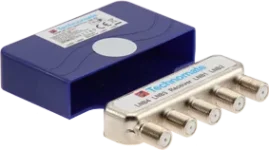
I am using TM-4S DiSEqC Switch with 28E going into LNB2 & 26E going into LNB4 and the output to my receiver.
I also looked up few videos on youtube on how to set up diseqc on enigma2 devices in case I am doing something wrong but the simple configuration below wouldn't work (tried all combinations of yes & no to options and other combination of 26E in ports A-D)
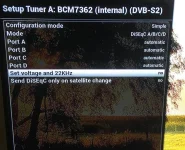
As soon as I press save here the box would go straight into this:
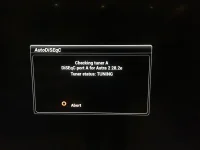
and it would be stuck here and not respond - even to cancel/red button - until I restart the box.
I left it at one point to see if it's doing something but over an hour later nothing changed.
I had to chose "automatic" because the only other option I am getting is 26E or "nothing connected" ..... for some reason I am not getting any option for 28E but when it starts scanning it recognizes this signal as 28E but freezes at this stage.
Tried another way of scanning 28E by setting up the satellite as a single LNB but it does not give me an option to choose 28E ..... only 26E & motorized options
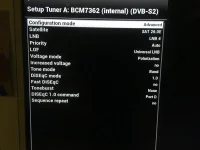
I tried to chose the satellite under one of the options but all I am getting is 26E
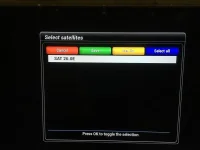
I tried different settings under advanced configuration (as per youtube videos) - tried all combinations the four LNB numbers along with 4 different ports & nothing worked - just wasted a good chunk of the afternoon on my day off. I will try tomorrow to use the 28E alone without diseqc and see if there is a problem there.
It used to be much easier with my old technomate TM-5200 D with all the satellites listed .... could it be a bug in openvix image?
Do I need to download a file or something to list other satellites?
I wonder if using settings from other users such as Malimali or ciefp would help show both satellites - then I can work from there by removing the others.
Any help appreciated guys
I have 2 dishes aready fitted in the house - Large one pointing at 26E and the smaller one at 28E
The box was working great with only 26E LNB attached, however; I tried connecting the 28E using a diseqc switch but for some reason the box is not happy about it.
Not sure what's wrong
I've used diseqc switches before so I'd like to think I can set it up.
I am using TM-4S DiSEqC Switch with 28E going into LNB2 & 26E going into LNB4 and the output to my receiver.
I also looked up few videos on youtube on how to set up diseqc on enigma2 devices in case I am doing something wrong but the simple configuration below wouldn't work (tried all combinations of yes & no to options and other combination of 26E in ports A-D)
As soon as I press save here the box would go straight into this:
and it would be stuck here and not respond - even to cancel/red button - until I restart the box.
I left it at one point to see if it's doing something but over an hour later nothing changed.
I had to chose "automatic" because the only other option I am getting is 26E or "nothing connected" ..... for some reason I am not getting any option for 28E but when it starts scanning it recognizes this signal as 28E but freezes at this stage.
Tried another way of scanning 28E by setting up the satellite as a single LNB but it does not give me an option to choose 28E ..... only 26E & motorized options
I tried to chose the satellite under one of the options but all I am getting is 26E
I tried different settings under advanced configuration (as per youtube videos) - tried all combinations the four LNB numbers along with 4 different ports & nothing worked - just wasted a good chunk of the afternoon on my day off. I will try tomorrow to use the 28E alone without diseqc and see if there is a problem there.
It used to be much easier with my old technomate TM-5200 D with all the satellites listed .... could it be a bug in openvix image?
Do I need to download a file or something to list other satellites?
I wonder if using settings from other users such as Malimali or ciefp would help show both satellites - then I can work from there by removing the others.
Any help appreciated guys

