Pretty sure I've set something incorrect, but on my Vu+ Ultimo 4k the eit info for the infobar is not updating when the time changes (where the event also is changing). It's working fine on my Xtrend 10000 with same image and skin. I have also set to Show EIT now/next in infobar to yes in settings.

Superb quality and spec AB-Com PULSe 4K SE. Crazy offer! Only £99! FREE UK DELIVERY! 4K UHD, Enigma 2, Multiboot 4 images & more!...
Superb quality and spec AB-Com PULSe 4K Rev II Twin Satellite tuner only £149! FREE UK DELIVERY! 4K UHD, Enigma 2, SATA HDD facility, Multiboot 4 images & more!...
You are using an out of date browser. It may not display this or other websites correctly.
You should upgrade or use an alternative browser.
You should upgrade or use an alternative browser.
[ViX_Misc] EIT not updating infobar when time changes
- Thread starter gipo
- Start date


Joe_90
Moderator
Is this happening on specific channels or is it a generalised issue? ITV HD London is screwed up at the moment and is not providing now/next or EPG schedule data.
Is this happening on specific channels or is it a generalised issue? ITV HD London is screwed up at the moment and is not providing now/next or EPG schedule data.
Well I initially thought it was Saorview only, however the only other I just tested with was UTV on sat so maybe that is same as above. So I think just Saorview as hadn't noticed it happening to Sat channels elsewhere.
And as I said its working fine on Xtrend box for all.
Joe_90
Moderator
Saorview is a completely different system to sat, so can't be a broadcaster problem. I haven't noticed any issue with EIT data except specifically for ITV HD London. I'm a bit stumped as to what is causing your issue. I'm in Ireland, so am using Saorview and also Freesat/SKY free-to-air. Can you capture some screenshots, maybe?

You are using a later image.Saorview is a completely different system to sat, so can't be a broadcaster problem. I haven't noticed any issue with EIT data except specifically for ITV HD London. I'm a bit stumped as to what is causing your issue. I'm in Ireland, so am using Saorview and also Freesat/SKY free-to-air. Can you capture some screenshots, maybe?
Enigma updates the display when the broadcaster sends the event-change signal. But here's the thing, if the program starts early, which is common on many channels, and the broadcaster hasn't updated the EPG to reflect this, the event-change signal arrives when the epg data for the previous show is still current.
So program schedule is:
- 18:00 - 19:00
- 19:00 - 20:00
- 20:00 - 21:00
And the event-change signal comes at:
- 17:59:45
- 18:59:50
- 20:00:03
Let's say you don't zap during that period:
- First program appears not to update the EPG on the infobar, details of the previous show remain,
- Second program shows details for the first program,
- Third program displays correctly.
As Now/Next is more accurate this problem will show less.
In 6.7 a second (fake) update event has been added to try to avoid the above problem. The second event occurs 5 seconds after the next 5 minute boundary (from the epoch). e.g. event time: 18:59:42; second event time: 19:00:05, or, event time: 18:57:04; second event time: 19:00:05.
https://github.com/OpenViX/enigma2/commit/56f25c3eb6770035fe7a1289f33bd36a5abd15d9
From my log:
MOTD was scheduled to start at 08:30. But in fact started early, and sent the update event at 08:28:49 when "Breakfast" was the current event in the epg. At 08:30:05 the timed repeat event corrected the epg display.
Code:
08:28:49.7364 [EventInfo] gotEvent, type: 'now', what: 'evUpdatedEventInfo', is timed repeat: False
08:28:49.7389 [EventInfo] gotEvent, timer is set to repeat event in 76 seconds
08:28:49.7403 [EventInfo] current event: Breakfast
...
08:30:05.7391 [EventInfo] gotEvent, type: 'now', what: 'evUpdatedEventInfo', is timed repeat: True
08:30:05.7428 [EventInfo] current event: MOTD: FA Cup Highlights
MOTD was scheduled to start at 08:30. But in fact started early, and sent the update event at 08:28:49 when "Breakfast" was the current event in the epg. At 08:30:05 the timed repeat event corrected the epg display.
So I was incorrect to think re flashing had fixed as same issue again.
So it seems very similar to what Huevos is explaining. The Now and Next is not updating. However, for Saorview I don't think it sends an update. But at the time the program is scheduled to start the Now/Next does not updated (apart from time remaining). This is all witout Zapping. If I zap back and forth it shows as it should.
In the screenshot you can see the time is 10:18am but the Next program scheduled to start (and started) at 10:10, but the Now info is for the previous program.
It possibly is working for whe EIT update is sent which would explain why I don't notice on some other channels, especially main sat.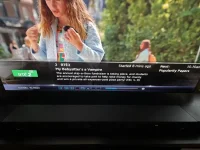
So it seems very similar to what Huevos is explaining. The Now and Next is not updating. However, for Saorview I don't think it sends an update. But at the time the program is scheduled to start the Now/Next does not updated (apart from time remaining). This is all witout Zapping. If I zap back and forth it shows as it should.
In the screenshot you can see the time is 10:18am but the Next program scheduled to start (and started) at 10:10, but the Now info is for the previous program.
It possibly is working for whe EIT update is sent which would explain why I don't notice on some other channels, especially main sat.
Joe_90
Moderator
@gipo - Huevos is right when he points out that I'm on a later (test development) update, so the issue over programmes starting early has been fixed in the version I am using.
However, I also use a plugin called VPS, which I use when recording particular programmes. This plugin actively monitors the now/next EIT data and determines when the broadcaster sends the "Running" flag for the start of the programme. In this scenario, when I have scheduled a recording, VPS will trigger the recording start as soon as it gets the signal - either early or late.
Now, however, I am a bit puzzled by your Saorview experience. Unless something has changed in the past week, RTENL (who control the network) trigger the programme EIT data to coincide exactly with the EPG time. So, the EIT trigger for "The Late Late Show" happens at exactly 21.35 on Friday even though it might not have started. On Saorview you should be seeing the now/next data update properly to match the EPG even though the programme actually being broadcast might be running late. Channel 5 on satellite also uses the actual scheduked EPG time to trigger the EIT now/next changes. However, BBC, ITV and CH4 all use automated playout systems and the EIT data triggers exactly as the programme starts. So, it's only on those channels that the now/next info might change early or late and possibly trip up the display code that you are running and has been fixed.
Now it's entirely possible that RTENL are playing around with automated triggers or have messed something up, but I have found RTE1 data to be pretty reliable generally. I record the 6.01pm News every day and the EIT data always triggers my recording exactly at 6.01pm. I'll play around with RTE2 this afternoon and see if I can replicate your issue, but I'm sure that the software fix which will be in the 6.7 Release will sort it out ultimately!
Thanks for flagging the issue.
However, I also use a plugin called VPS, which I use when recording particular programmes. This plugin actively monitors the now/next EIT data and determines when the broadcaster sends the "Running" flag for the start of the programme. In this scenario, when I have scheduled a recording, VPS will trigger the recording start as soon as it gets the signal - either early or late.
Now, however, I am a bit puzzled by your Saorview experience. Unless something has changed in the past week, RTENL (who control the network) trigger the programme EIT data to coincide exactly with the EPG time. So, the EIT trigger for "The Late Late Show" happens at exactly 21.35 on Friday even though it might not have started. On Saorview you should be seeing the now/next data update properly to match the EPG even though the programme actually being broadcast might be running late. Channel 5 on satellite also uses the actual scheduked EPG time to trigger the EIT now/next changes. However, BBC, ITV and CH4 all use automated playout systems and the EIT data triggers exactly as the programme starts. So, it's only on those channels that the now/next info might change early or late and possibly trip up the display code that you are running and has been fixed.
Now it's entirely possible that RTENL are playing around with automated triggers or have messed something up, but I have found RTE1 data to be pretty reliable generally. I record the 6.01pm News every day and the EIT data always triggers my recording exactly at 6.01pm. I'll play around with RTE2 this afternoon and see if I can replicate your issue, but I'm sure that the software fix which will be in the 6.7 Release will sort it out ultimately!
Thanks for flagging the issue.
Last edited:
Joe_90
Moderator
@gipo - I checked RTE2 at about 14:05 as a change in event was due at 14:15 to "Young Masterchef". The on-screen EIT change popped up at 14:15 as expected (during an ad break) and the programme started shortly afterwards. No zapping or otherwise. So, the EIT trigger is linked to the EPG schedule time which my experience with Saorview to date. So, while the actual programme might start early or late, the on-screen EIT info and the schedule info should always agree on Saorview. I have only ever experienced the situation that you have screenshotted on channels like C4 or E4 in the past where a programme actually starts early or late (or doesn't transmit EIT now/next data due to a broadcaster error) and Huevo's change in the next release will fix that.
It's strange that this is not happening for you on the Xtrend but only on the VU. Are they both running the same image version and skin? I use the default S1080HD skin as it gives me a baseline for all my box testing. At the risk of confusing the issue (as I'm running the newer code) you can see from my log that the event info was logged at 14:15:03 and my on-screen display popped up a message at exactly that time. The ads were still in progress and Masterchef didn't actually start until some 30 seconds later. I have permanent timeshift running on this box also, so you can see a new timeshift file being started and old one deleted.
It's strange that this is not happening for you on the Xtrend but only on the VU. Are they both running the same image version and skin? I use the default S1080HD skin as it gives me a baseline for all my box testing. At the risk of confusing the issue (as I'm running the newer code) you can see from my log that the event info was logged at 14:15:03 and my on-screen display popped up a message at exactly that time. The ads were still in progress and Masterchef didn't actually start until some 30 seconds later. I have permanent timeshift running on this box also, so you can see a new timeshift file being started and old one deleted.
Code:
<   514.823272> 14:15:03.8131 [EventInfo] gotEvent, type: 'now', what: 'evUpdatedEventInfo', is timed repeat: False
<   514.830980> 14:15:03.8208 [EventInfo] gotEvent, timer is set to repeat event in 302 seconds
<   514.836727> 14:15:03.8266 [EventInfo] current event: Young MasterChef
<   514.837407> 14:15:03.8273 [EventInfo] gotEvent, type: 'next', what: 'evUpdatedEventInfo', is timed repeat: False
<   514.842663> 14:15:03.8325 [EventInfo] gotEvent, timer is set to repeat event in 302 seconds
<   514.885914> 14:15:03.8758 [eDVBServicePlay] pts of eit change: 159da83a4, fixup_pts: 1228f98, first_pts: 158b7f40c
<   514.898996> 14:15:03.8889 [eDVBDemux] open demux /dev/dvb/adapter0/demux0
<   514.899329> 14:15:03.8892 [eDVBSectionReader] DMX_SET_FILTER pid=18
<   515.852433> 14:15:04.8423 [eFilePushThreadRecorder] stopping thread.
<   515.852790> 14:15:04.8426 [eDVBRecordFileThread] waiting for aio to complete
<   515.852890> 14:15:04.8427 [eDVBRecordFileThread] buffer usage histogram (40 buffers of 188 kB)
<   515.852947> 14:15:04.8428 [eDVBRecordFileThread]   1:    470
<   515.914370> 14:15:04.9042 [eFilePushThreadRecorder] THREAD STOP
<   515.917598> 14:15:04.9074 [eDVBServicePlay] remove timeshift files
<   515.917887> 14:15:04.9077 [eThread] old thread joined 0
<   515.918435> 14:15:04.9083 [eBackgroundFileEraser] filename /media/hdd/timeshift/timeshift.wNaBD8.cuts not found: Function not implemented
<   515.920192> 14:15:04.9100 [setIoPrio] best-effort level 7 ok
<   515.921108> 14:15:04.9110 [eBackgroundFileEraser] removing /media/hdd/timeshift/timeshift.wNaBD8.del OK
<   515.922197> 14:15:04.9121 [eBackgroundFileEraser] removing /media/hdd/timeshift/timeshift.wNaBD8.sc.del OK
<   515.923900> 14:15:04.9137 [eDVBServicePlay] Start timeshift!
<   515.924577> 14:15:04.9144 [eDVBServicePlay] timeshift recording to /media/hdd/timeshift/timeshift.Bsiv5f
<   515.925910> 14:15:04.9158 [setIoPrio] realtime level 7 ok
<   515.926757> 14:15:04.9166 [eFilePushThreadRecorder] THREAD START
<   515.930574> 14:15:04.9204 [eEPGCache][saveEventToFile] saveEventToFile epg event id 2f23
<   515.932403> 14:15:04.9223 [eDVBServicePlay] unpause
<   520.931711> 14:15:09.9216 [HdmiCEC][messageReceived0]: msgaddress=0  CECcmd=<Feature Abort>, cmd=00, ctrl0=0, datalength=0
<   520.931945> 14:15:09.9218 [HdmiCEC][messageReceived1b]: received polling message
<   532.095428> 14:15:21.0856 [eInputDeviceInit] 1 160 (352) 1
<   532.096491> 14:15:21.0863 [eRCDeviceInputDev] emit: 1
<   532.097744> 14:15:21.0876 [InfoBarGenerics] Key: 352 (Make) KeyID='KEY_OK' Binding='('OK',)'.
<   532.098945> 14:15:21.0888 [ActionMap] Keymap 'InfobarShowHideActions' -> Action = 'toggleShow'.
Last edited:
Ok, so I think I've figured it out and seems to be working. The skin slyk-onyx-1080 had a separate package to be installed that may not have been done on this box. Once installed it looks to be working, will verify further but looks like case closed. Thanks for the help.
Joe_90
Moderator
Ok, good. But just for future reference, what is the extra separate package called?
@gigo, unless you use the file I linked to it is not fixed.
Joe_90
Moderator
It's highly unlikely that he would hit that particular error on Saorview as the EIT now/next changes are linked to the EPG schedule. I had thought it odd that he was having no issue on the Xtrend box, but it appears that the two are set up slightly differently.
Similar threads

- Replies
- 10
- Views
- 462

