Superb quality and spec AB-Com PULSe 4K SE. Crazy offer! Only £129! FREE UK DELIVERY! 4K UHD, Enigma 2, Multiboot 4 images & more!...
Superb quality and spec AB-Com PULSe 4K Rev II Twin Satellite tuner only £179! FREE UK DELIVERY! 4K UHD, Enigma 2, SATA HDD facility, Multiboot 4 images & more!...

[VU+ Solo2] Epg download crashing Vu Solo 2

Thirsty

New member
Joined
May 15, 2010
Messages
46
Reaction score
0
Points
0
Have setup EPG to import/update data each morning at 7.00
All goes well and EPG is downloaded, but Vu solo 2 box then freezes and requires a re boot (power off).
Only have this problem since the update to 5.0 build.
Any help appreciated
T.
 
Sorry, can't help, FYI I had the same problem with my Mirclebox, it wouldn't switch on in the morning after running EPG update. My remedy was to run it manually. I am currently using openvix-5.0.008. I know it’s not a fix but it makes for a less stressful start to the day!
 
No issues running CrossEPG on my Vu+ Solo2 every morning, so most likely a user setup error. You are best providing us with your EPG settings/setup and use screen shots taken from WebIf to be clearer so we understand your problem better.


Sent from my iPhone using Tapatalk
 
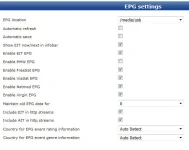
Thanks Mal, Thanks Andy, attached is a screenshot of the settings I've been using without any problem until recently. EPG Settings 1.webp
 
Sounds like a memory issue. Ie in flash instead of drive. Reboot and make sure it's saving in right place. I have refresh and save enabled btw.

Sent from my FRD-L09 using Tapatalk
 
For me in most cases removing the contents of the downloads folder, so crossepg in /media/usb and then testing a manual download always sorts out any issues I've had.
 
The screenshots in post 4 are the System EPG settings. How are you obtaining EPG?
Are you using EPG/XMLTV? If so, which providers?
Are you using CrossEPG downloader? If so, which providers?

It seems that we have a new issue where the mount points are jumping around if you have more than one storage device. o work around this, press Blue > Vix > Mount Manager and set the mounts. This is a more robust way of setting the mount points.

Use the mechanical HDD as the EPG storage device. The EPG is not written constantly, so don't worry about using it.

It is possible that the epg.dat is corrupt. I would suggest that you use this plugin/script to remove any versions so that we start from scratch.
http://www.world-of-satellite.com/showthread.php?52890-Remove-EPG

Then follow this guide:
http://www.world-of-satellite.com/showthread.php?14373-How-to-setup-Crossepg-in-all-ViX-Images
If you do anything else that is not mentioned in the guide, you may have problems. Double check your steps.
 
I reset the EPG to the HDD and checked by setting the download to start 10 minutes later. All now OK.
The problem must be with the USB stick.
Thanks to everyone.
T.
 
Spoke to soon, the problem is still there; will try Abu s solution tomorrow
T.
 
Problem solved: I use the EPG -importer but at sometime or other I enabled the Cross Epg import and download. When I disabled this everything returned to normal.
thanks again
T.
 
...........it's fixed !!
 

OpenViX Feeds Status

Back
Top