Superb quality and spec AB-Com PULSe 4K SE. Crazy offer! Only £99! FREE UK DELIVERY! 4K UHD, Enigma 2, Multiboot 4 images & more!...
Superb quality and spec AB-Com PULSe 4K Rev II Twin Satellite tuner only £149! FREE UK DELIVERY! 4K UHD, Enigma 2, SATA HDD facility, Multiboot 4 images & more!...

[VU+ Duo] epg empty

  • Thread starter Thread starter dangermoose
  • Start date Start date
D

dangermoose

Guest
hi im running vix and enigma 2 but my epg is coming up blank epg.webp
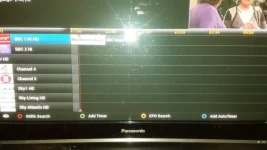
tried updating crossepg downloader and autobouquets e2 to no avail

hope someone can help all programmes still work just no planner

plus hope this is the right section lol
 
tried this using usb stick and set it to use usb and all my channels on epg came back
but it wanted to use my usb as my hard drive instead of internal
set it back to internal
my epg is still ok but think it might go again to blanks lol although hope im wrong lol
 
If you have an internal HDD, why aren't you using that for EPG?
 
yeah was just trying anything to see if i could get my epg working properly lol
 
Folks, I do not want to start another thread as my issue is related but somewhat different.

I'm using Vu Duo with latest Vix Image 796(forced to try new image as I thought it could fix my issue).

Problem:

1. It took minimum of 30mins or more for box to boot up to see openvix blue screen image on TV. Box only displays '>Starting...' for more than 30mins.

2. On EPG Location, I can't change EPG location from 'Internal Flash' to '/media/hdd/' even though I've 500GB HDD installed. I've done Filesystem check via Storage devices to ensure the HDD is properly mounted. Moreso, I've been using HDD for sometime on the box and it was working perfectly until this problem. Now, I can't even access the HDD to see my recorded movies on it.

Pls why is the box taking more than half an hour to show image on TV from Shutdown?

Why can't I see the movies recorded on HDD? When I press R it will do like loading the files recorded for a fraction of secs then bring a blank screen with Trashcan: 0KB at the foot.

Pressing Yellow button to verify location gives 2 Options, Other and /media/hdd/movie. Selecting 2nd option Directory does not exist. First option show me media/hdd/movie as bookmarked, selecting that gives same not exist.

Pls, I need help to fix my long boot issue and to save my movies files on HDD. Also, crossepg can't load because of this problem.

Thanks
 
Last edited by a moderator:
Folks, I do not want to start another thread as my issue is related but somewhat different.
Well then, please do start a new thread.
I'm using Vu Duo with latest Vix Image 796(forced to try new image as I thought it could fix my issue).

Problem:

1. It took minimum of 30mins or more for box to boot up to see openvix blue screen image on TV. Box only displays '>Starting...' for more than 30mins.
Should never take 30 mins, so something else wrong.
2. On EPG Location, I can't change EPG location from 'Internal Flash' to '/media/hdd/' even though I've 500GB HDD installed. I've done Filesystem check via Storage devices to ensure the HDD is properly mounted. Moreso, I've been using HDD for sometime on the box and it was working perfectly until this problem. Now, I can't even access the HDD to see my recorded movies on it.

Pls why is the box taking more than half an hour to show image on TV from Shutdown?
Corrupt flash, trying to tune to a channel that isn't available or many other reasons.
Debug logs here might help explain, please enable & upload them.
 
Menu -> Setup -> System -> Logs -> Settings -> Enable debug log = yes.
Restart E2.
Logs will be saved in /home/root/logs/ by default using ViX image.
 
Menu -> Setup -> System -> Logs -> Settings -> Enable debug log = yes.
Restart E2.
Logs will be saved in /home/root/logs/ by default using ViX image.

waiting for box to boot up...it takes time pls be patient.
 
Duo really shouldn't take any longer than 3 minutes to boot-up.
If it does, something else is wrong.
 
I'm still waiting for it to load up, it takes 30mins or more. This is why I updated to latest 796 to no avail.
Pls I'm still waiting for it to load up. TV says no signal, box showing >starting.... 20mins now and counting...:confused:
 
Code:
File "/usr/lib/enigma2/python/Components/GUISkin.py", line 112, in applySkin
Skin error, which skin are you using?
 
thanks mate, you've been so helpful. got to hit the bed now, work at 8am. i will continue with amy advice you post tomorrow night.
 
I'm still waiting for it to load up, it takes 30mins or more. This is why I updated to latest 796 to no avail.
Pls I'm still waiting for it to load up. TV says no signal, box showing >starting.... 20mins now and counting...:confused:

Try to create a serial ( rs232 ) bootlog if you can also this could signal a hardware failure such as the infamous capacitor / RED LED of death.
 
Yes I can create rs232 bootlog if pointed into the direction of doing it. Also, assuming its the infamous capacitor/RED LED of death, has this got a solution? if yes plaese what's the solution? Is this why I can change EPG Location from Internal Flash to /media/hdd/movie?
 
i was all excited when seen how many posts were in my thread thought somebody had a fix for me lol
still hope u get yours sorted too mate
 

OpenViX Feeds Status

Back
Top