
Superb quality and spec AB-Com PULSe 4K SE. Crazy offer! Only £99! FREE UK DELIVERY! 4K UHD, Enigma 2, Multiboot 4 images & more!...
Superb quality and spec AB-Com PULSe 4K Rev II Twin Satellite tuner only £149! FREE UK DELIVERY! 4K UHD, Enigma 2, SATA HDD facility, Multiboot 4 images & more!...
You are using an out of date browser. It may not display this or other websites correctly.
You should upgrade or use an alternative browser.
You should upgrade or use an alternative browser.
EPG files test: Phase 1. Refactor
- Thread starter abu baniaz
- Start date


Did u make code changes as mentioned by Simon in post 108 or was it ok for you (ie didn't go as far as back as mine did)?Looks good, again only a few minutes of testing.
I installed from scratch onto 5.3.023 and all my epg settings came in - excellent!!
I found the changes mentioned in 108 were better.
Asking as may need that change made to latest release!


abu baniaz
Moderator
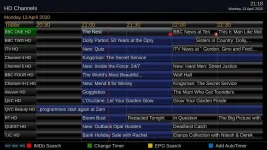
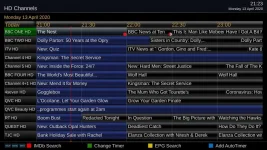
If I set maintain old EPG to "0" or 15 minutes and , Grid EPG looks as pictured. Base time is 15 minutes.
EDIT: Also affects Inforbar Grid EPG
EDIT: Also affects Inforbar Grid EPG
Last edited:
abu baniaz
Moderator
Once you go forward to where there is data, it looks OK. It is just the initial access that looks off for me.
As I understand it, how long Enigma2 keeps EPG data is one thing (option in EPG menu). How much of the EPG data is displayed is another thing (no menu for this in EPG screens). If my understanding is correct, there may be some confusion. The backward display in the EPG screens should not exceed the amount of data being kept.
As I understand it, how long Enigma2 keeps EPG data is one thing (option in EPG menu). How much of the EPG data is displayed is another thing (no menu for this in EPG screens). If my understanding is correct, there may be some confusion. The backward display in the EPG screens should not exceed the amount of data being kept.
Last edited:

ccs
ViX Beta Tester
- Joined
- Sep 6, 2014
- Messages
- 5,836
- Reaction score
- 5
- Points
- 0
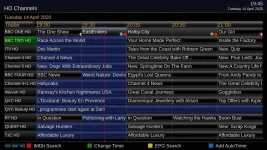
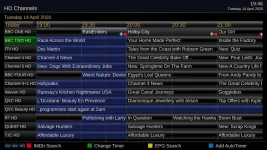
It doesn't quite work for me.
Base time 30 minutes, old epg 15 minutes.
@19:45 it's ok (same as the old version), but at 19:46 the titles of programs that have finished disappear.
These blank elements looks untidy especially when there are lots of them.
The old version changes the timeline from 19:00 to 19:30 at this point (labelled 1947 in the attachments) and does what I expect from the settings I'm using.
Attachments
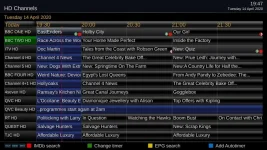
It doesn't quite work for me.
If i'm being honest, and given the choice, my preference would be for the old timeline behaviour be restorted. The old timeline behaviour just worked all the time and no missing channel info (which I occasionally have now under this new timeline behaviour).I'm happy to revert the tweaks from the old EPG if people were happier with the timeline behaviour of the old EPG - it's only a couple of lines
I suspect @ccs is in agreement also for the old timeline code be restored. Am I correct @ccs ?
ccs
ViX Beta Tester
- Joined
- Sep 6, 2014
- Messages
- 5,836
- Reaction score
- 5
- Points
- 0
I suspect @ccs is in agreement also for the old timeline code be restored. Am I correct @ccs ?
Yes, I prefer the old timeline, if the new code can achieve this, then so much the better.
abu baniaz
Moderator
The purpose of this thread is for people to test the new EPG files and feedback their findings so that Simon and I can replace the EPG files without adversely affecting users.
To facilitate and keep this on track, I will be soft deleting posts to keep the current issues on topic. I will leave fixed issues for a day or so to avoid duplicate bug reports. I shall undelete the post so the user input and assistance is not lost and recognised by others. Thanks once again to all our volunteers.
I have moved the Developer posts to the existing thread in that has been open since the 7th of February.
Thread is in Developer section and only those with access can see it.
https://www.world-of-satellite.com/showthread.php?62447-EPG-refactor-Developement-thread
Latest file that still has the timeline issue uploaded to post 3.
To facilitate and keep this on track, I will be soft deleting posts to keep the current issues on topic. I will leave fixed issues for a day or so to avoid duplicate bug reports. I shall undelete the post so the user input and assistance is not lost and recognised by others. Thanks once again to all our volunteers.
I have moved the Developer posts to the existing thread in that has been open since the 7th of February.
Thread is in Developer section and only those with access can see it.
https://www.world-of-satellite.com/showthread.php?62447-EPG-refactor-Developement-thread
Latest file that still has the timeline issue uploaded to post 3.
Last edited:
That thread seems to have restricted access?The purpose of this thread is for people to test the new EPG files and feedback their findings so that Simon and I can replace the EPG files without adversely affecting users.
To facilitate and keep this on track, I will be soft deleting posts to keep the current issues on topic. I will leave fixed issues for a day or so to avoid duplicate bug reports. I shall undelete the post so the user input and assistance is not lost and recognised by others. Thanks once again to all our volunteers.
I have moved the Developer posts to the existing thread that has been open since the 7th of February.
https://www.world-of-satellite.com/showthread.php?62447-EPG-refactor-Developement-thread
Latest file that still has the timeline issue uploaded to post 3.
Sent from my ONEPLUS A6003 using Tapatalk
ccs
ViX Beta Tester
- Joined
- Sep 6, 2014
- Messages
- 5,836
- Reaction score
- 5
- Points
- 0
Yes, I prefer the old timeline, if the new code can achieve this, then so much the better.
Took the liberty of trying the latest EpgListGrid.py, and looks good to me!
Many thanks, simonc.
Attachments
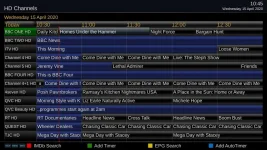
Where is that? Did u get it from his github?Took the liberty of trying the latest EpgListGrid.py, and looks good to me!
ccs
ViX Beta Tester
- Joined
- Sep 6, 2014
- Messages
- 5,836
- Reaction score
- 5
- Points
- 0
Where is that? Did u get it from his github?
........Yes
abu baniaz
Moderator
File to add to resolve the issue hopefully.
I will reupload whole lot later. I seem to have got in a muddle with the folders change
I will reupload whole lot later. I seem to have got in a muddle with the folders change
Last edited:
Similar threads
- Replies
- 12
- Views
- 1K
- Replies
- 24
- Views
- 1K


- Replies
- 5
- Views
- 499