Superb quality and spec AB-Com PULSe 4K SE. Crazy offer! Only £99! FREE UK DELIVERY! 4K UHD, Enigma 2, Multiboot 4 images & more!...
Superb quality and spec AB-Com PULSe 4K Rev II Twin Satellite tuner only £149! FREE UK DELIVERY! 4K UHD, Enigma 2, SATA HDD facility, Multiboot 4 images & more!...

EPG files test: Phase 1. Refactor

Just updated to latest gridepg file.

Current Time: 16:46

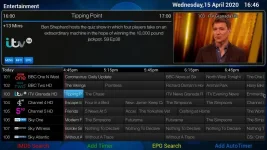
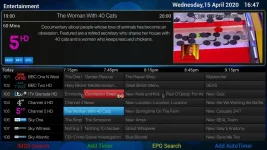
As you can see I see the timeline (just, but I see so that's okay - the old version probably did that just never noticed depending on current time). However, when I scrolled right to see what was on later, it then wouldn't let me scroll back to current time.

Left Picture: Default view when go into EPG
Right Picture: Result after I scroll right to see what's on later today but unable to scroll left anymore than what is on that page 17:15
newgridepg1.webp newgridepg2.webp

Anyone else notice this? Remember that I normally have 0 history minutes (default) and timebase of 15mins (again default).
 
Same issue as @bbbuk.

I also get a crash while pressing menu in in graphical epg

Enigma2_crash_2020-04-15_16-52-36.log

Code:
<  7599.372> Traceback (most recent call last):
<  7599.372>   File "/usr/lib/enigma2/python/Components/ActionMap.py", line 57, in action
<  7599.372>   File "/usr/lib/enigma2/python/Screens/Epg/EpgSelectionGrid.py", line 95, in createSetup
<  7599.372>     self.session.openWithCallback(onSetupClose, Setup, 'epggrid')
<  7599.372>   File "/usr/lib/enigma2/python/mytest.py", line 329, in openWithCallback
<  7599.372>     dlg = self.open(screen, *arguments, **kwargs)
<  7599.372>   File "/usr/lib/enigma2/python/mytest.py", line 339, in open
<  7599.373>     dlg = self.current_dialog = self.instantiateDialog(screen, *arguments, **kwargs)
<  7599.373>   File "/usr/lib/enigma2/python/mytest.py", line 276, in instantiateDialog
<  7599.373>     return self.doInstantiateDialog(screen, arguments, kwargs, self.desktop)
<  7599.374>   File "/usr/lib/enigma2/python/mytest.py", line 299, in doInstantiateDialog
<  7599.374>     dlg = screen(self, *arguments, **kwargs)
<  7599.374>   File "/usr/lib/enigma2/python/Screens/Setup.py", line 107, in __init__
<  7599.374> AttributeError: 'Setup' object has no attribute 'setup'
<  7599.374> [ePyObject] (CallObject(<bound method HelpableActionMap.action of <Components.ActionMap.HelpableActionMap instance at 0x9ba491e8>>,('EPGSelectActions', 'menu')) failed)

Or another crash menu, setup, epg, graphical epg.

Enigma2_crash_2020-04-15_16-59-15.log

Code:
<  7998.296> Traceback (most recent call last):
<  7998.296>   File "/usr/lib/enigma2/python/Components/ActionMap.py", line 77, in action
<  7998.296>   File "/usr/lib/enigma2/python/Components/ActionMap.py", line 57, in action
<  7998.296>   File "/usr/lib/enigma2/python/Screens/Menu.py", line 60, in okbuttonClick
<  7998.297>   File "/usr/lib/enigma2/python/Tools/BoundFunction.py", line 9, in __call__
<  7998.297>   File "/usr/lib/enigma2/python/Screens/Menu.py", line 83, in openSetup
<  7998.297>   File "/usr/lib/enigma2/python/mytest.py", line 329, in openWithCallback
<  7998.297>     dlg = self.open(screen, *arguments, **kwargs)
<  7998.297>   File "/usr/lib/enigma2/python/mytest.py", line 339, in open
<  7998.297>     dlg = self.current_dialog = self.instantiateDialog(screen, *arguments, **kwargs)
<  7998.297>   File "/usr/lib/enigma2/python/mytest.py", line 276, in instantiateDialog
<  7998.298>     return self.doInstantiateDialog(screen, arguments, kwargs, self.desktop)
<  7998.298>   File "/usr/lib/enigma2/python/mytest.py", line 299, in doInstantiateDialog
<  7998.298>     dlg = screen(self, *arguments, **kwargs)
<  7998.298>   File "/usr/lib/enigma2/python/Screens/Setup.py", line 111, in __init__
<  7998.298>   File "/usr/lib/enigma2/python/Screens/Setup.py", line 181, in createSetupList
<  7998.298>   File "<string>", line 1, in <module>
<  7998.298>   File "/usr/lib/enigma2/python/Components/config.py", line 1884, in __getattr__
<  7998.298> AttributeError: graph_type_mode
<  7998.298> [ePyObject] (CallObject(<bound method NumberActionMap.action of <Components.ActionMap.NumberActionMap instance at 0x9ba5cd78>>,('OkCancelActions', 'ok')) failed)


Using openvix 5.3.023 vskin 1080 on vu+ uno4k

For the files I have used are from post 3 epg_refactor post 106.zip and EPGListGrid.py from post 61
 
Last edited:
I just can't (easily) go back to current time after scrolling right.

It doesn't crash for me, however, when pressing menu button whilst in Graphical/Grid EPG. Solo2 but still on Vix 5.3. 022

Maybe a change in 023 affecting it?

UPDATE: Just checked gridepg file and it doesn't even have graph_type_mode at all that it crashed because of!

It's listed in stock UsageConfig.py and EPGSelection.py.

Have all the files been transferred over correctly?
 
Last edited:
Anyone else notice this? Remember that I normally have 0 history minutes (default) and timebase of 15mins (again default).
Yes, me too, with history 15 and base 30.
 
That is the wrong file. The EPG sub-folder does not exist any more on newest files. Bother. Sorry.:o

Hold on to your horses people. I shall boot into release and test files before uploading.
 
I don't see any crashes either - are you still seeing graphical epg, because it's now Grid Epg?

In epg menu yes I see graphical epg. I think it maybe due to software update to 5.3.023. Maybe the menu.xml or setup.xm has changed on updates? I'll have to check openvix github commits.


I'll also re add the files from post 3
 
Last edited:
Re uploading menu.xml and setup.xml has resolved the crash and grid epg now shows in epg menu.

Possibly software update overridden the files. I'll avoid software updates while testing
 
Post 2 has file set (15A), this has a bug with the non-returning timeline. You can go back to current time with 0 or just press exit and re-enter.

Please accept my apology for the upload error
 
Last edited:
A fix is on it's way for the not going backwards to current time problem.
 
A fix is on it's way for the not going backwards to current time problem.
Thanks.

Just noticed the mini GridEPG (or whatever it's called - what you see when you press < or > from live TV) also suffers from non-returning timeline. Not sure about other EPGs.
 
Last edited:
Yes, they both use the same bit of code, so that'll also be fixed :-)
 
An update that should sort out the scrolling issues. In a side by side comparison the timeline appears in the same place as the old EPG. I've resurrected some of the previous logic to try and keep the timeline in the middle if you've got a larger EPG history setting.

Mod EDIT:
Also uploaded to post 2

View attachment epg_refactor_20200415_2253.zip
 
Last edited by a moderator:
That fixes it for me in both the Grid EPG as well as Infobar Grid EPG

Thanks.
 
Last edited:
Five existing files must be backed up. I normally add an ".orig" at end of the file after the extension. If there is a crash, you can quickly restore these and you will use the original EPG file.

/usr/lib/enigma2/python/Components/EpgList.pyo
/usr/lib/enigma2/python/Components/UsageConfig.pyo
/usr/lib/enigma2/python/Screens/ChannelSelection.pyo
/usr/lib/enigma2/python/Screens/InfoBarGenerics.pyo
/usr/lib/enigma2/python/Screens/EPGSelection.pyo
/usr/share/enigma2/menu.xml
/usr/share/enigma2/setup.xml
/usr/share/enigma2/keymap.xml


Latest files are in post 2


Extract the attachment
Three xml files go in /usr/share/enigma2/
python/folder files to the /usr/lib/enigma2/python/ folder
Restart.
Sorry if I've missed something, but I can't find keymap.xml in the zip file.
 
Yep, works for me also. Thanks :)

MOD EDIT:
removed quote no longer relevant.
 
Last edited by a moderator:
keymap.xml is in data folder.

Cheers.

Searching github/openvix finds it ok, but simonc's repo doesn't - maybe you can inhibit searching, or maybe it's just me?
 
Cheers.

Searching github/openvix finds it ok, but simonc's repo doesn't - maybe you can inhibit searching, or maybe it's just me?
You have to select correct branch. Here is more direct link here.
 

OpenViX Feeds Status

Back
Top